Unlock a world of possibilities! Login now and discover the exclusive benefits awaiting you.

Announcements
Share your agentic AI experience, learn from others, and earn a new badge: Put Agentic AI to Work
- Qlik Community
- :
- All Forums
- :
- QlikView
- :
- Server Log - QVW User Actions
Options
- Subscribe to RSS Feed
- Mark Topic as New
- Mark Topic as Read
- Float this Topic for Current User
- Bookmark
- Subscribe
- Mute
- Printer Friendly Page
Turn on suggestions
Auto-suggest helps you quickly narrow down your search results by suggesting possible matches as you type.
Showing results for

Not applicable
2015-01-27
04:44 PM
- Mark as New
- Bookmark
- Subscribe
- Mute
- Subscribe to RSS Feed
- Permalink
- Report Inappropriate Content
Server Log - QVW User Actions
I am attempting to locate the server log which displays the user actions on a particular .qvw. The layout below is from a past file but do not know its source.
If enabled what is its default location?
Is this something which is enabled by default or must it be manually turned on?
| Server Started | Timestamp | Document | Type | User | Message | |
| 9/27/2013 10:06 | 9/30/2013 11:16 | \\server\path\appname.qvw | Selection | CRENT\[username] | Year | 2013 |
| 9/27/2013 10:06 | 9/30/2013 11:16 | \server\path\appname.qvw | Selection | CRENT\[username] | Month | Aug |
| 9/27/2013 10:06 | 9/30/2013 11:16 | \server\path\appname.qvw | Selection | CRENT\[username] | RevenueCategory | Office |
| 9/27/2013 10:06 | 9/30/2013 11:16 | \server\path\appname.qvw | SendToExcel | CRENT\[username] | Sheet Object Document\TB13 | |
| 9/27/2013 10:06 | 9/30/2013 11:17 | \server\path\appname.qvw | Export | CRENT\[username] | Sheet Object Document\TB13 | |
| 9/27/2013 10:06 | 9/30/2013 11:18 | \server\path\appname.qvw | Selection | CRENT\[username] | EnteredUserID | ALL |
| 9/27/2013 10:06 | 9/30/2013 11:18 | \server\path\appname.qvw | Selection | CRENT\[username] | EnteredUserID | ALL |
941 Views
1 Reply

 jonasheisterkam
Partner - Creator III
2015-01-27
04:54 PM
- Mark as New
- Bookmark
- Subscribe
- Mute
- Subscribe to RSS Feed
- Permalink
- Report Inappropriate Content
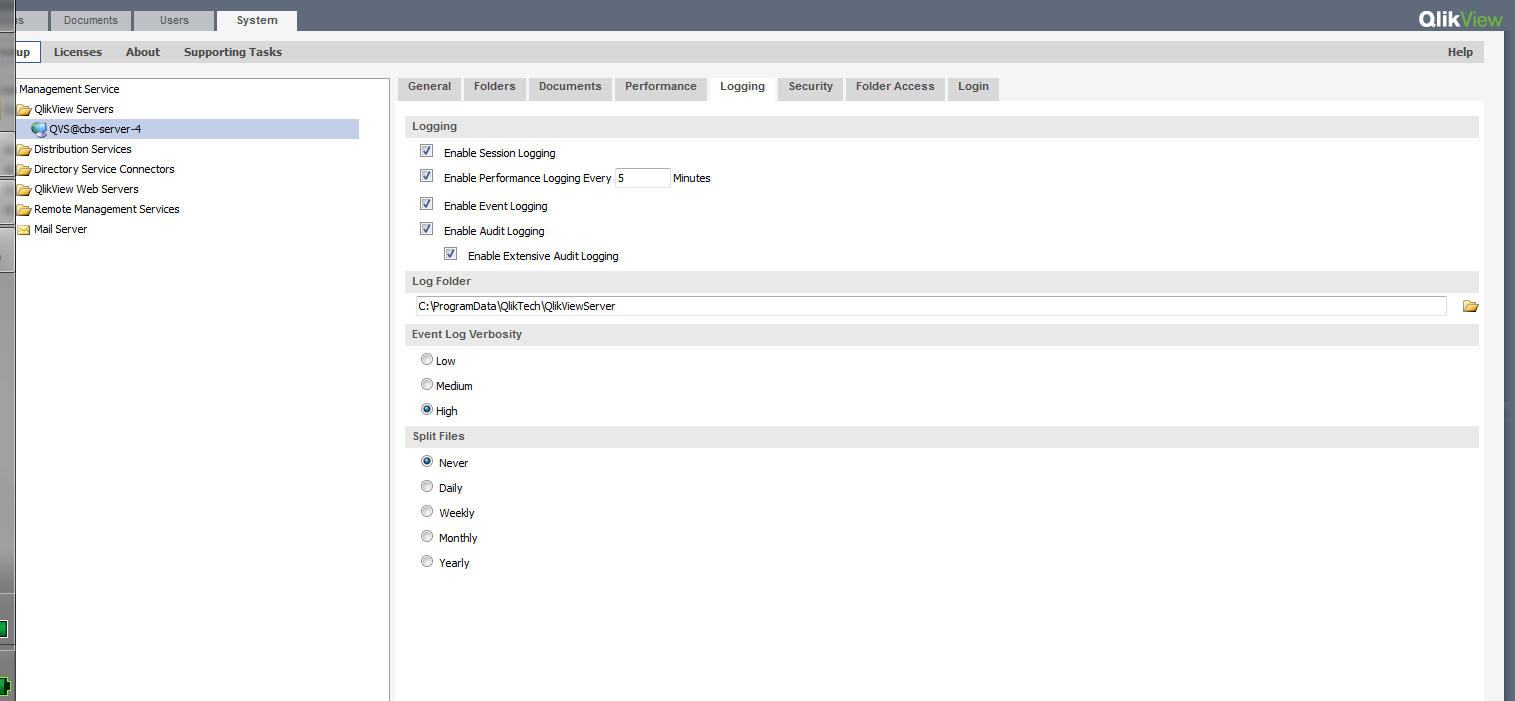
C:\ProgramData\QlikTech\QlikViewServer
Look at the Audit
593 Views