Unlock a world of possibilities! Login now and discover the exclusive benefits awaiting you.

- Qlik Community
- :
- All Forums
- :
- QlikView
- :
- Server log file timestamp format
- Subscribe to RSS Feed
- Mark Topic as New
- Mark Topic as Read
- Float this Topic for Current User
- Bookmark
- Subscribe
- Mute
- Printer Friendly Page

 hermanli
- Mark as New
- Bookmark
- Subscribe
- Mute
- Subscribe to RSS Feed
- Permalink
- Report Inappropriate Content
Server log file timestamp format
Hi all,
I had 2 servers, one in US and one in UK. I am trying to use the System Monitoring QVW in both server. The System Monitoring QVW reload successfully on both servers, however, I found that in the UK Server, it got some logs from the futures, e.g. 6-Dec-2015.
After a detail check , I found that the timestamp that captured in the log files is in different format in the UK server.
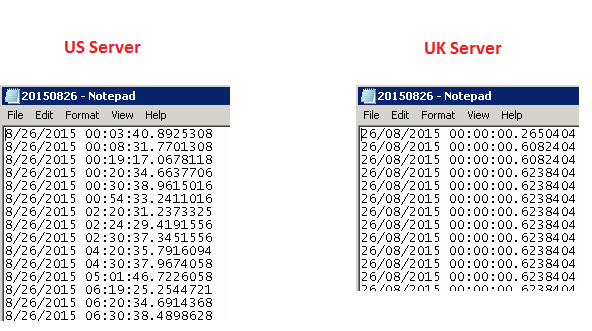
I had attached both log content above. for the US Server, it is in MM/DD/YYYY format, however, in UK Server, it is in DD/MM/YYYY format and this caused the System Monitoring QVW transform the timestamp of 12/08/2015 (Which is suppose 12-Aug-2015) become 08-Dec-2015.
Any experts here know how to make the log file in the UK server captures the timestamp the same as the US Server, i.e. MM/DD/YYYY ?
Thanks in advance.

 aveeeeeee7en
- Mark as New
- Bookmark
- Subscribe
- Mute
- Subscribe to RSS Feed
- Permalink
- Report Inappropriate Content
Hi
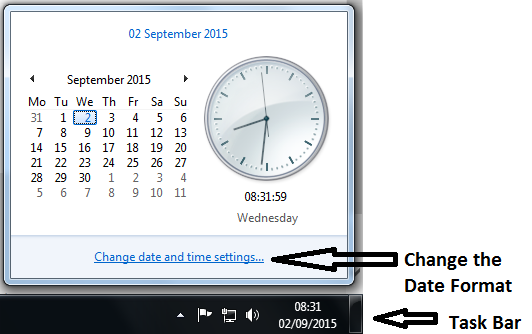
I think changing your Server Date Format will do the Job.
See this:
Regards
Av7eN
