Unlock a world of possibilities! Login now and discover the exclusive benefits awaiting you.

- Qlik Community
- :
- All Forums
- :
- QlikView
- :
- Re: Set Analysis - Comparing Two Fields
- Subscribe to RSS Feed
- Mark Topic as New
- Mark Topic as Read
- Float this Topic for Current User
- Bookmark
- Subscribe
- Mute
- Printer Friendly Page

 shane_spencer
- Mark as New
- Bookmark
- Subscribe
- Mute
- Subscribe to RSS Feed
- Permalink
- Report Inappropriate Content
Set Analysis - Comparing Two Fields
I've got a Document with two tables. These both essentially compare Original Tax (AMT_TAX_TAXREP_R_src_1) against Final Tax (AMT_TAX_TAXREP_R_clo_1) - two fields in different but linked tables.
What I want to do is only show the rows where the Change TAX (i.e. the difference between these two fields) is Zero.
i.e. Those rows highlighted in Yellow:
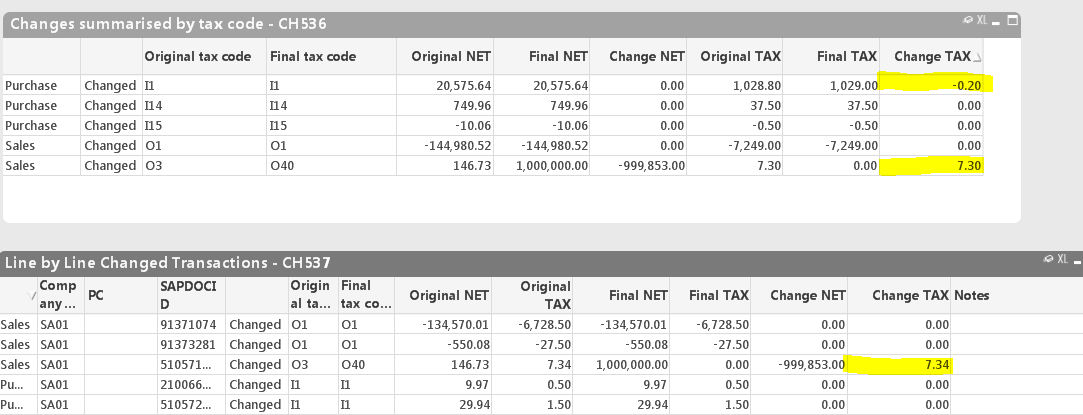
I think the answer is in set analysis but I'm really struggling. Can anyone help?
- Tags:
- set analysis
Accepted Solutions

 YoussefBelloum
- Mark as New
- Bookmark
- Subscribe
- Mute
- Subscribe to RSS Feed
- Permalink
- Report Inappropriate Content
Hi,
to display only rows whch is different from 0 on the change tax column, you can do this on every column of the table:
if([Original TAX]-[Final TAX]<>0, round([Original TAX]-[Final TAX],0.01))
but here even with this you will not be able to display the lines you want because of the round function.
YoussefBelloum
- Mark as New
- Bookmark
- Subscribe
- Mute
- Subscribe to RSS Feed
- Permalink
- Report Inappropriate Content
Hi,
to display only rows whch is different from 0 on the change tax column, you can do this on every column of the table:
if([Original TAX]-[Final TAX]<>0, round([Original TAX]-[Final TAX],0.01))
but here even with this you will not be able to display the lines you want because of the round function.
shane_spencer
- Mark as New
- Bookmark
- Subscribe
- Mute
- Subscribe to RSS Feed
- Permalink
- Report Inappropriate Content
Thanks! That works great, though it seems almost counter-intuitive to use the results of the Expressions like that to decide what to show in the expressions.
