Unlock a world of possibilities! Login now and discover the exclusive benefits awaiting you.

- Qlik Community
- :
- All Forums
- :
- QlikView
- :
- Re: Set Analysis Condition and Selection
- Subscribe to RSS Feed
- Mark Topic as New
- Mark Topic as Read
- Float this Topic for Current User
- Bookmark
- Subscribe
- Mute
- Printer Friendly Page

- Mark as New
- Bookmark
- Subscribe
- Mute
- Subscribe to RSS Feed
- Permalink
- Report Inappropriate Content
Set Analysis Condition and Selection
Hello There!
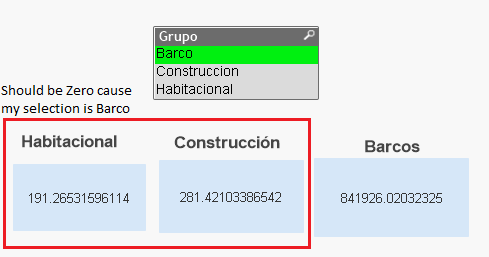
Is it possible to have a condition in Set Analysis and exclude the results when selecting dimension declared in set analysis?
=Sum(Aggr(
if(sum(Aggr(Sum ({<TipoDato={'NS_TipoServicio'}, Año={'$(vMaxAño)'}, Grupo={'Habitacional'} >}CanAliHue) ,CargoADescr))=0,0,
( sum(Aggr(Sum ({<TipoDato={'Movimiento'}, Año={'$(vMaxAño)'}, Grupo={'Habitacional'} >}CostoMov) ,CargoADescr ))
/
sum(Aggr(Sum ({<TipoDato={'NS_TipoServicio'}, Año={'$(vMaxAño)'}, Grupo={'Habitacional'} >}CanAliHue) ,CargoADescr)))
)
,CargoADescr))
Here is an example:
The original data
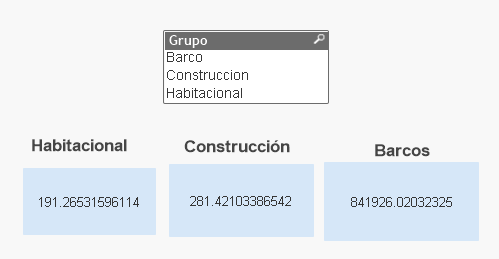
When I do a selection for dimension "Grupo" should be as the next image:
- Tags:
- new_to_qlikview
Accepted Solutions

 Kushal_Chawda
- Mark as New
- Bookmark
- Subscribe
- Mute
- Subscribe to RSS Feed
- Permalink
- Report Inappropriate Content
try this
Expression for Habitacional
If(Wildmatch(GetFieldSelections(Grupo), '*Habitacional*') , YourExpression, 0)
Expression for Barco
If(Wildmatch(GetFieldSelections(Grupo), '*Barco*') , YourExpression, 0)
Expression for Construccion
If(Wildmatch(GetFieldSelections(Grupo), '*Construccion*') , YourExpression, 0)
 sunny_talwar
- Mark as New
- Bookmark
- Subscribe
- Mute
- Subscribe to RSS Feed
- Permalink
- Report Inappropriate Content
You may do this:
Expression for Habitacional
If(GetFieldSelections(Grupo) = 'Barco' or GetFieldSelections(Grupo) = 'Construction', 0, YourCurrentExpression)
Similar ideas for other two expression
HTH
Best,
Sunny
Kushal_Chawda
- Mark as New
- Bookmark
- Subscribe
- Mute
- Subscribe to RSS Feed
- Permalink
- Report Inappropriate Content
try this,
if( getfieldselections(Grupo)='Barcos', Your Expression, 0) for Bracos Text object
Likewise you can do for others
sunny_talwar
- Mark as New
- Bookmark
- Subscribe
- Mute
- Subscribe to RSS Feed
- Permalink
- Report Inappropriate Content
Use this, as this should be a much better solution
Expression for Habitacional
If(SubStringCount(Concat(Grupo, ','), 'Habitacional') = 1, YourExpression, 0)
If(SubStringCount(Concat(DISTINCT Grupo, ','), 'Habitacional') = 1, YourExpression, 0)
Expression for Barco
If(SubStringCount(Concat(Grupo, ','), 'Barco') = 1, YourExpression, 0)
If(SubStringCount(Concat(DISTINCT Grupo, ','), 'Barco') = 1, YourExpression, 0)
Expression for Construccion
If(SubStringCount(Concat(Grupo, ','), 'Construccion') = 1, YourExpression, 0)
If(SubStringCount(Concat(DISTINCT Grupo, ','), 'Construccion') = 1, YourExpression, 0)
HTH
Best,
Sunny
Kushal_Chawda
- Mark as New
- Bookmark
- Subscribe
- Mute
- Subscribe to RSS Feed
- Permalink
- Report Inappropriate Content
try this
Expression for Habitacional
If(Wildmatch(GetFieldSelections(Grupo), '*Habitacional*') , YourExpression, 0)
Expression for Barco
If(Wildmatch(GetFieldSelections(Grupo), '*Barco*') , YourExpression, 0)
Expression for Construccion
If(Wildmatch(GetFieldSelections(Grupo), '*Construccion*') , YourExpression, 0)
- Mark as New
- Bookmark
- Subscribe
- Mute
- Subscribe to RSS Feed
- Permalink
- Report Inappropriate Content
Thank you everyone, all your answers where very helpful.
I just add
if(GetSelectedCount(Grupo)=0
At the beggining of expession when there is no selection, WILDMATCH function works perfect for me.
Thank you Kush141087
Kushal_Chawda
- Mark as New
- Bookmark
- Subscribe
- Mute
- Subscribe to RSS Feed
- Permalink
- Report Inappropriate Content
I am glad that I was able to help