Unlock a world of possibilities! Login now and discover the exclusive benefits awaiting you.

- Qlik Community
- :
- All Forums
- :
- QlikView
- :
- Re: Set Analysis Expression Question
- Subscribe to RSS Feed
- Mark Topic as New
- Mark Topic as Read
- Float this Topic for Current User
- Bookmark
- Subscribe
- Mute
- Printer Friendly Page

 mphekin12
- Mark as New
- Bookmark
- Subscribe
- Mute
- Subscribe to RSS Feed
- Permalink
- Report Inappropriate Content
Set Analysis Expression Question
Hello,
I have a quick set analysis question. I'm trying to use a field in a set analysis expression that is also selectable by the end user. This is causing errors in the final result. Here is an example:
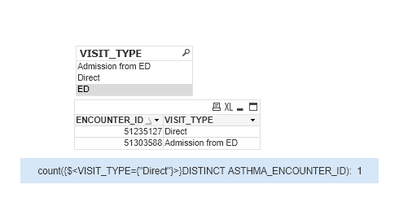
As you can see we have two encounters, one with a visit type of 'Direct' and the other with a visit type of 'Admission from ED'. The set analysis formula in the blue text box is working as it should. When I select the visit type of 'Admission from ED', I would think that the set analysis formula in the blue text box would display 0, but it is still displaying 1 even though there is no longer a Direct visit type in the set:
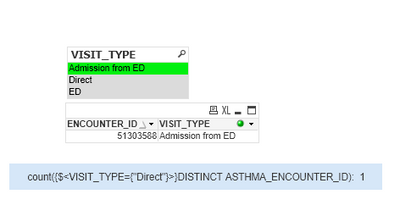
I'm sure there is probably an easy solution for this but I can't seem to figure it out.
Thank you for your help!
Accepted Solutions

 agigliotti
- Mark as New
- Bookmark
- Subscribe
- Mute
- Subscribe to RSS Feed
- Permalink
- Report Inappropriate Content
Hi,
You should use VISIT_TYPE * = instead of VISIT_TYPE =
Follow me on my LinkedIn | Know Gamma Informatica at gammainformatica.it
agigliotti
- Mark as New
- Bookmark
- Subscribe
- Mute
- Subscribe to RSS Feed
- Permalink
- Report Inappropriate Content
Hi,
You should use VISIT_TYPE * = instead of VISIT_TYPE =
Follow me on my LinkedIn | Know Gamma Informatica at gammainformatica.it
mphekin12
- Mark as New
- Bookmark
- Subscribe
- Mute
- Subscribe to RSS Feed
- Permalink
- Report Inappropriate Content
Thank you so much! That seems to work.
