Unlock a world of possibilities! Login now and discover the exclusive benefits awaiting you.

- Qlik Community
- :
- All Forums
- :
- QlikView
- :
- Re: Set Analysis Expression <= $0
- Subscribe to RSS Feed
- Mark Topic as New
- Mark Topic as Read
- Float this Topic for Current User
- Bookmark
- Subscribe
- Mute
- Printer Friendly Page

 NickHoff
- Mark as New
- Bookmark
- Subscribe
- Mute
- Subscribe to RSS Feed
- Permalink
- Report Inappropriate Content
Set Analysis Expression <= $0
Hello,
Inside a pivot table I have an expression Cost Per Case
SUM(SupplyChainLUOMTotalCost)/COUNT(DISTINCT SurgicalCaseSk)
a variable eCostBenchmark to calculate Benchmark depending on the Org Option selected
Which is defined as:
=@CostBenchmark
Derived from the following INLINE table:
CostLevel:
LOAD * INLINE [
@CostLevelID, @CostLevel, @CostDescriptionField, @CostBenchmark, @OrgLevel
1, HCA, HCACostDescription, BMHCA50PCT, CorporateName
2, Group, GroupCostDescription, BMGroup50PCT, GroupName
3, Division, DivisionCostDescription, BMDivision50PCT, DivisionName
4, Market, MarketCostDescription, BMMarket50PCT, MarketName,
5, Facility, FacilityCostDescription, BMFacility50PCT, Facility
];
Finally an expression to get the variance between [Benchmark] - [Cost Per Case].
I only want my chart to display expressions where the variance between [Benchmark] - [Cost Per Case] <= 0.
I've tried the following with no success:
SUM({<ProcedureSurgeonName = {"=SUM(SupplyChainLUOMTotalCost)/COUNT(DISTINCT SurgicalCaseSk) - $(eBenchmarkCost) <= 0"}>}SupplyChainLUOMTotalCost)/COUNT({<ProcedureSurgeonName = {"=SUM(SupplyChainLUOMTotalCost)/COUNT(DISTINCT SurgicalCaseSk) - $(eBenchmarkCost) <= 0"}>}DISTINCT SurgicalCaseSk)
Accepted Solutions

 sunny_talwar
- Mark as New
- Bookmark
- Subscribe
- Mute
- Subscribe to RSS Feed
- Permalink
- Report Inappropriate Content
One way to use if statement would be to create a new field from all your dimensions in the table
AutoNumber(GroupName, DivisionName, MarketName, Facility, ProcedureSurgeonName, ProcGroupDesc) as Key
and then use this
SUM({<Key = {"=Sum(SupplyChainLUOMTotalCost)/COUNT(DISTINCT SurgicalCaseSk) >= $(eCostBenchmark)"}>}SupplyChainLUOMTotalCost)/COUNT({<Key = {"=Sum(SupplyChainLUOMTotalCost)/COUNT(DISTINCT SurgicalCaseSk) >= $(eCostBenchmark)"}>} DISTINCT SurgicalCaseSk)
Do this for your variable expression as well and see if that works
sunny_talwar
- Mark as New
- Bookmark
- Subscribe
- Mute
- Subscribe to RSS Feed
- Permalink
- Report Inappropriate Content
Would you be able to share a sample to take a look at this?
sunny_talwar
- Mark as New
- Bookmark
- Subscribe
- Mute
- Subscribe to RSS Feed
- Permalink
- Report Inappropriate Content
One way to use if statement would be to create a new field from all your dimensions in the table
AutoNumber(GroupName, DivisionName, MarketName, Facility, ProcedureSurgeonName, ProcGroupDesc) as Key
and then use this
SUM({<Key = {"=Sum(SupplyChainLUOMTotalCost)/COUNT(DISTINCT SurgicalCaseSk) >= $(eCostBenchmark)"}>}SupplyChainLUOMTotalCost)/COUNT({<Key = {"=Sum(SupplyChainLUOMTotalCost)/COUNT(DISTINCT SurgicalCaseSk) >= $(eCostBenchmark)"}>} DISTINCT SurgicalCaseSk)
Do this for your variable expression as well and see if that works
NickHoff
- Mark as New
- Bookmark
- Subscribe
- Mute
- Subscribe to RSS Feed
- Permalink
- Report Inappropriate Content
Sunny,
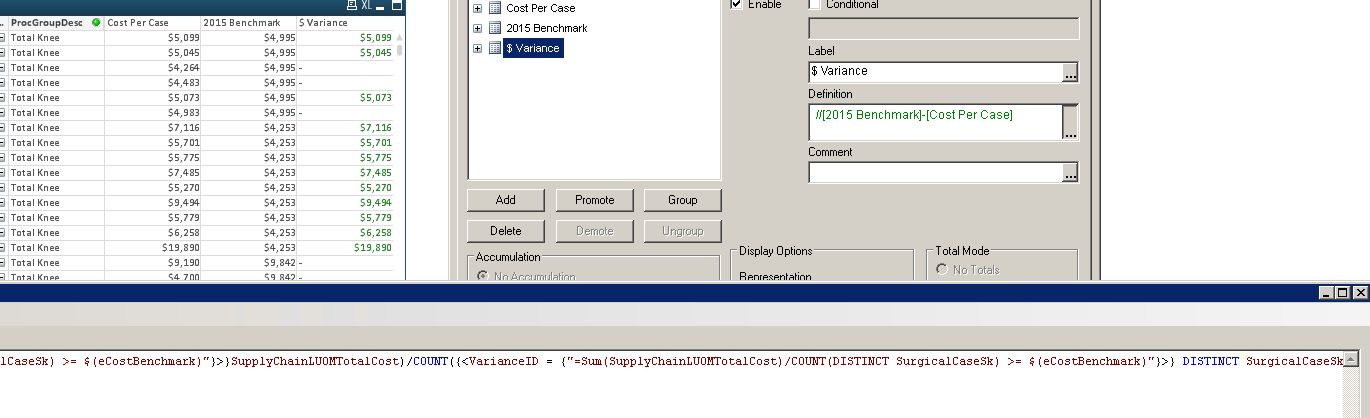
I added a key for SurgicalCoid (keyfield for Group,Division,Market, Facility)&ProcedureSurgeonName&ProcGroupDesc AS VarianceID and included the set above with VarianceID as the Key, but the expression is giving the $ variance = to the Cost Per Case and not the correct variance as shown below.
sunny_talwar
- Mark as New
- Bookmark
- Subscribe
- Mute
- Subscribe to RSS Feed
- Permalink
- Report Inappropriate Content
Did you subtract the variable from your expression?
NickHoff
- Mark as New
- Bookmark
- Subscribe
- Mute
- Subscribe to RSS Feed
- Permalink
- Report Inappropriate Content
That was it, working as intended. Thanks Sunny!
