Unlock a world of possibilities! Login now and discover the exclusive benefits awaiting you.

- Qlik Community
- :
- All Forums
- :
- QlikView
- :
- Re: Set Analysis? Find Formula Value for Dimension...
- Subscribe to RSS Feed
- Mark Topic as New
- Mark Topic as Read
- Float this Topic for Current User
- Bookmark
- Subscribe
- Mute
- Printer Friendly Page

- Mark as New
- Bookmark
- Subscribe
- Mute
- Subscribe to RSS Feed
- Permalink
- Report Inappropriate Content
Set Analysis? Find Formula Value for Dimension Value
Dear all,
I have the following graph with test data:
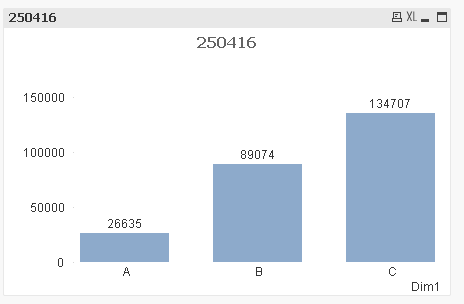
Now I want to show a text box like this:

This one was created using the following formula:
'The Dim1 value with the highest value in sum(Expression1) is: ' max(aggr(sum(Expression1), Dim1)) // here I want to see "C", not the formula value.
However, I do not want to show the formula value of 134707, but the dimension value "C". How can I do this? With set analysis?
Please find attached the QVW. Thank you very much in advance.
QS
- Tags:
- qlikview_scripting
Accepted Solutions

 sunny_talwar
- Mark as New
- Bookmark
- Subscribe
- Mute
- Subscribe to RSS Feed
- Permalink
- Report Inappropriate Content
Try this
='The Dim1 value with the highest value in sum(Expression1) is: ' & FirstSortedValue(Dim1, -aggr(sum(Expression1), Dim1)) // here I want to see "C", not the formula value.
sunny_talwar
- Mark as New
- Bookmark
- Subscribe
- Mute
- Subscribe to RSS Feed
- Permalink
- Report Inappropriate Content
Try this
='The Dim1 value with the highest value in sum(Expression1) is: ' & FirstSortedValue(Dim1, -aggr(sum(Expression1), Dim1)) // here I want to see "C", not the formula value.
- Mark as New
- Bookmark
- Subscribe
- Mute
- Subscribe to RSS Feed
- Permalink
- Report Inappropriate Content
Thank you very much, that did the job!
- QS

 kakani87
- Mark as New
- Bookmark
- Subscribe
- Mute
- Subscribe to RSS Feed
- Permalink
- Report Inappropriate Content
Hi Sunny .... what exactly -Aggr() dose here could you explain this expression

 fabdulazeez
- Mark as New
- Bookmark
- Subscribe
- Mute
- Subscribe to RSS Feed
- Permalink
- Report Inappropriate Content
aggr is creating a virtual table with 2 columns dim1 and its sum. FirstSortedValue will get the max(beacuse of negative sign) in DIM1 from that table
kakani87
- Mark as New
- Bookmark
- Subscribe
- Mute
- Subscribe to RSS Feed
- Permalink
- Report Inappropriate Content
Thank you Fawaz for the clarification.