Unlock a world of possibilities! Login now and discover the exclusive benefits awaiting you.

Announcements
Talend Cloud AWS EU Scheduled Outage: Starting Tues 26 May 21:00 CEST with expected completion Wed 27 May 01:00 CEST
- Qlik Community
- :
- All Forums
- :
- QlikView
- :
- Set Analysis - how to set a field based on another
Options
- Subscribe to RSS Feed
- Mark Topic as New
- Mark Topic as Read
- Float this Topic for Current User
- Bookmark
- Subscribe
- Mute
- Printer Friendly Page
Turn on suggestions
Auto-suggest helps you quickly narrow down your search results by suggesting possible matches as you type.
Showing results for

Not applicable
2013-10-09
10:40 PM
- Mark as New
- Bookmark
- Subscribe
- Mute
- Subscribe to RSS Feed
- Permalink
- Report Inappropriate Content
Set Analysis - how to set a field based on another
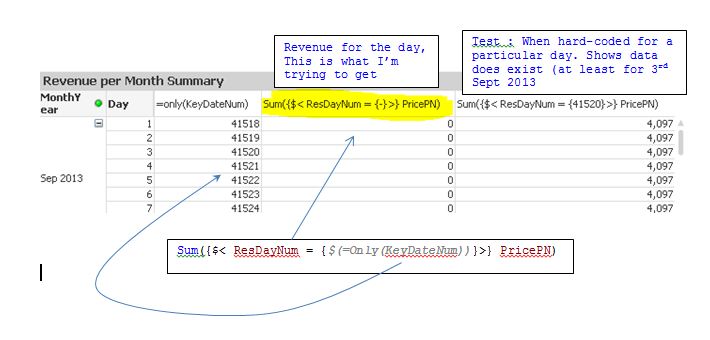
Hi , just having some difficulty with setting a field (ResDayNum) based on another field (KeyDateNum).
Hopefully this explains the problem....
821 Views
1 Solution
Accepted Solutions

 Gysbert_Wassena
Partner - Champion III
2013-10-10
02:15 AM
- Mark as New
- Bookmark
- Subscribe
- Mute
- Subscribe to RSS Feed
- Permalink
- Report Inappropriate Content
Set analysis calculates a set per chart, not per row. So for what you want you can't use set analysis. You'll have to use an if statement. sum(if(ResDayNum=KeyDateNum,PriceN)).
talk is cheap, supply exceeds demand
700 Views
2 Replies
Gysbert_Wassena
Partner - Champion III
2013-10-10
02:15 AM
- Mark as New
- Bookmark
- Subscribe
- Mute
- Subscribe to RSS Feed
- Permalink
- Report Inappropriate Content
Set analysis calculates a set per chart, not per row. So for what you want you can't use set analysis. You'll have to use an if statement. sum(if(ResDayNum=KeyDateNum,PriceN)).
talk is cheap, supply exceeds demand
701 Views
Not applicable
2013-10-10
11:28 PM
Author
- Mark as New
- Bookmark
- Subscribe
- Mute
- Subscribe to RSS Feed
- Permalink
- Report Inappropriate Content
Thanks - interesting to know the row dimensions still applies in set analysis
700 Views