Unlock a world of possibilities! Login now and discover the exclusive benefits awaiting you.

- Qlik Community
- :
- All Forums
- :
- QlikView
- :
- Re: Set Analysis little issue
- Subscribe to RSS Feed
- Mark Topic as New
- Mark Topic as Read
- Float this Topic for Current User
- Bookmark
- Subscribe
- Mute
- Printer Friendly Page

 alec1982
- Mark as New
- Bookmark
- Subscribe
- Mute
- Subscribe to RSS Feed
- Permalink
- Report Inappropriate Content
Set Analysis little issue
Hi Guys,
I am trying to use the following formula within a bar chart to get an average
=Sum({1<[Type]={'A'}>}[Amount])/Sum({1}B)
The Dimension is C.
I need to get a straight line of average across the bar chart. Not sure what I am doing wrong here.. I've done this hundred times before with no issue.
The formula above returns a zigzag line that moves with the bars..
Let me know your thoughts and thanks in advance.
Best,
Alec
- « Previous Replies
- Next Replies »

 MK_QSL
- Mark as New
- Bookmark
- Subscribe
- Mute
- Subscribe to RSS Feed
- Permalink
- Report Inappropriate Content
You can also use this in expression....
=SUM(TOTAL {<Type = {'A'}>}Amount)/COUNT(TOTAL Count)
alec1982
- Mark as New
- Bookmark
- Subscribe
- Mute
- Subscribe to RSS Feed
- Permalink
- Report Inappropriate Content
Currently here is the formula I am using :
varR=Sum({1<[Type]={'B'}>}[Annualized Amount])/Sum({1}Count)
and it is getting different value for each bar of the dimension.
MK_QSL
- Mark as New
- Bookmark
- Subscribe
- Mute
- Subscribe to RSS Feed
- Permalink
- Report Inappropriate Content
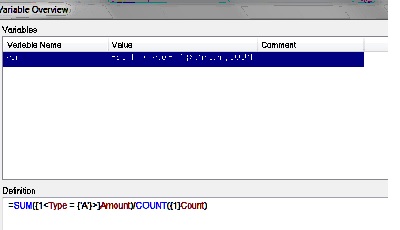
in the variable definition
=Sum({1<[Type]={'B'}>}[Annualized Amount])/Sum({1}Count)
as i said... = should be there...
if you will not put = in front... you will not get desired result..
You can also use this in expression....
=SUM(TOTAL {<Type = {'A'}>}Amount)/COUNT(TOTAL Count)

- Mark as New
- Bookmark
- Subscribe
- Mute
- Subscribe to RSS Feed
- Permalink
- Report Inappropriate Content
you are looking to show the total amount of B divided by total of the count across all types, correct?
the expression you are looking for is below.
SUM(total {<Type = {'B'}>}Amount)/sum(total Count)
alec1982
- Mark as New
- Bookmark
- Subscribe
- Mute
- Subscribe to RSS Feed
- Permalink
- Report Inappropriate Content
For some reason it doesn't work on my QVW even I am 100% sure that all the above is correct. I have used the reference line from the presentation tab as a solution as i don't think it is worthy to spend more time on this.
Thank you all for your help.
- « Previous Replies
- Next Replies »