Unlock a world of possibilities! Login now and discover the exclusive benefits awaiting you.

- Qlik Community
- :
- All Forums
- :
- QlikView
- :
- Re: Set Analysis
- Subscribe to RSS Feed
- Mark Topic as New
- Mark Topic as Read
- Float this Topic for Current User
- Bookmark
- Subscribe
- Mute
- Printer Friendly Page

- Mark as New
- Bookmark
- Subscribe
- Mute
- Subscribe to RSS Feed
- Permalink
- Report Inappropriate Content
Set Analysis
Hi,
how to show Last month sales i am getting syntax problum please help me
Accepted Solutions

 MK_QSL
- Mark as New
- Bookmark
- Subscribe
- Mute
- Subscribe to RSS Feed
- Permalink
- Report Inappropriate Content
Current Month
=num(sum({<[Month Year]= {"$(=Date(Max(Date#([Month Year], 'MMM YYYY')),'MMM YYYY'))"} >}Sales))
Last Month
=num(sum({<[Month Year]= {"$(=Date(Max(AddMonths(Date#([Month Year], 'MMM YYYY'),-1)),'MMM YYYY'))"} >}Sales))
 sunny_talwar
- Mark as New
- Bookmark
- Subscribe
- Mute
- Subscribe to RSS Feed
- Permalink
- Report Inappropriate Content
Your Month Year field is text field and not Dual (Date) Field. Make these changes in the script and rerun:
LOAD MonthName(Date#([Month&Year], 'MMM YYYY')) as MonthYear,
Sales
FROM
[USA.xlsx]
(ooxml, embedded labels, table is Sheet1);
Once you have done that, try this expression:
=Sum({<MonthYear= {"$(=MonthName(AddMonths(Max(MonthYear), -1)))"}>} Sales)
MK_QSL
- Mark as New
- Bookmark
- Subscribe
- Mute
- Subscribe to RSS Feed
- Permalink
- Report Inappropriate Content
Current Month
=num(sum({<[Month Year]= {"$(=Date(Max(Date#([Month Year], 'MMM YYYY')),'MMM YYYY'))"} >}Sales))
Last Month
=num(sum({<[Month Year]= {"$(=Date(Max(AddMonths(Date#([Month Year], 'MMM YYYY'),-1)),'MMM YYYY'))"} >}Sales))
 maxgro
- Mark as New
- Bookmark
- Subscribe
- Mute
- Subscribe to RSS Feed
- Permalink
- Report Inappropriate Content
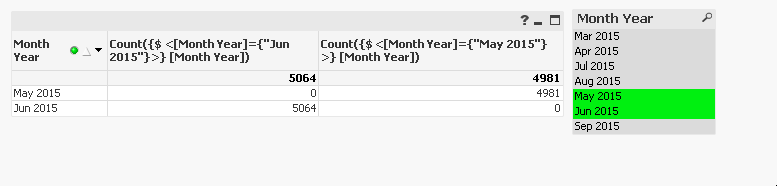
Count({$ <[Month Year]={"$(=(Date(Max(AddMonths(Date#([Month Year], 'MMM YYYY'),-1)), 'MMM YYYY')))"}>} [Month Year])