Unlock a world of possibilities! Login now and discover the exclusive benefits awaiting you.

- Qlik Community
- :
- All Forums
- :
- QlikView
- :
- Set analysis range
- Subscribe to RSS Feed
- Mark Topic as New
- Mark Topic as Read
- Float this Topic for Current User
- Bookmark
- Subscribe
- Mute
- Printer Friendly Page

 chris_munns
- Mark as New
- Bookmark
- Subscribe
- Mute
- Subscribe to RSS Feed
- Permalink
- Report Inappropriate Content
Set analysis range
Struggling with the right syntax for a sum of units;
I need to sum the units from the start of the month and 59 days forward. Date variable in the chart/table looks like this;
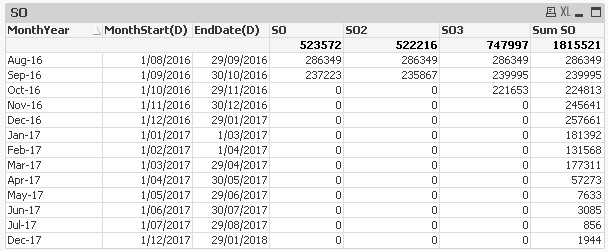
Expression SO3 is;
sum({1<Date= {">=$(=vMonthStartDate)<=$(='30/10/2016')"}> } [Units])
this seems to break up the calculated values by [MonthYear]. The result i need is a value for Sep-16 that is the sum of the [Units] between 1/9/2016 and 30/10/2016 - 461648 (239995+2211653) units displayed in place of the 239995 number.
Not quite sure where i am going wrong.
Thanks,
Chris
- « Previous Replies
-
- 1
- 2
- Next Replies »

 tresB
tresB
- Mark as New
- Bookmark
- Subscribe
- Mute
- Subscribe to RSS Feed
- Permalink
- Report Inappropriate Content
It could be date format issue. Try like:
sum({1<Date= {">=$(=Date(vMonthStartDate,'DD/MM/YYYY'))<=$(='30/10/2016')"}> } [Units])
chris_munns
- Mark as New
- Bookmark
- Subscribe
- Mute
- Subscribe to RSS Feed
- Permalink
- Report Inappropriate Content
Hi Amit,
Thanks for your thoughts, unfortunately the same result.
I think if the formatting wasn't quite right, SO3 would show '-'.
Cheers,
Chris

 qlikviewwizard
- Mark as New
- Bookmark
- Subscribe
- Mute
- Subscribe to RSS Feed
- Permalink
- Report Inappropriate Content
Hi Try like this:
sum({1<Date= {">=$(=vMonthStartDate)<=$(='10/30/2016')"}> } [Units])
tresB
- Mark as New
- Bookmark
- Subscribe
- Mute
- Subscribe to RSS Feed
- Permalink
- Report Inappropriate Content
Have you checked the output of your variable? Could you post a sample qvw?

- Mark as New
- Bookmark
- Subscribe
- Mute
- Subscribe to RSS Feed
- Permalink
- Report Inappropriate Content
Have you checked this
Your SET date should same as DD/MM/YYYY
vMonthStartDate == ??????
sum({1<Date= {">=$(=vMonthStartDate)<='30/10/2016'"}> } [Units])
 antoniotiman
- Mark as New
- Bookmark
- Subscribe
- Mute
- Subscribe to RSS Feed
- Permalink
- Report Inappropriate Content
Hi Chris,
how about Below() function like this
RangeSum(Below(Sum(Units),0,2))

 sunny_talwar
- Mark as New
- Bookmark
- Subscribe
- Mute
- Subscribe to RSS Feed
- Permalink
- Report Inappropriate Content
Can you try this:
Sum({1<Date= {"$(='>=' & Date(MonthStart(Today(), 1), 'D/MM/YYYY') & '<=' & Date(MonthStart(Today(), 1) + 59, 'D/MM/YYYY'))"}>} [Units])
chris_munns
- Mark as New
- Bookmark
- Subscribe
- Mute
- Subscribe to RSS Feed
- Permalink
- Report Inappropriate Content
hi all,
Thanks for the feedback, here is the update from your suggestions;
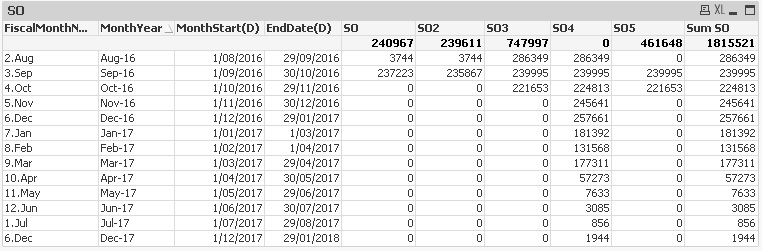
SO4 (Antonio Mancini) =RangeSum(Below(Sum([Units]),0,2))
SO5 (Sunny T) = Sum({1<Date= {"$(='>=' & Date(MonthStart(Today(), 1), 'D/MM/YYYY') & '<=' & Date(MonthStart(Today(), 1) + 59, 'D/MM/YYYY'))"}>} [Units])
(Anil Babu) vMonthStartDate is MonthStart(floor([Date]))
SO5 has the right total 461648 just need it in the 239995 cell.
Thanks,
Chris
sunny_talwar
- Mark as New
- Bookmark
- Subscribe
- Mute
- Subscribe to RSS Feed
- Permalink
- Report Inappropriate Content
Try this out:
=RangeSum(Below(TOTAL Sum([Units]),0,2))

- « Previous Replies
-
- 1
- 2
- Next Replies »