Unlock a world of possibilities! Login now and discover the exclusive benefits awaiting you.

- Qlik Community
- :
- All Forums
- :
- QlikView
- :
- Show Certain Row in Straight Table
- Subscribe to RSS Feed
- Mark Topic as New
- Mark Topic as Read
- Float this Topic for Current User
- Bookmark
- Subscribe
- Mute
- Printer Friendly Page

- Mark as New
- Bookmark
- Subscribe
- Mute
- Subscribe to RSS Feed
- Permalink
- Report Inappropriate Content
Show Certain Row in Straight Table
Dear Team,
i have a following straight table, and i use rowno(total) to get the row number
| Employee | rowno(TOTAL) |
| AAA | 1 |
| BBB | 2 |
| CCC | 3 |
| DDD | 4 |
| EEE | 5 |
My question, how do i display certain row? For example, I want to display row 2 to 4. Means showing 3 rows only.
or show row 1 to 4 only
thank you
- Mark as New
- Bookmark
- Subscribe
- Mute
- Subscribe to RSS Feed
- Permalink
- Report Inappropriate Content
Attached is my file.
Just manage to find this attach option. Thanks

 jagan
jagan
- Mark as New
- Bookmark
- Subscribe
- Mute
- Subscribe to RSS Feed
- Permalink
- Report Inappropriate Content
Hi,
Please find attached file, I did the following changes
- Modified all the expressions
- Selected the "Suppress When value is Null" for dimension in Dimension tab.
- Selected the "Suppress Missing" option in Presentation tab.
Hope this helps you.
Regards,
Jagan.
- Mark as New
- Bookmark
- Subscribe
- Mute
- Subscribe to RSS Feed
- Permalink
- Report Inappropriate Content
Thanks Jagan,
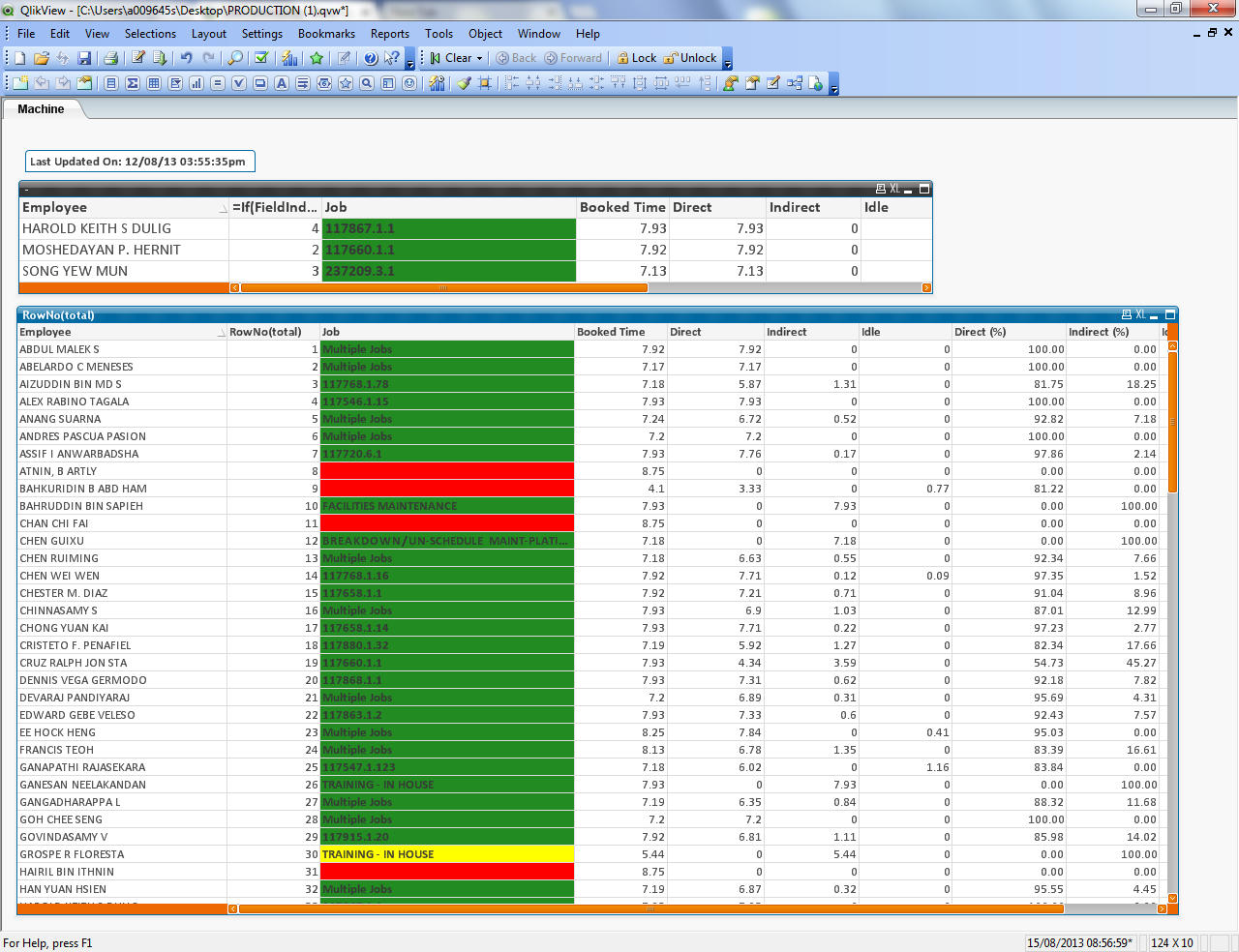
You refer to the below table which is original one.
How come your 234 row is totally different from the original one?
Anyway, your changes is so almost there.
jagan
- Mark as New
- Bookmark
- Subscribe
- Mute
- Subscribe to RSS Feed
- Permalink
- Report Inappropriate Content
Hi,
FieldIndex() will return the value of the Index, in the expression we get those whose index are 2, 3 and 4. That is what the records are displayed in my attached file.
I am not sure what you are asking, is the entire row is different including dimension or expression values are different?
Regards,
Jagan.
- Mark as New
- Bookmark
- Subscribe
- Mute
- Subscribe to RSS Feed
- Permalink
- Report Inappropriate Content
As you can see the original table 2,3,4 is following name
| ABDUL MALEK S |
| ABELARDO C MENESES |
| AIZUDDIN BIN MD S |
But the field index giving different kind of result. What i want is if i specify row 2-4. Then it will return the 2-4 name
thanks
jagan
- Mark as New
- Bookmark
- Subscribe
- Mute
- Subscribe to RSS Feed
- Permalink
- Report Inappropriate Content
Hi,
Sort the names in the script, then you will get the values correctly.
Regards,
Jagan.
- Mark as New
- Bookmark
- Subscribe
- Mute
- Subscribe to RSS Feed
- Permalink
- Report Inappropriate Content
Jagan,
Happened to see your this thread in the community. I think maybe i should give up the display certain row and apply the paging for my straight table.
http://community.qlik.com/docs/DOC-3890
how could i apply to my work?
jagan
- Mark as New
- Bookmark
- Subscribe
- Mute
- Subscribe to RSS Feed
- Permalink
- Report Inappropriate Content
Hi,
Can you attach the Visual-all.txt file, need to change some script, I think you need the paging implementation.
Regards,
Jagan.
- Mark as New
- Bookmark
- Subscribe
- Mute
- Subscribe to RSS Feed
- Permalink
- Report Inappropriate Content
Yup. I think paging method as well.
Hope you could help.
Thanks Jagan
jagan
- Mark as New
- Bookmark
- Subscribe
- Mute
- Subscribe to RSS Feed
- Permalink
- Report Inappropriate Content
Hi,
Try this script it sorts the names
SET ThousandSep=',';
SET DecimalSep='.';
SET MoneyThousandSep=',';
SET MoneyDecimalSep='.';
SET MoneyFormat='£#,##0.00;-£#,##0.00';
SET TimeFormat='hh:mm:ss';
SET DateFormat='DD/MM/YYYY';
SET TimestampFormat='DD/MM/YYYY hh:mm:ss[.fff]';
SET MonthNames='Jan;Feb;Mar;Apr;May;Jun;Jul;Aug;Sep;Oct;Nov;Dec';
SET DayNames='Mon;Tue;Wed;Thu;Fri;Sat;Sun';
Temp:
LOAD b_LoginID,
b_FullName,
b_UserDepartment,
b_Supervisor,
b_UserDeptSection,
b_OrderNumber,
b_OrderLine,
b_OrderLinePart,
b_CustomerName,
b_BookingTypeDesc,
b_ProductivityTypeDesc,
b_BookedTime,
b_IndirectHours,
b_DirectHours,
b_LaborCode,
b_LaborCodeDesc,
b_Shift,
b_JobNo,
b_StartDate,
b_EndDate,
b_StartTime,
b_EndTime,
b_OTIndHours,
b_OTDirHours,
b_Code,
b_Absence,
b_AbsenceHrs,
b_LastRun,
b_SinceWhen,
if(b_SinceWhen='', null(), 1) AS [b_InProcessFlag],
b_LunchTimeDirect,
b_LunchTimeIndirect
FROM
DATA\visual-all.txt
(txt, codepage is 1252, embedded labels, delimiter is ';', msq);
Data:
NoConcatenate LOAD
*
RESIDENT Temp
ORDER BY b_CustomerName;
DROP TABLE Temp;
Hope it helps you.
Regards,
Jagan.