Unlock a world of possibilities! Login now and discover the exclusive benefits awaiting you.

- Qlik Community
- :
- All Forums
- :
- QlikView
- :
- Re: Show certain orders
- Subscribe to RSS Feed
- Mark Topic as New
- Mark Topic as Read
- Float this Topic for Current User
- Bookmark
- Subscribe
- Mute
- Printer Friendly Page

- Mark as New
- Bookmark
- Subscribe
- Mute
- Subscribe to RSS Feed
- Permalink
- Report Inappropriate Content
Show certain orders
Hello
Recently started working with QlikView, but I have trouble with filtering out certain values.
Im looking to return orders where a customer have only bought one type of product (shoes). In the table below, I want to show orders where only shoes is in the order. So it should return OrderID 1, 3 and 4. CAn it be done in the load script?
| OrderID | Products |
|---|---|
| 1 | Shoes |
| 2 | Shoes |
| 2 | Hats |
| 3 | Shoes |
| 4 | Shoes |
| 4 | Shoes |
| 5 | Pants |
thanks in advance.
Accepted Solutions

 robert_mika
- Mark as New
- Bookmark
- Subscribe
- Mute
- Subscribe to RSS Feed
- Permalink
- Report Inappropriate Content
t1:
load * inline
[
OrderID ,Products
1, Shoes
2, Shoes
2, Hats
3, Shoes
4, Shoes
4, Shoes
5, Pants
]
;
t2:
load OrderID as ID,
count(OrderID) as CountAll
resident t1
Group by OrderID;
join(t2)
load OrderID as ID,
count(OrderID) as CountShoes
resident t1
where Products ='Shoes'
group by OrderID;
final:
load ID as OrderID
resident t2
where CountAll=CountShoes;
drop table t1,t2
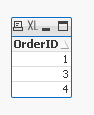

 fred_s
- Mark as New
- Bookmark
- Subscribe
- Mute
- Subscribe to RSS Feed
- Permalink
- Report Inappropriate Content
Hi Karl,
Use something like this:
Select OrderID,
Products
FROM yourtablename
WHERE Products = 'Shoes';
Grtz Fred
robert_mika
- Mark as New
- Bookmark
- Subscribe
- Mute
- Subscribe to RSS Feed
- Permalink
- Report Inappropriate Content
t1:
load * inline
[
OrderID ,Products
1, Shoes
2, Shoes
2, Hats
3, Shoes
4, Shoes
4, Shoes
5, Pants
]
;
t2:
load OrderID as ID,
count(OrderID) as CountAll
resident t1
Group by OrderID;
join(t2)
load OrderID as ID,
count(OrderID) as CountShoes
resident t1
where Products ='Shoes'
group by OrderID;
final:
load ID as OrderID
resident t2
where CountAll=CountShoes;
drop table t1,t2
 maxgro
- Mark as New
- Bookmark
- Subscribe
- Mute
- Subscribe to RSS Feed
- Permalink
- Report Inappropriate Content
t1:
load * inline [
OrderID ,Products
1, Shoes
2, Shoes
2, Hats
3, Shoes
4, Shoes
4, Shoes
5, Pants
];
t2:
load * where NumProdXOrder=1 and MaxProdXOrder='Shoes';
load OrderID, count(distinct Products) as NumProdXOrder, MaxString(Products) as MaxProdXOrder
Resident t1 group by OrderID;
Right Keep (t1) load OrderID Resident t2;
DROP Table t2;
 MK_QSL
- Mark as New
- Bookmark
- Subscribe
- Mute
- Subscribe to RSS Feed
- Permalink
- Report Inappropriate Content
T1:
Load *, RowNo() as ID Inline
[
OrderID, Products
1, Shoes
2, Shoes
2, Hats
3, Shoes
4, Shoes
4, Shoes
5, Pants
];
Left Join (T1)
Load
OrderID,
Count(Distinct Products) as TotalProduct
Resident T1
Group By OrderID;
Left Join (T1)
Load
OrderID,
1 as Flag
Resident T1
Where TotalProduct = 1 and Products = 'Shoes';
Now Create a TableBox with Flag and OrderID dimension...