Unlock a world of possibilities! Login now and discover the exclusive benefits awaiting you.

- Qlik Community
- :
- All Forums
- :
- QlikView
- :
- Sort value in Block chart
- Subscribe to RSS Feed
- Mark Topic as New
- Mark Topic as Read
- Float this Topic for Current User
- Bookmark
- Subscribe
- Mute
- Printer Friendly Page

- Mark as New
- Bookmark
- Subscribe
- Mute
- Subscribe to RSS Feed
- Permalink
- Report Inappropriate Content
Sort value in Block chart
Hi ,
I have a block chart like this
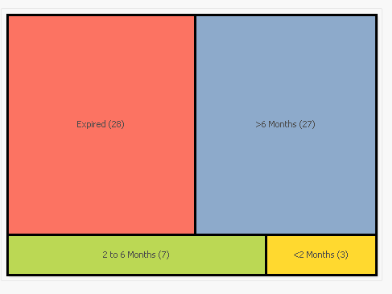
I used calculated dimension:
| =if(CountOfExpiryDate>180,'>6 Months',if(CountOfExpiryDate>60 and CountOfExpiryDate<181,'2 to 6 Months',if(CountOfExpiryDate<61 and CountOfExpiryDate>0,'<2 Months','Expired'))) |
Expression is Count(EmployeeID)
CountOfExpiryDate is consists of date count
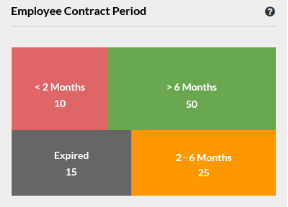
But there is a problem I need to show the chart like below chart, The value should be show in sort in ascending order ,and how can I sort the value in a block chart
Regards,
Vijay.M

 sunny_talwar
- Mark as New
- Bookmark
- Subscribe
- Mute
- Subscribe to RSS Feed
- Permalink
- Report Inappropriate Content
May be like this
=
if(CountOfExpiryDate>180, Dual('>6 Months', 1),
if(CountOfExpiryDate>60 and CountOfExpiryDate<181, Dual('2 to 6 Months', 2),
if(CountOfExpiryDate<61 and CountOfExpiryDate>0, Dual('<2 Months', 3),
Dual('Expired', 4))))
- Mark as New
- Bookmark
- Subscribe
- Mute
- Subscribe to RSS Feed
- Permalink
- Report Inappropriate Content
Sorry Sunny, its not working which you given condition,may i know is any other condition like this.
sunny_talwar
- Mark as New
- Bookmark
- Subscribe
- Mute
- Subscribe to RSS Feed
- Permalink
- Report Inappropriate Content
Did you use the above as your calculated dimension?
- Mark as New
- Bookmark
- Subscribe
- Mute
- Subscribe to RSS Feed
- Permalink
- Report Inappropriate Content
yes I have used the above as my calculated dimension.
sunny_talwar
- Mark as New
- Bookmark
- Subscribe
- Mute
- Subscribe to RSS Feed
- Permalink
- Report Inappropriate Content
Would you be able to share your app to look at this?
- Mark as New
- Bookmark
- Subscribe
- Mute
- Subscribe to RSS Feed
- Permalink
- Report Inappropriate Content
Sorry I don't know to share can you guide me
sunny_talwar
- Mark as New
- Bookmark
- Subscribe
- Mute
- Subscribe to RSS Feed
- Permalink
- Report Inappropriate Content