Unlock a world of possibilities! Login now and discover the exclusive benefits awaiting you.

- Qlik Community
- :
- All Forums
- :
- QlikView
- :
- Re: Sorting Values in a Filter Pane
- Subscribe to RSS Feed
- Mark Topic as New
- Mark Topic as Read
- Float this Topic for Current User
- Bookmark
- Subscribe
- Mute
- Printer Friendly Page

 SAMSAM
- Mark as New
- Bookmark
- Subscribe
- Mute
- Subscribe to RSS Feed
- Permalink
- Report Inappropriate Content
Sorting Values in a Filter Pane
I wish sort values in a filter pane first alphabetically, then by the string length.
How can I go about this?
I can sort alphabetically by checking the "Sort Alphabetical" check box in Sort pane/section.
I can sort string length by checking the use expression checkbox, then with the function: Len(myString).
But how to combine them both?
In sql, this is "order by..., then by..."

 rwunderlich
- Mark as New
- Bookmark
- Subscribe
- Mute
- Subscribe to RSS Feed
- Permalink
- Report Inappropriate Content
Can you post some sample data and your expected output?
-Rob
SAMSAM
- Mark as New
- Bookmark
- Subscribe
- Mute
- Subscribe to RSS Feed
- Permalink
- Report Inappropriate Content
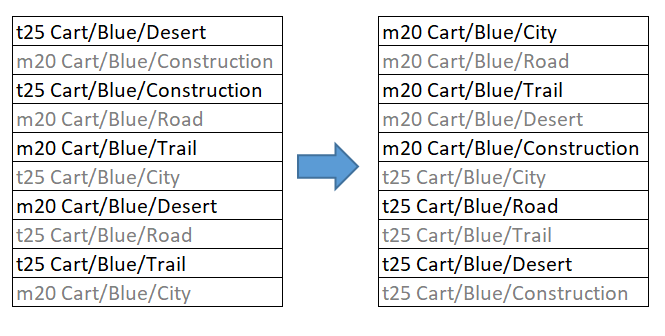
The above is a sample of what I would like to achieve.
To improve on my OP and to be more concise,
what I want is to sort the first word alphabetically then sort by string length.
In this manner, the first word/code of the values will be grouped together,
then sorted arranged by the string length.
Layout in this manner looks neater.
