Unlock a world of possibilities! Login now and discover the exclusive benefits awaiting you.

- Qlik Community
- :
- All Forums
- :
- QlikView
- :
- Re: Sorting a List Box
- Subscribe to RSS Feed
- Mark Topic as New
- Mark Topic as Read
- Float this Topic for Current User
- Bookmark
- Subscribe
- Mute
- Printer Friendly Page

- Mark as New
- Bookmark
- Subscribe
- Mute
- Subscribe to RSS Feed
- Permalink
- Report Inappropriate Content
Sorting a List Box
Hello
I have a list box. The dimension in that List Box is Period Name. It has the values as SEP,JAN,MAR,JUN,FEB........
How do I sort it to show JAN,FEB,MAR,APR,MAY....................DEC.
What is the best setting that I should do in my sort tab to fix this.
Thanks
- « Previous Replies
-
- 1
- 2
- Next Replies »
Accepted Solutions

 preminqlik
- Mark as New
- Bookmark
- Subscribe
- Mute
- Subscribe to RSS Feed
- Permalink
- Report Inappropriate Content
Hi there,
go to expression and write the below expression...make sure remaining check boxes are unchecked
only({1}num(Month(Date#(capitalize(left(FieldName,3)),'MMM'))))
Hope this helps


 swuehl
- Mark as New
- Bookmark
- Subscribe
- Mute
- Subscribe to RSS Feed
- Permalink
- Report Inappropriate Content
Create a dual value for example using Month(Date) in your load script, which automatically returns a dual value. Then sort numeric.
http://community.qlik.com/blogs/qlikviewdesignblog/2012/11/13/dual
 PradeepReddy
- Mark as New
- Bookmark
- Subscribe
- Mute
- Subscribe to RSS Feed
- Permalink
- Report Inappropriate Content
Hi,
Choose auto ascending option from List box properties..
List Box Properties --> Sort --> Sort By (Choose Auto Ascending)
Thanks
Pradeep
- Mark as New
- Bookmark
- Subscribe
- Mute
- Subscribe to RSS Feed
- Permalink
- Report Inappropriate Content
This does not work sorry. Already tried this.
Thanks
- Mark as New
- Bookmark
- Subscribe
- Mute
- Subscribe to RSS Feed
- Permalink
- Report Inappropriate Content
Hello
I do not want Minth(Date). I just want the first three letters of the month.
For example JAN, FEB,....
tHANKS
 its_anandrjs
- Mark as New
- Bookmark
- Subscribe
- Mute
- Subscribe to RSS Feed
- Permalink
- Report Inappropriate Content
For months load num value also in load like
Month -> JAN,FEB,MAR,APR,MAY....................DEC
MonthNum -> 1,2,3,4,5,6,7,8,9,10,11,12
and in list box of the sort option use MonthNum field for sort
Or
In list box of the Month in sort -> expression
write like
=Match(Month,'JAN','FEB','MAR','APR','MAY','JUN','JUL','AUG','SEP','OCT','NOV','DEC')
Best way is add MonthNum field.
its_anandrjs
- Mark as New
- Bookmark
- Subscribe
- Mute
- Subscribe to RSS Feed
- Permalink
- Report Inappropriate Content
Write like the below code in Expression and uncheck other option
=Match(Month,'JAN','FEB','MAR','APR','MAY','JUN','JUL','AUG','SEP','OCT','NOV','DEC')
- Mark as New
- Bookmark
- Subscribe
- Mute
- Subscribe to RSS Feed
- Permalink
- Report Inappropriate Content
Hello Anand
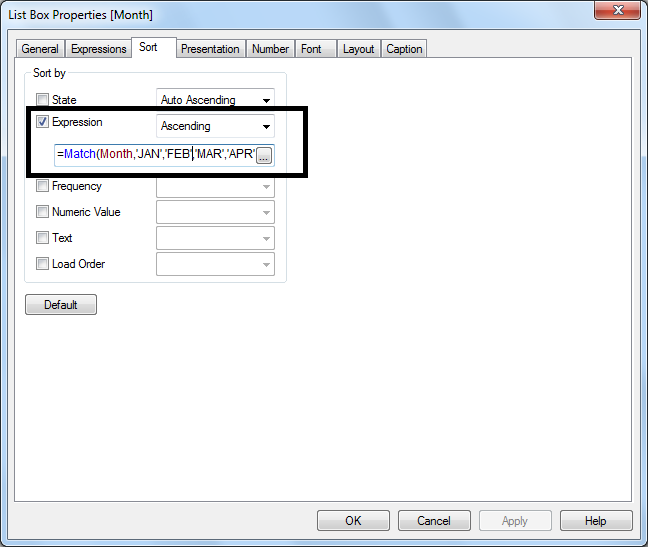
Where should I add this line
=Match(Month,'
JAN','FEB','MAR','APR','MAY','JUN','JUL','AUG','SEP','OCT','NOV','DEC')
In my list box?
Thanks
swuehl
- Mark as New
- Bookmark
- Subscribe
- Mute
- Subscribe to RSS Feed
- Permalink
- Report Inappropriate Content
Month function will return a three letter month name code, according to your settings in the load script:
From the Help:
Month. Returns a text string representing the month when the fraction of expr is interpreted as a date, but can be formatted as a number.
Example:
month( '1971-10-30' ) returns Oct.
Basically, it will return one of the text values defined in your script, like in my setting:
SET MonthNames='Jan;Feb;Mrz;Apr;Mai;Jun;Jul;Aug;Sep;Okt;Nov;Dez';
its_anandrjs
- Mark as New
- Bookmark
- Subscribe
- Mute
- Subscribe to RSS Feed
- Permalink
- Report Inappropriate Content
In the expression option with your month field this line
=Match(Month,'JAN','FEB','MAR','APR','MAY','JUN','JUL','AUG','SEP','OCT','NOV','DEC')
See the attached snap shot.
- « Previous Replies
-
- 1
- 2
- Next Replies »