Unlock a world of possibilities! Login now and discover the exclusive benefits awaiting you.

- Qlik Community
- :
- All Forums
- :
- QlikView
- :
- Sorting by Month with timestamp data.
- Subscribe to RSS Feed
- Mark Topic as New
- Mark Topic as Read
- Float this Topic for Current User
- Bookmark
- Subscribe
- Mute
- Printer Friendly Page

- Mark as New
- Bookmark
- Subscribe
- Mute
- Subscribe to RSS Feed
- Permalink
- Report Inappropriate Content
Sorting by Month with timestamp data.
I am new here, and also new with Qlikview.
I have a issue with sorting by months. I have a column called Closed which containt Timestamp data.
I did use a format pattern for timestamp: MMMMMMMMMM-YYYY, as you can see below in the screenshot.
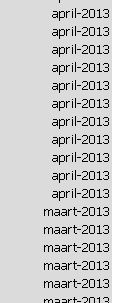
Now I want to sort it like this:
april-2013
maart-2013
etc...
How can I accomplish this? Thanks for your help.

 Gysbert_Wassena
- Mark as New
- Bookmark
- Subscribe
- Mute
- Subscribe to RSS Feed
- Permalink
- Report Inappropriate Content
Your listbox shows duplicates because the values are really still timestamps, just formatted as month-year. What I think you should do is create a new field in the script:
date(monthstart(Closed),'MMMM-YYYY') as MonthYear
This new field will be a date field with the start of the month as numeric value and formatted as monthname-year. You can sort that numerically in descending order to get the sorting you want.
talk is cheap, supply exceeds demand

 swuehl
- Mark as New
- Bookmark
- Subscribe
- Mute
- Subscribe to RSS Feed
- Permalink
- Report Inappropriate Content
Sorting seems to be ok. I think your problem is that you formatted the textual representation of your values like 'MMMM-YYYY', but you kept the underlying numeric timestamp values, thus keeping multiple values for your months in e.g. a list box (because of the distinct numeric values).
Create an additional list box expression
=num(Closed)
to see what I mean.
Try using something like
LOAD
Date(Monthstart(Closed),'MMMM-YYYY') as MonthClosed,
....
when creating your month field from timestamp field.
Also have a look at
http://community.qlik.com/docs/DOC-3102
Hope this helps,
Stefan