Unlock a world of possibilities! Login now and discover the exclusive benefits awaiting you.

- Qlik Community
- :
- All Forums
- :
- QlikView
- :
- Split a table
Options
- Subscribe to RSS Feed
- Mark Topic as New
- Mark Topic as Read
- Float this Topic for Current User
- Bookmark
- Subscribe
- Mute
- Printer Friendly Page
Turn on suggestions
Auto-suggest helps you quickly narrow down your search results by suggesting possible matches as you type.
Showing results for

 AmCh
AmCh
Creator
2021-05-04
09:03 AM
- Mark as New
- Bookmark
- Subscribe
- Mute
- Subscribe to RSS Feed
- Permalink
- Report Inappropriate Content
Split a table
Hello all,
I have the following table (xls.) as an input:
| System | Variant |
| A | 11 |
| A | 12 |
| A | 13 |
| B | 21 |
| B | 22 |
| B | 23 |
| C | 31 |
| C | 32 |
| C | 33 |
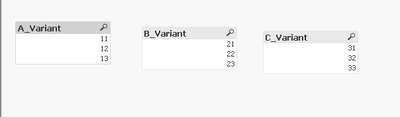
I want to import those fields separetly and named:
Fields:
| A_Variants |
| 11 |
| 12 |
| 13 |
| B_Variants |
| 21 |
| 22 |
| 23 |
| C_Variants |
| 31 |
| 32 |
| 33 |
Any help please?
Thanks in advance.
Labels (6)
Labels
- Subscribe by Topic:
-
Application Development
-
Creating Analytics
-
Layout & Visualizations
-
Other
-
QlikView App Dev
-
Scripting
735 Views
1 Solution
Accepted Solutions

 Taoufiq_Zarra
MVP
2021-05-04
10:10 AM
- Mark as New
- Bookmark
- Subscribe
- Mute
- Subscribe to RSS Feed
- Permalink
- Report Inappropriate Content
Maye be like this:
Data:
LOAD * INLINE [
    System, Variant
    A, 11
    A, 12
    A, 13
    B, 21
    B, 22
    B, 23
    C, 31
    C, 32
    C, 33
];

Tmp:
load distinct System as SysTmp resident Data;


FOR Each a in FieldValueList('SysTmp')

LOAD Variant as '$(a)_Variant' resident Data where System='$(a)';

NEXT a

drop table Data,Tmp;
output:

Regards,
Taoufiq ZARRA
"Please LIKE posts and "Accept as Solution" if the provided solution is helpful "
(you can mark up to 3 "solutions") 😉
Taoufiq ZARRA
"Please LIKE posts and "Accept as Solution" if the provided solution is helpful "
(you can mark up to 3 "solutions") 😉
1 Reply
Taoufiq_Zarra
MVP
2021-05-04
10:10 AM
- Mark as New
- Bookmark
- Subscribe
- Mute
- Subscribe to RSS Feed
- Permalink
- Report Inappropriate Content
Maye be like this:
Data:
LOAD * INLINE [
    System, Variant
    A, 11
    A, 12
    A, 13
    B, 21
    B, 22
    B, 23
    C, 31
    C, 32
    C, 33
];

Tmp:
load distinct System as SysTmp resident Data;


FOR Each a in FieldValueList('SysTmp')

LOAD Variant as '$(a)_Variant' resident Data where System='$(a)';

NEXT a

drop table Data,Tmp;
output:
Regards,
Taoufiq ZARRA
"Please LIKE posts and "Accept as Solution" if the provided solution is helpful "
(you can mark up to 3 "solutions") 😉
Taoufiq ZARRA
"Please LIKE posts and "Accept as Solution" if the provided solution is helpful "
(you can mark up to 3 "solutions") 😉
