Unlock a world of possibilities! Login now and discover the exclusive benefits awaiting you.

- Qlik Community
- :
- All Forums
- :
- QlikView
- :
- Re: Static Min and Max
- Subscribe to RSS Feed
- Mark Topic as New
- Mark Topic as Read
- Float this Topic for Current User
- Bookmark
- Subscribe
- Mute
- Printer Friendly Page

- Mark as New
- Bookmark
- Subscribe
- Mute
- Subscribe to RSS Feed
- Permalink
- Report Inappropriate Content
Static Min and Max
Hi,
in my app, having 2 dimensions and 4 expressions.
Now i needs to check my 4 expressions values which is minimum and maximum. And should display the y-axis minimum +1 and maximum+1.
I tried below conditions for Static Min and Static Max, but it displays only min and max in y-axis.
Static Min :
if(min(Column(1))> Column(2)and Column(3) and Column(4),min(Column(1)),
if(min(Column(2))> Column(1)and Column(3) and Column(4),min(Column(2)),
if(min(Column(3))> Column(1)and Column(2) and Column(4),min(Column(3)),min(Column(4)))))
Static Max :
if(max(Column(1))> Column(2)and Column(3) and Column(4),max(Column(1)),
if(max(Column(2))> Column(1)and Column(3) and Column(4),max(Column(2)),
if(max(Column(3))> Column(1)and Column(2) and Column(4),max(Column(3)),max(Column(4)))))
Example for what i'm trying is :
1.) From all the expression min is 14.33 then y-axis should start from 13.33
2.) From all the expression max is 25.17 then y-axis should end at 26.17
Is this possible ?
Thanks in advance.
Regards,
venkat

 CELAMBARASAN
- Mark as New
- Bookmark
- Subscribe
- Mute
- Subscribe to RSS Feed
- Permalink
- Report Inappropriate Content
Try using range functions
RangeMin(Expr1,Expr2,Expr3,Expr4)-1
RangeMax(Expr1,Expr2,Expr3,Expr4)+1
- Mark as New
- Bookmark
- Subscribe
- Mute
- Subscribe to RSS Feed
- Permalink
- Report Inappropriate Content
Hi,
Thanks for reply.
I tried Range function, but it didn't helps me.
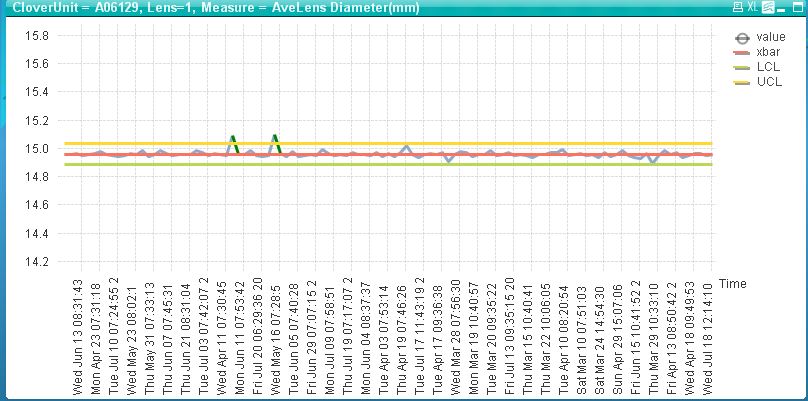
I'm attaching the 2 screenshots 1.) Without any Static Min and Max 2.) After applying Static Min and Max.
After applying below Stati Min and Max:
StaticMin:
RangeMin(Sum( {$<[Clover Unit]={'A06129'}, Lens#={'1'},measure={'Ave Lens Diameter (mm)'}>}value),
Sum( {$<[Clover Unit]={'A06129'}, Lens#={'1'},measure={'Ave Lens Diameter (mm)'}>}xbar),
Sum( {$<[Clover Unit]={'A06129'}, Lens#={'1'},measure={'Ave Lens Diameter (mm)'}>}LCL),
Sum( {$<[Clover Unit]={'A06129'}, Lens#={'1'},measure={'Ave Lens Diameter (mm)'}>}UCL))-1
StaticMax:
RangeMax(Sum( {$<[Clover Unit]={'A06129'}, Lens#={'1'},measure={'Ave Lens Diameter (mm)'}>}value),
Sum( {$<[Clover Unit]={'A06129'}, Lens#={'1'},measure={'Ave Lens Diameter (mm)'}>}xbar),
Sum( {$<[Clover Unit]={'A06129'}, Lens#={'1'},measure={'Ave Lens Diameter (mm)'}>}LCL),
Sum( {$<[Clover Unit]={'A06129'}, Lens#={'1'},measure={'Ave Lens Diameter (mm)'}>}UCL))+1
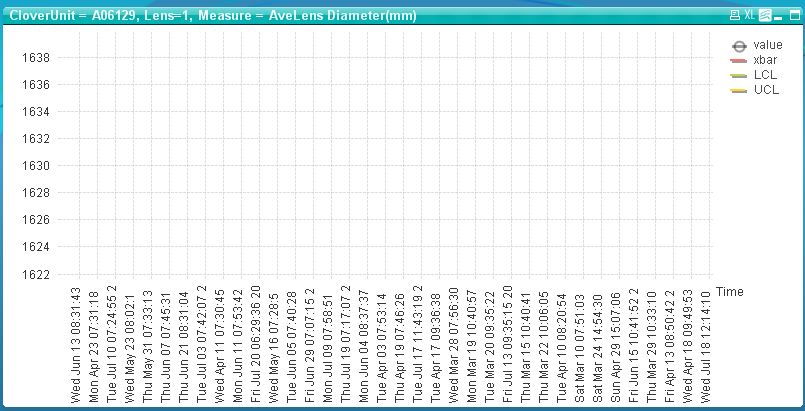
thanks in advance.
Regards,
Venkat

 CELAMBARASAN
- Mark as New
- Bookmark
- Subscribe
- Mute
- Subscribe to RSS Feed
- Permalink
- Report Inappropriate Content
Is it was a percentage?or divided by something?
instead of adding 1 check with adding 0.01?

 ericcosmai
- Mark as New
- Bookmark
- Subscribe
- Mute
- Subscribe to RSS Feed
- Permalink
- Report Inappropriate Content
Hi!
Could you send a datatable with values?
Regards.
- Mark as New
- Bookmark
- Subscribe
- Mute
- Subscribe to RSS Feed
- Permalink
- Report Inappropriate Content
Hi,
i tried by adding 0.01 but no difference, it is not increasing the min and max scale.
Please find the attached sample app.
Thanks & Regards,
Satish.A
- Mark as New
- Bookmark
- Subscribe
- Mute
- Subscribe to RSS Feed
- Permalink
- Report Inappropriate Content
hi,
Can anyone help on this. Its really urgent to complete.
Thanks in advance.
Regards,
Venkat

 swuehl
- Mark as New
- Bookmark
- Subscribe
- Mute
- Subscribe to RSS Feed
- Permalink
- Report Inappropriate Content
Maybe like
=min(aggr(RangeMin(
Sum( {$<[Clover Unit]={'A06129'}, Lens#={'1'},measure={'Ave Lens Diameter (mm)'}>}value)
,Sum( {$<[Clover Unit]={'A06129'}, Lens#={'1'},measure={'Ave Lens Diameter (mm)'}>}xbar)
,Sum( {$<[Clover Unit]={'A06129'}, Lens#={'1'},measure={'Ave Lens Diameter (mm)'}>}LCL)
,Sum( {$<[Clover Unit]={'A06129'}, Lens#={'1'},measure={'Ave Lens Diameter (mm)'}>}UCL)
),[Time Data Recorded]))-1
for min axis scaling and
=
max(aggr(RangeMax(
Sum( {$<[Clover Unit]={'A06129'}, Lens#={'1'},measure={'Ave Lens Diameter (mm)'}>}value)
,Sum( {$<[Clover Unit]={'A06129'}, Lens#={'1'},measure={'Ave Lens Diameter (mm)'}>}xbar)
,Sum( {$<[Clover Unit]={'A06129'}, Lens#={'1'},measure={'Ave Lens Diameter (mm)'}>}LCL)
,Sum( {$<[Clover Unit]={'A06129'}, Lens#={'1'},measure={'Ave Lens Diameter (mm)'}>}UCL)
),[Time Data Recorded]))+1
for max axis scaling