Unlock a world of possibilities! Login now and discover the exclusive benefits awaiting you.

- Qlik Community
- :
- All Forums
- :
- QlikView
- :
- Re: Stored Procedure
- Subscribe to RSS Feed
- Mark Topic as New
- Mark Topic as Read
- Float this Topic for Current User
- Bookmark
- Subscribe
- Mute
- Printer Friendly Page

- Mark as New
- Bookmark
- Subscribe
- Mute
- Subscribe to RSS Feed
- Permalink
- Report Inappropriate Content
Stored Procedure
Hi,
I want to load data from stored procedure into qlikview.
the SP gets an input (date) and returns AgencyId and HotelId.
I created an ODBC connection and then:
SP:
sql
DECLARE @d date = getdate()-1
EXEC sp_WhiteDots @d;
the sql script works in Microsoft SQL server.
but there are no results in qlikview (no errors either).
i also tried :
load AgencyId, HotelId;
sql
DECLARE @d date = getdate()-1
EXEC sp_WhiteDots @d;
but then i got this error :
Field not found - <AgencyId>
sql
DECLARE @d date = getdate()-1
EXEC sp_WhiteDots @d
help please! 
- Tags:
- qlikview_scripting

 marcus_sommer
- Mark as New
- Bookmark
- Subscribe
- Mute
- Subscribe to RSS Feed
- Permalink
- Report Inappropriate Content
You could only use these functions and syntax within your sql-statement which the database and the odbc-driver support. I would it try something easier like:
Load *;
SQL SELECT YourFields From YourProcedure;
- Marcus

 Gabriel
- Mark as New
- Bookmark
- Subscribe
- Mute
- Subscribe to RSS Feed
- Permalink
- Report Inappropriate Content
Hi,
I would suggest create a QlikView variable to hold DECLARE @d date = getdate()-1 and pass the variable into your SQL
EXEC sp_WhiteDots @d.
Hope this help
 maxgro
- Mark as New
- Bookmark
- Subscribe
- Mute
- Subscribe to RSS Feed
- Permalink
- Report Inappropriate Content
let var= date(today()-1, 'YYYYMMDD');
trace var=$(var);
T:
load *;
sql execute sp_WhiteDots '$(var)';

 sinanozdemir
- Mark as New
- Bookmark
- Subscribe
- Mute
- Subscribe to RSS Feed
- Permalink
- Report Inappropriate Content
Please see the below script:
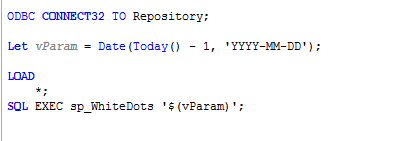
As you can see I created a variable called vParam which is equivalent of GETDATE() - 1. Although, pay attention to the date format 'YYYY-MM-DD', this is SQL Server default date format.
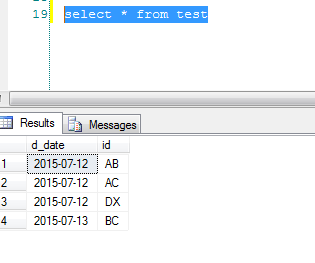
The original table had the below data:
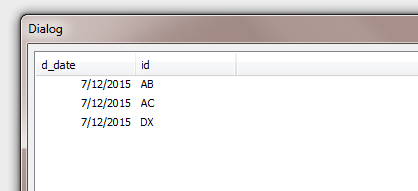
After I ran the QV script, I got the below results which gave every record that didn't have today's date:
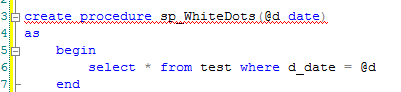
And here is my stored procedure for this exercise:
hope this helps.