Unlock a world of possibilities! Login now and discover the exclusive benefits awaiting you.

- Qlik Community
- :
- All Forums
- :
- QlikView
- :
- Re: Stores Performance Map?
- Subscribe to RSS Feed
- Mark Topic as New
- Mark Topic as Read
- Float this Topic for Current User
- Bookmark
- Subscribe
- Mute
- Printer Friendly Page

 tomovangel
- Mark as New
- Bookmark
- Subscribe
- Mute
- Subscribe to RSS Feed
- Permalink
- Report Inappropriate Content
Stores Performance Map?
Hello guys,
I have got a map, ( which is an image .png) 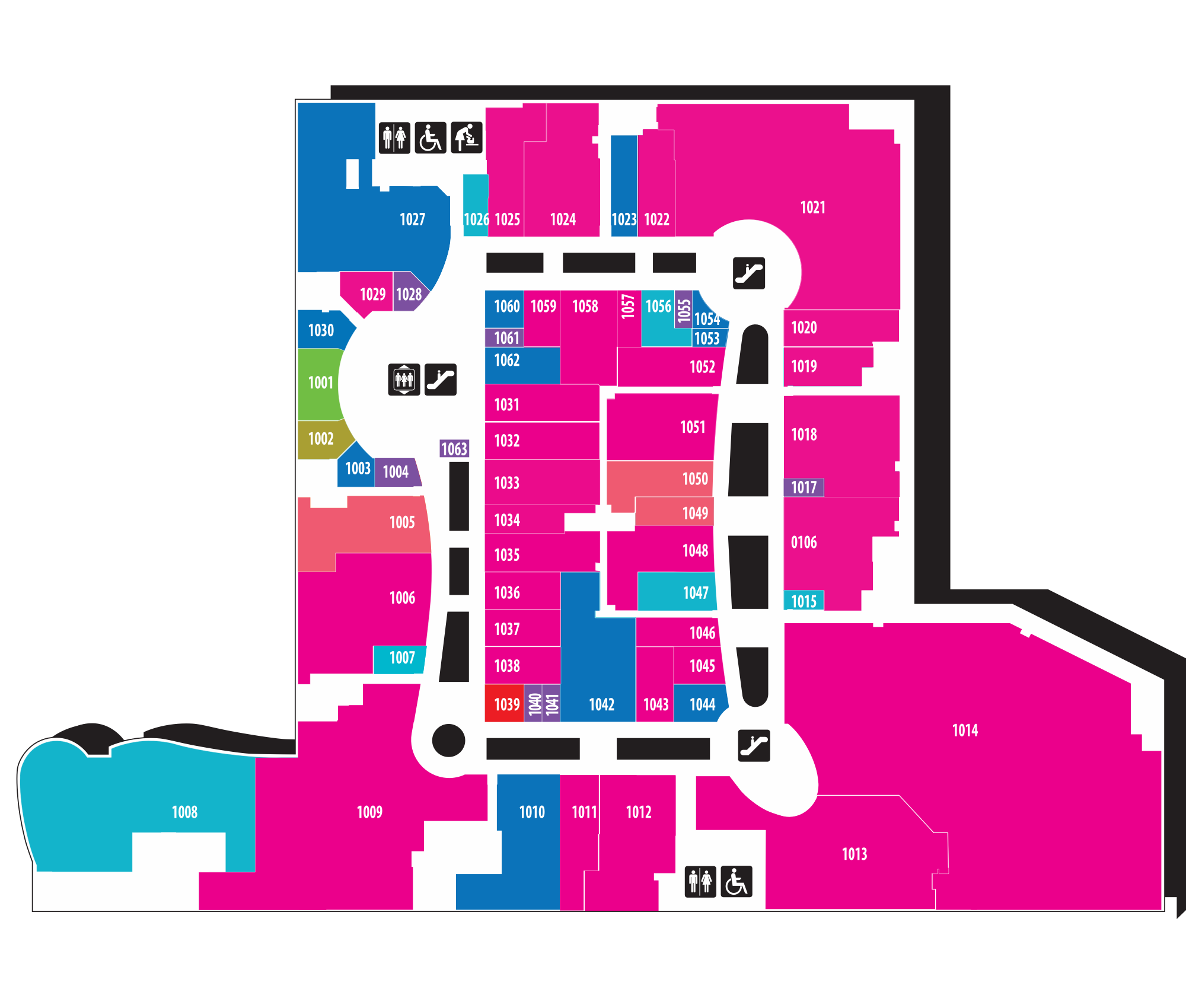
And it shows me how the Mall is structured, and all the corresponding shops.
IF i make a Random generator for stores from 1001 to 1063( the stores in the map)
and then I make a Random generator for Sales of stores from 1001 to 1063,
How to show how much sales each store has, on the map?
-Thanks
- « Previous Replies
-
- 1
- 2
- Next Replies »
tomovangel
- Mark as New
- Bookmark
- Subscribe
- Mute
- Subscribe to RSS Feed
- Permalink
- Report Inappropriate Content
Hello Stefan,
I have been wondering, Is it possible to choose which labels are showing, when the User hoovers up over the points.
Now it shows
Store:
Latitude:
Longitude:
Net Amount:
Can I make it to show only
Store:
Net Amount:
?
- Thanks

 swuehl
- Mark as New
- Bookmark
- Subscribe
- Mute
- Subscribe to RSS Feed
- Permalink
- Report Inappropriate Content
You can disable 'pop-up labels' on presentation tab, create a 4th expression (in advanced mode) like
='Store: ' &StoreID & chr(13) & 'Net Amount: '&Sum(Revenue)
and enable 'Text as pop-up' option for that expression only on expression tab
tomovangel
- Mark as New
- Bookmark
- Subscribe
- Mute
- Subscribe to RSS Feed
- Permalink
- Report Inappropriate Content
Thanks for the help with everything
I wish you a great week 
 Colin-Albert
- Mark as New
- Bookmark
- Subscribe
- Mute
- Subscribe to RSS Feed
- Permalink
- Report Inappropriate Content
Anther option is to use a custom SVG map with the SVG Map extension object.

- « Previous Replies
-
- 1
- 2
- Next Replies »