Unlock a world of possibilities! Login now and discover the exclusive benefits awaiting you.

- Qlik Community
- :
- All Forums
- :
- QlikView
- :
- Straigh/Pivot Table issue
- Subscribe to RSS Feed
- Mark Topic as New
- Mark Topic as Read
- Float this Topic for Current User
- Bookmark
- Subscribe
- Mute
- Printer Friendly Page

- Mark as New
- Bookmark
- Subscribe
- Mute
- Subscribe to RSS Feed
- Permalink
- Report Inappropriate Content
Straigh/Pivot Table issue
Hi there,
I am a little bit confused and I need your advice asap.
Could you please see the attached qvw and help me reach the correct results?
I don't want to see doublications to the first column and I want to see the correct numbers (see text object). I have no idea what pivot does to the final results is it the Total Mode or something else?
Please check out the attachment and let me know if you need further info.
Regards,
Helen
Accepted Solutions

 jerem1234
- Mark as New
- Bookmark
- Subscribe
- Mute
- Subscribe to RSS Feed
- Permalink
- Report Inappropriate Content
It's because in your first table, you have a bunch of hidden dimensions (which affects the values you will get). I reduced it to find that Units FC1 14 changes the values once i removed it from the first table. Therefore for the second, I simply used the aggr function for the 2 expressions, aggregating them by [Profit center text] and [Units FC1 14]. I attached the qvw. The expressions were:
sum(aggr(sum([Sales FC1 14])-sum([Sales BU14]), [Profit center text], [Units FC1 14]))
sum(aggr(sum([Sales FC1 14]/[Units FC1 14]-[Sales BU14]/[Units BU14])*[Units FC1 14], [Profit center text], [Units FC1 14]))
Now you should double check the numbers to make sure that they are indeed the correct values that you want.
Hope this helps!
- Mark as New
- Bookmark
- Subscribe
- Mute
- Subscribe to RSS Feed
- Permalink
- Report Inappropriate Content
Hello,
Basically these 2 are mathematically different.
BR
Serhan
- Mark as New
- Bookmark
- Subscribe
- Mute
- Subscribe to RSS Feed
- Permalink
- Report Inappropriate Content
Hi Eleni,
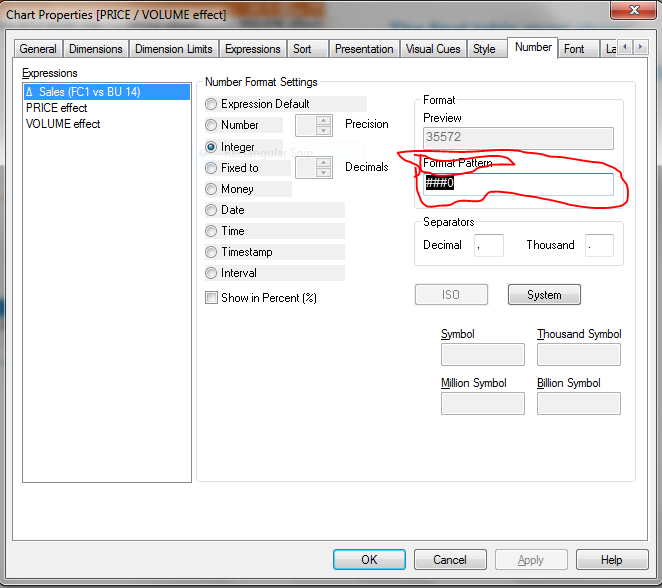
you just need go inside properties then choose number tab then in format pattern and change into this - ###0
see the below image
- Mark as New
- Bookmark
- Subscribe
- Mute
- Subscribe to RSS Feed
- Permalink
- Report Inappropriate Content
Hi guys,
Thank you both for your answers but the problem is not the format.
Is that in the Straight table the dimension is doublicated....I want to only one row...........
- Mark as New
- Bookmark
- Subscribe
- Mute
- Subscribe to RSS Feed
- Permalink
- Report Inappropriate Content
Anyboby???
- Mark as New
- Bookmark
- Subscribe
- Mute
- Subscribe to RSS Feed
- Permalink
- Report Inappropriate Content
it will work on pivot table
- Mark as New
- Bookmark
- Subscribe
- Mute
- Subscribe to RSS Feed
- Permalink
- Report Inappropriate Content
Unfortunately no,
because as you can see in the QV1.qvw when I am using Pivot table the results for the second and third expression are wrong when the second dimension is collapsed....
Any ideas?
jerem1234
- Mark as New
- Bookmark
- Subscribe
- Mute
- Subscribe to RSS Feed
- Permalink
- Report Inappropriate Content
It's because in your first table, you have a bunch of hidden dimensions (which affects the values you will get). I reduced it to find that Units FC1 14 changes the values once i removed it from the first table. Therefore for the second, I simply used the aggr function for the 2 expressions, aggregating them by [Profit center text] and [Units FC1 14]. I attached the qvw. The expressions were:
sum(aggr(sum([Sales FC1 14])-sum([Sales BU14]), [Profit center text], [Units FC1 14]))
sum(aggr(sum([Sales FC1 14]/[Units FC1 14]-[Sales BU14]/[Units BU14])*[Units FC1 14], [Profit center text], [Units FC1 14]))
Now you should double check the numbers to make sure that they are indeed the correct values that you want.
Hope this helps!
- Mark as New
- Bookmark
- Subscribe
- Mute
- Subscribe to RSS Feed
- Permalink
- Report Inappropriate Content
That works!
Thanks a lot Jeremiah!