Unlock a world of possibilities! Login now and discover the exclusive benefits awaiting you.

- Qlik Community
- :
- All Forums
- :
- QlikView
- :
- Straight Table - hide rows with null values
- Subscribe to RSS Feed
- Mark Topic as New
- Mark Topic as Read
- Float this Topic for Current User
- Bookmark
- Subscribe
- Mute
- Printer Friendly Page

 exfosteve
- Mark as New
- Bookmark
- Subscribe
- Mute
- Subscribe to RSS Feed
- Permalink
- Report Inappropriate Content
Straight Table - hide rows with null values
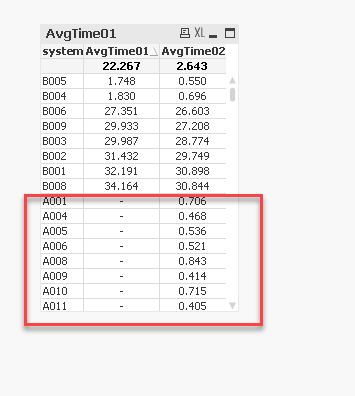
I have a straight table set up, and I'm trying hide the rows with a null value in the AvgTime01 dimension. I can't figure out how to do this. I've attached the QVW/QVD that I'm using.
Any help on this would be great.
thanks,
Accepted Solutions

 sunny_talwar
- Mark as New
- Bookmark
- Subscribe
- Mute
- Subscribe to RSS Feed
- Permalink
- Report Inappropriate Content
Another way to do this would be to use search string in the set analysis
Avg({<system = {"=Len(Trim(avg(Timer01))) > 0"}>} Timer02)
sunny_talwar
- Mark as New
- Bookmark
- Subscribe
- Mute
- Subscribe to RSS Feed
- Permalink
- Report Inappropriate Content
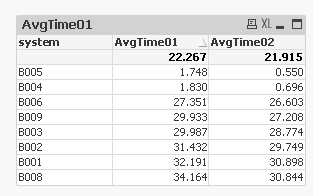
Make your second expression to be 0 when the first one is null... also make sure to select the total mode of Average to see the correct sub-total
If(Len(Trim(avg(Timer01))) > 0, Avg(Timer02))
sunny_talwar
- Mark as New
- Bookmark
- Subscribe
- Mute
- Subscribe to RSS Feed
- Permalink
- Report Inappropriate Content
Another way to do this would be to use search string in the set analysis
Avg({<system = {"=Len(Trim(avg(Timer01))) > 0"}>} Timer02)
exfosteve
- Mark as New
- Bookmark
- Subscribe
- Mute
- Subscribe to RSS Feed
- Permalink
- Report Inappropriate Content
Works like a champ. Thanks
