Unlock a world of possibilities! Login now and discover the exclusive benefits awaiting you.

- Qlik Community
- :
- All Forums
- :
- QlikView
- :
- Straight table hide expressions
Options
- Subscribe to RSS Feed
- Mark Topic as New
- Mark Topic as Read
- Float this Topic for Current User
- Bookmark
- Subscribe
- Mute
- Printer Friendly Page
Turn on suggestions
Auto-suggest helps you quickly narrow down your search results by suggesting possible matches as you type.
Showing results for

 CVR
CVR
Creator
2019-05-09
01:01 PM
- Mark as New
- Bookmark
- Subscribe
- Mute
- Subscribe to RSS Feed
- Permalink
- Report Inappropriate Content
Straight table hide expressions
Hello Qlik Geeks,
I have a straight table one dimension and 6 expressions. How Can I make all expressions in a two column as A1 and A2 and remove all zero value rows?

like this
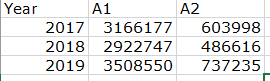
Note : the dimension is Year(fieldname)
1,180 Views
1 Solution
Accepted Solutions
 NW1965
Creator
2019-05-09
01:35 PM
- Mark as New
- Bookmark
- Subscribe
- Mute
- Subscribe to RSS Feed
- Permalink
- Report Inappropriate Content
With that much information I'm going to guess, so let's assume that your expressions are currently something simple like: Sum(A1); Sum(A2); Sum(B1); Sum(B2); Sum(C1); Sum(C2) If this, by some miracle, is indeed the case then make your two expressions like this: First Column = Sum(A1) + Sum(B1) + Sum(C1) Second Column = Sum(A2) + Sum(B2) + Sum(C2) Then, the suppress zeros and suppress missing should deal with the blank rows
1,170 Views
2 Replies
NW1965
Creator
2019-05-09
01:35 PM
- Mark as New
- Bookmark
- Subscribe
- Mute
- Subscribe to RSS Feed
- Permalink
- Report Inappropriate Content
With that much information I'm going to guess, so let's assume that your expressions are currently something simple like: Sum(A1); Sum(A2); Sum(B1); Sum(B2); Sum(C1); Sum(C2) If this, by some miracle, is indeed the case then make your two expressions like this: First Column = Sum(A1) + Sum(B1) + Sum(C1) Second Column = Sum(A2) + Sum(B2) + Sum(C2) Then, the suppress zeros and suppress missing should deal with the blank rows
1,171 Views
CVR
Creator
2019-05-09
01:56 PM
Author
- Mark as New
- Bookmark
- Subscribe
- Mute
- Subscribe to RSS Feed
- Permalink
- Report Inappropriate Content
Thanks for your help @NW1965
1,164 Views
