Unlock a world of possibilities! Login now and discover the exclusive benefits awaiting you.

- Qlik Community
- :
- All Forums
- :
- QlikView
- :
- Re: Stright table
- Subscribe to RSS Feed
- Mark Topic as New
- Mark Topic as Read
- Float this Topic for Current User
- Bookmark
- Subscribe
- Mute
- Printer Friendly Page

 adiarnon
- Mark as New
- Bookmark
- Subscribe
- Mute
- Subscribe to RSS Feed
- Permalink
- Report Inappropriate Content
Stright table
| fHeader 1 | Header 2 | Header 3 |
|---|---|---|
| project 1 | employee 1 | 50 |
| project 1 | employee 1 | 70 |
| project 1 | employee 2 | 5 |
| project 2 | employee 3 | 345 |
hi,
i have table like this-
i want that the border after each project will be thicker then the other borders
i cant use pivot table
can i do it?
adi

 vikasmahajan
- Mark as New
- Bookmark
- Subscribe
- Mute
- Subscribe to RSS Feed
- Permalink
- Report Inappropriate Content

Click on design grid , right click on straight table , Select Custom Format Cell
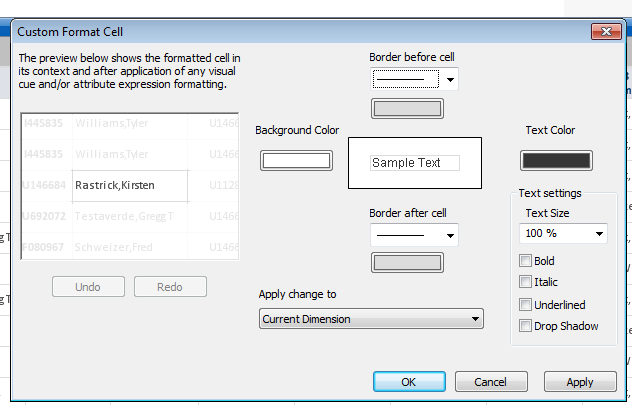
This will format your cell borders
Vikas
If the issue is solved please mark the answer with Accept as Solution & like it.
If you want to go quickly, go alone. If you want to go far, go together.
adiarnon
- Mark as New
- Bookmark
- Subscribe
- Mute
- Subscribe to RSS Feed
- Permalink
- Report Inappropriate Content
tnx,
i tried it
but its do it for each row in my table
and i want fo each project

 tresB
tresB
- Mark as New
- Bookmark
- Subscribe
- Mute
- Subscribe to RSS Feed
- Permalink
- Report Inappropriate Content
AFAIK, that's not possible using qv straight table.

- Mark as New
- Bookmark
- Subscribe
- Mute
- Subscribe to RSS Feed
- Permalink
- Report Inappropriate Content
If you use a Fully Expanded Pivot table that will make your change of Project easy to see.
adiarnon
- Mark as New
- Bookmark
- Subscribe
- Mute
- Subscribe to RSS Feed
- Permalink
- Report Inappropriate Content
yes, i know i can with a spivot table
but in the pivot table the null values is on the top and i naad them on the bottom
can i change that?
tresB
- Mark as New
- Bookmark
- Subscribe
- Mute
- Subscribe to RSS Feed
- Permalink
- Report Inappropriate Content
I guess, if you play with sort option, that can be handled. Could you post a sample qvw?