Unlock a world of possibilities! Login now and discover the exclusive benefits awaiting you.

- Qlik Community
- :
- All Forums
- :
- QlikView
- :
- Re: Subfield
- Subscribe to RSS Feed
- Mark Topic as New
- Mark Topic as Read
- Float this Topic for Current User
- Bookmark
- Subscribe
- Mute
- Printer Friendly Page

 everest226
- Mark as New
- Bookmark
- Subscribe
- Mute
- Subscribe to RSS Feed
- Permalink
- Report Inappropriate Content
Subfield
hi i am using subfield in chart but somehow top two user UK709065 and UK703562 are not showing basically it dosent have \ on that user
my expression of subfield is
=SubField([user],'\',2)
UK709065
UK703562
UTA\Ram
CAMPUS\Juliya
PHM\RAmtu
Accepted Solutions

 swuehl
- Mark as New
- Bookmark
- Subscribe
- Mute
- Subscribe to RSS Feed
- Permalink
- Report Inappropriate Content
swuehl
- Mark as New
- Bookmark
- Subscribe
- Mute
- Subscribe to RSS Feed
- Permalink
- Report Inappropriate Content
Maybe
=If(Index(user,'\'), SubField([user],'\',2), user)
everest226
- Mark as New
- Bookmark
- Subscribe
- Mute
- Subscribe to RSS Feed
- Permalink
- Report Inappropriate Content
Now i am getting
UK709065
UK703562
but not this
UTA\Ram
CAMPUS\Juliya
PHM\RAmtu

 sunny_talwar
- Mark as New
- Bookmark
- Subscribe
- Mute
- Subscribe to RSS Feed
- Permalink
- Report Inappropriate Content
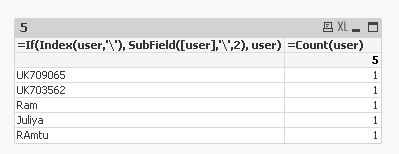
Stefan's expression seems to be working for me
swuehl
- Mark as New
- Bookmark
- Subscribe
- Mute
- Subscribe to RSS Feed
- Permalink
- Report Inappropriate Content
Seems to work for me:
| user | test |
|---|---|
| CAMPUS\Juliya | Juliya |
| UK703562 | UK703562 |
| UK709065 | UK709065 |
| UTA\Ram | Ram |
LOAD *,
If(Index(user,'\'), SubField([user],'\',2), user) as test;
LOAD * INLINE [
user
UK709065
UK703562
UTA\Ram
CAMPUS\Juliya
];

 surendraj
- Mark as New
- Bookmark
- Subscribe
- Mute
- Subscribe to RSS Feed
- Permalink
- Report Inappropriate Content
stefan's expression is working fine.
Here is the another one.
If(SubStringCount(data,'\')=1, SubField(data,'\',2), data)
everest226
- Mark as New
- Bookmark
- Subscribe
- Mute
- Subscribe to RSS Feed
- Permalink
- Report Inappropriate Content
Thanks
everest226
- Mark as New
- Bookmark
- Subscribe
- Mute
- Subscribe to RSS Feed
- Permalink
- Report Inappropriate Content
Thanks Sunny
 rwunderlich
- Mark as New
- Bookmark
- Subscribe
- Mute
- Subscribe to RSS Feed
- Permalink
- Report Inappropriate Content
Or
mid(user, Index(user,'\')+1)
-Rob
