Unlock a world of possibilities! Login now and discover the exclusive benefits awaiting you.

- Qlik Community
- :
- All Forums
- :
- QlikView
- :
- Re: Subtotal - IF Function - SUM - AR Aging
- Subscribe to RSS Feed
- Mark Topic as New
- Mark Topic as Read
- Float this Topic for Current User
- Bookmark
- Subscribe
- Mute
- Printer Friendly Page

- Mark as New
- Bookmark
- Subscribe
- Mute
- Subscribe to RSS Feed
- Permalink
- Report Inappropriate Content
Subtotal - IF Function - SUM - AR Aging
Hi I have problem on expression syntax. New on using QBAR-QlikView.
if((Age >= 0) and (Age<= 30),OpenBalance*1,0)
 Can somebody help me with the code expression.
I think I miss SUM but i dont know the code.
Thanks in advance
- « Previous Replies
- Next Replies »

- Mark as New
- Bookmark
- Subscribe
- Mute
- Subscribe to RSS Feed
- Permalink
- Report Inappropriate Content
May be this?
if((Age >= 0 and Age<= 30,OpenBalance*1,0)
or
Sum(Aggr(if((Age >= 0 and Age<= 30,OpenBalance*1,0), Type))
- Mark as New
- Bookmark
- Subscribe
- Mute
- Subscribe to RSS Feed
- Permalink
- Report Inappropriate Content
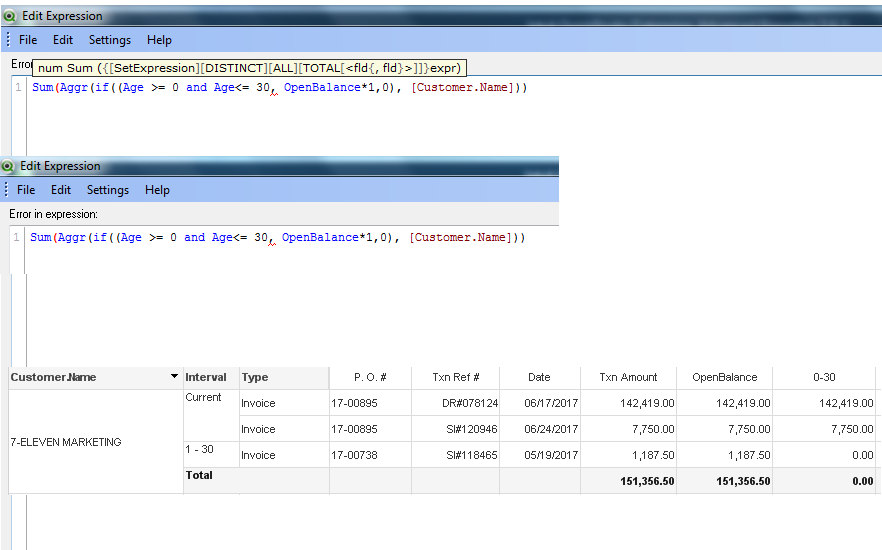
Hi Anil Thank you for your reply.
I dont know what's wrong on this sum. here is the snap

 Kushal_Chawda
- Mark as New
- Bookmark
- Subscribe
- Mute
- Subscribe to RSS Feed
- Permalink
- Report Inappropriate Content
You need to include this condition inside aggregation function so that to aggregate your data with respect to your dimension
=sum(if((Age >= 0) and (Age<= 30),OpenBalance*1,0))
Kushal_Chawda
- Mark as New
- Bookmark
- Subscribe
- Mute
- Subscribe to RSS Feed
- Permalink
- Report Inappropriate Content
It's always better to write set analysis
=sum({<Age={">=0<=30"}>}OpenBalance*1)
- Mark as New
- Bookmark
- Subscribe
- Mute
- Subscribe to RSS Feed
- Permalink
- Report Inappropriate Content

- Mark as New
- Bookmark
- Subscribe
- Mute
- Subscribe to RSS Feed
- Permalink
- Report Inappropriate Content
Try this?
Sum(Aggr(If(Age >= 0 and Age <= 30, OpenBalance * 1, 0), [Customer.Name]))
- Mark as New
- Bookmark
- Subscribe
- Mute
- Subscribe to RSS Feed
- Permalink
- Report Inappropriate Content

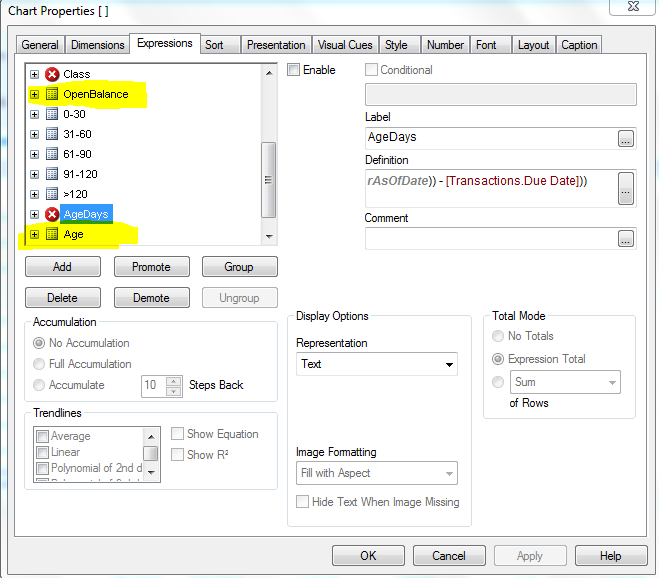
Hi Kushal Bad field names:
Age & OpenBalance is a Expression Column

 mangalsk
- Mark as New
- Bookmark
- Subscribe
- Mute
- Subscribe to RSS Feed
- Permalink
- Report Inappropriate Content
try this
sum(aggr(sum({<Age={">=0<=30"}>}OpenBalance)*1+sum({<Age-={">=0<=30"}>}OpenBalance)*0,[Customer.Name]))
- Mark as New
- Bookmark
- Subscribe
- Mute
- Subscribe to RSS Feed
- Permalink
- Report Inappropriate Content
Hi Sir Anil, The expression is OK. but the result comes "0" .
.

- « Previous Replies
- Next Replies »