Unlock a world of possibilities! Login now and discover the exclusive benefits awaiting you.

- Qlik Community
- :
- All Forums
- :
- QlikView
- :
- Re: Subtotal and Grandtotal in pivot table
- Subscribe to RSS Feed
- Mark Topic as New
- Mark Topic as Read
- Float this Topic for Current User
- Bookmark
- Subscribe
- Mute
- Printer Friendly Page

- Mark as New
- Bookmark
- Subscribe
- Mute
- Subscribe to RSS Feed
- Permalink
- Report Inappropriate Content
Subtotal and Grandtotal in pivot table
Hello everyone,
I have a pivot table with subtotal of the number of product by customer and I want to calculate the grand total of one product but for all custommer like theses screenshots:
I have this in QlikView:
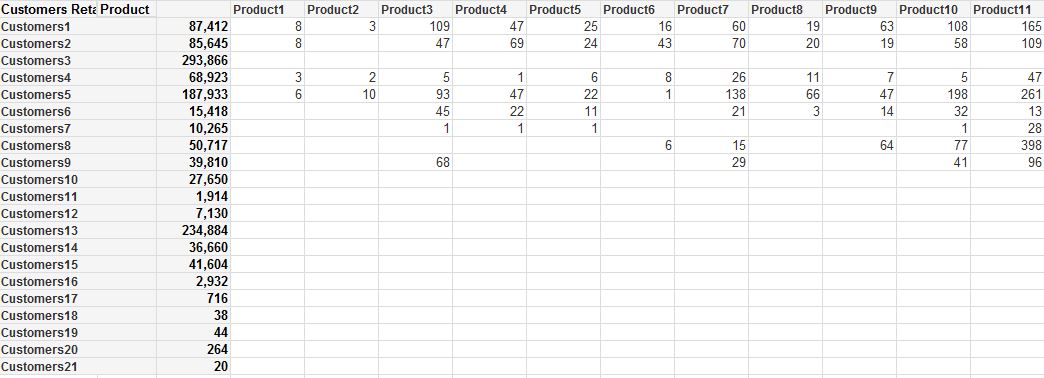
and I want this ( in red )
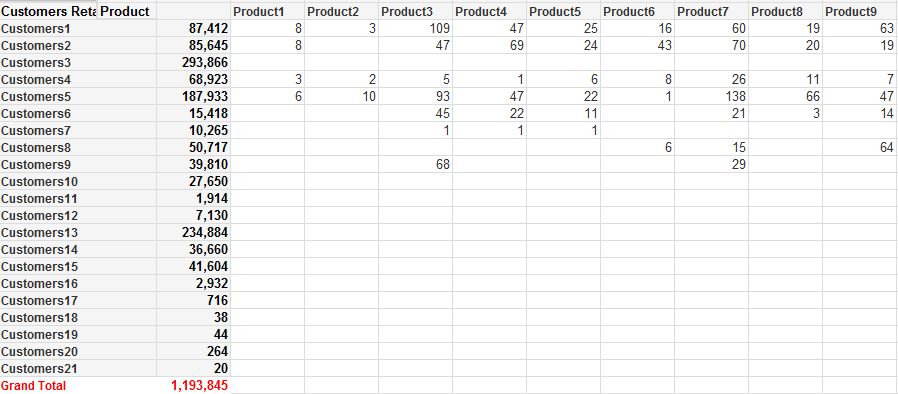
How can I do this in the pivot table?
Thank you
- Tags:
- new_to_qlikview
Accepted Solutions
- Mark as New
- Bookmark
- Subscribe
- Mute
- Subscribe to RSS Feed
- Permalink
- Report Inappropriate Content
I think that you're short one checkbox. Try going to the Presentation tab of the chart property and checking the "Show Partial Sums" box for your first (Customers) dimension.

 MK_QSL
- Mark as New
- Bookmark
- Subscribe
- Mute
- Subscribe to RSS Feed
- Permalink
- Report Inappropriate Content
Go to presentation tab.
select dimension and tick Show Partial Sums
- Mark as New
- Bookmark
- Subscribe
- Mute
- Subscribe to RSS Feed
- Permalink
- Report Inappropriate Content
I think that you're short one checkbox. Try going to the Presentation tab of the chart property and checking the "Show Partial Sums" box for your first (Customers) dimension.
 rubenmarin
- Mark as New
- Bookmark
- Subscribe
- Mute
- Subscribe to RSS Feed
- Permalink
- Report Inappropriate Content
Seems you checked partial sums only for Product, check it also by customer.
BTW totals row can be set Up (Left) or Down (Right), so you can't show it Left and Down.