Unlock a world of possibilities! Login now and discover the exclusive benefits awaiting you.

- Qlik Community
- :
- All Forums
- :
- QlikView
- :
- Subtotal on expression
- Subscribe to RSS Feed
- Mark Topic as New
- Mark Topic as Read
- Float this Topic for Current User
- Bookmark
- Subscribe
- Mute
- Printer Friendly Page

- Mark as New
- Bookmark
- Subscribe
- Mute
- Subscribe to RSS Feed
- Permalink
- Report Inappropriate Content
Subtotal on expression
Hi everyone!
I have a question, I don't know if it's possible to enable subtotals on expressions. I'm asking this because on the graphic properties sheet "Presentation" the option "show subtotal" remains disabled when is selected a expression.
Follow attached my example, I need this because I have a big pivot table full of set analysis expressions and each line is a different value. Then at the end of the column I'd like to show a subtotal.
Thanks!

 maxgro
- Mark as New
- Bookmark
- Subscribe
- Mute
- Subscribe to RSS Feed
- Permalink
- Report Inappropriate Content
Example?
- Mark as New
- Bookmark
- Subscribe
- Mute
- Subscribe to RSS Feed
- Permalink
- Report Inappropriate Content
Sorry, now the post has the attachment : )
- Mark as New
- Bookmark
- Subscribe
- Mute
- Subscribe to RSS Feed
- Permalink
- Report Inappropriate Content
This (attached)?
- Mark as New
- Bookmark
- Subscribe
- Mute
- Subscribe to RSS Feed
- Permalink
- Report Inappropriate Content
Or better this
- Mark as New
- Bookmark
- Subscribe
- Mute
- Subscribe to RSS Feed
- Permalink
- Report Inappropriate Content
Hi Michael,
yes...and...no : )
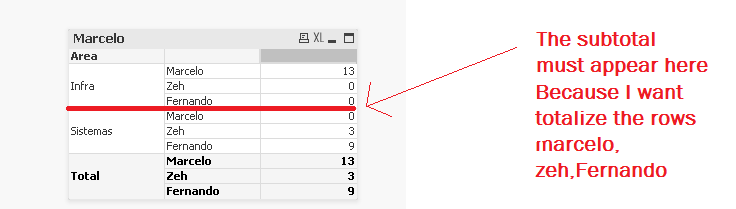
I've opened your .qvw and I saw that you made 4 examples of subtotal but all examples you are using a dimension to totalize. I'd like to know if on my example you could totalize a expression that's used as a row:
- Mark as New
- Bookmark
- Subscribe
- Mute
- Subscribe to RSS Feed
- Permalink
- Report Inappropriate Content
Eduardo,
To sum expression you have to create additional expression which is the sum of the other expressions. But in this case it is a challenge to present it the way you want. And the unnecessary challenge at that.
I believe that the bottom left chart in my example is what you need. Yes, "Nome" is used here as dimensions, and it is for a reason. I don't see any advantage using it as a set of expressions which are all the same just with the different "Nome" condition. Maybe a reason is that you want only specific Names to be included. In this case, you can do it in this single expression:
sum({<Nome={'Marcelo','Zeh','Fernando'}>} QtdSapatos)
It gives you an additional advantage - you can keep the list of names in a variable, so can update it without changing the expression itself.
Regards,
Michael
PS: And, if it is necessary to show 0's, you can create 0 amounts for all Nome/Area combination.
- Mark as New
- Bookmark
- Subscribe
- Mute
- Subscribe to RSS Feed
- Permalink
- Report Inappropriate Content
hi
please find attachment i think i have done it according requirement
thanks

 jonathandienst
- Mark as New
- Bookmark
- Subscribe
- Mute
- Subscribe to RSS Feed
- Permalink
- Report Inappropriate Content
Eduardo
You are trying to incorporate data logic in your expressions. It is better to design a data model that reflects the structure of what you need to report. This problem becomes much simpler if you include a a group or flag field in your model that indicates the special case made up of those three names.
Then it becomes a matter including this field in the dimensions or in a set expression.
HTH
Jonathan