Unlock a world of possibilities! Login now and discover the exclusive benefits awaiting you.

- Qlik Community
- :
- All Forums
- :
- QlikView
- :
- Sum Distinct
- Subscribe to RSS Feed
- Mark Topic as New
- Mark Topic as Read
- Float this Topic for Current User
- Bookmark
- Subscribe
- Mute
- Printer Friendly Page

 stvn_003
- Mark as New
- Bookmark
- Subscribe
- Mute
- Subscribe to RSS Feed
- Permalink
- Report Inappropriate Content
Sum Distinct
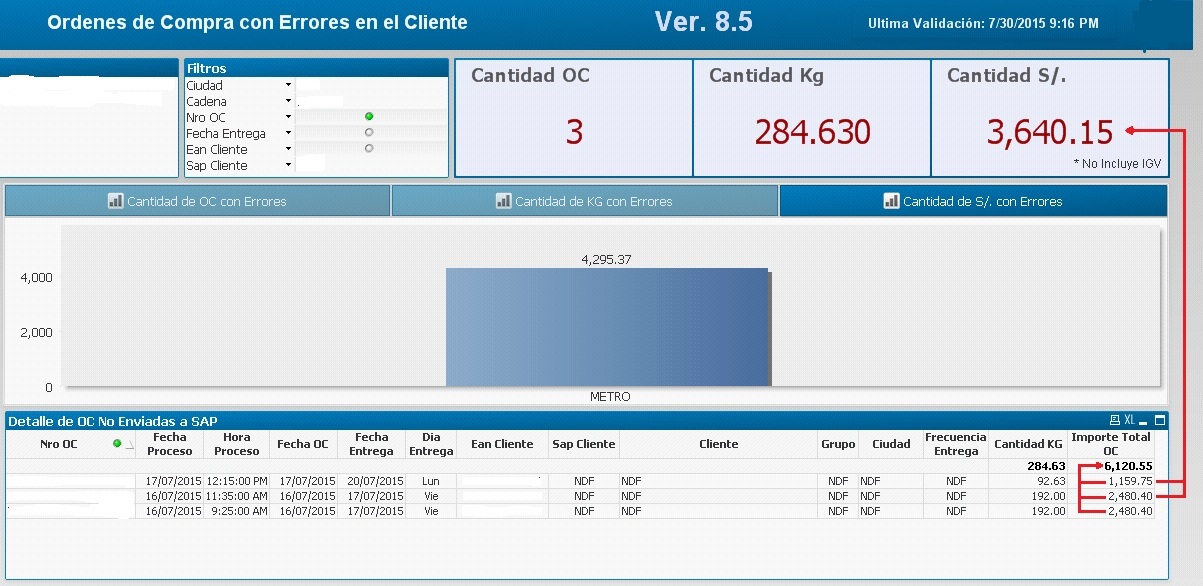
I want to show a total on a label, but when I add the amount ignored repeated amounts, which relamente I want is to add the amounts of each sales order once, but instead only sum the amount of each sales order which they are different.
This is the formula I use:
SUM( {$<occ_cesvl = {'01'}, occ_sclnok = {'N'}>} DISTINCT occ_imp_bru)
As exist two equal amounts, only considers one.
Accepted Solutions

 sunny_talwar
- Mark as New
- Bookmark
- Subscribe
- Mute
- Subscribe to RSS Feed
- Permalink
- Report Inappropriate Content
Try this instead:
=Sum(Aggr(Sum({$<occ_cesvl = {'01'}, occ_sclnok = {'N'}>} occ_imp_bru), SalesOrderField))
=Sum(Aggr(Avg({$<occ_cesvl = {'01'}, occ_sclnok = {'N'}>} occ_imp_bru), SalesOrderField))
sunny_talwar
- Mark as New
- Bookmark
- Subscribe
- Mute
- Subscribe to RSS Feed
- Permalink
- Report Inappropriate Content
Try this instead:
=Sum(Aggr(Sum({$<occ_cesvl = {'01'}, occ_sclnok = {'N'}>} occ_imp_bru), SalesOrderField))
=Sum(Aggr(Avg({$<occ_cesvl = {'01'}, occ_sclnok = {'N'}>} occ_imp_bru), SalesOrderField))
sunny_talwar
- Mark as New
- Bookmark
- Subscribe
- Mute
- Subscribe to RSS Feed
- Permalink
- Report Inappropriate Content
In your case if SalesOrderField is called [Nro OC], then this:
=Sum(Aggr(Sum({$<occ_cesvl = {'01'}, occ_sclnok = {'N'}>} occ_imp_bru), [Nro OC]))
=Sum(Aggr(Avg({$<occ_cesvl = {'01'}, occ_sclnok = {'N'}>} occ_imp_bru), [Nro OC]))

 antoniotiman
- Mark as New
- Bookmark
- Subscribe
- Mute
- Subscribe to RSS Feed
- Permalink
- Report Inappropriate Content
Try to remove DISTINCT

 jagan
jagan
- Mark as New
- Bookmark
- Subscribe
- Mute
- Subscribe to RSS Feed
- Permalink
- Report Inappropriate Content
HI,
Try this
=Sum({<occ_cesvl = {'01'}, occ_sclnok = {'N'}>} Aggr(Sum({<occ_cesvl = {'01'}, occ_sclnok = {'N'}>} DISTINCT occ_imp_bru), [Nro OC]))
Regards,
Jagan.
stvn_003
- Mark as New
- Bookmark
- Subscribe
- Mute
- Subscribe to RSS Feed
- Permalink
- Report Inappropriate Content
Thanks Sunny T, great!
