Unlock a world of possibilities! Login now and discover the exclusive benefits awaiting you.

- Qlik Community
- :
- All Forums
- :
- QlikView
- :
- Re: Sum IF, but from previous date with data
- Subscribe to RSS Feed
- Mark Topic as New
- Mark Topic as Read
- Float this Topic for Current User
- Bookmark
- Subscribe
- Mute
- Printer Friendly Page

- Mark as New
- Bookmark
- Subscribe
- Mute
- Subscribe to RSS Feed
- Permalink
- Report Inappropriate Content
Sum IF, but from previous date with data
Hi,
I need to sum like below but for the previous applicable date, any ideas?
=SUM(IF(Type='XXXX',Amount))
- Mark as New
- Bookmark
- Subscribe
- Mute
- Subscribe to RSS Feed
- Permalink
- Report Inappropriate Content
Getting a Script line error when pasting the vPreviousDate into my script
- Mark as New
- Bookmark
- Subscribe
- Mute
- Subscribe to RSS Feed
- Permalink
- Report Inappropriate Content
Hey Olle:
I am gonna attend a meeting. My friend SunIndia will try to help you on this if you have still not got the right answer.
Sorry.

 sunny_talwar
- Mark as New
- Bookmark
- Subscribe
- Mute
- Subscribe to RSS Feed
- Permalink
- Report Inappropriate Content
Pasting it in the script? Just add to the variables in the front end using the variable overview
Best,
S

 mukesh24
- Mark as New
- Bookmark
- Subscribe
- Mute
- Subscribe to RSS Feed
- Permalink
- Report Inappropriate Content
simply create additional day variable same as month...
- Mark as New
- Bookmark
- Subscribe
- Mute
- Subscribe to RSS Feed
- Permalink
- Report Inappropriate Content
Hi,
For some reason I cannot get the variable to work properly when adding it into the Variable Overview. Same if I SET it in the script. However the if-function works properly.
So now I've got the below two working formulas, how do I put them together? My set analysis skills are poor, I never seem to learn the syntaxes 
TODAYS
=SUM(IF(TYPE='XXX',AMOUNT))
BUT NEED TO USE YESTERDAYS DATE
IF(WeekDay(Max(Date)) = 'Mon', Date(Max(Date) - 3), Date(Max(Date) -1))
sunny_talwar
- Mark as New
- Bookmark
- Subscribe
- Mute
- Subscribe to RSS Feed
- Permalink
- Report Inappropriate Content
Please find the attachment for further clarification
vPreviousDateTypeXYZ =If(WeekDay(Max({<Type = {'XYZ'}>}Date)) = 'Mon', Date(Max({<Type = {'XYZ'}>}Date) - 3), Date(Max({<Type = {'XYZ'}>}Date) -1))
vPreviousDateTypZZZ =If(WeekDay(Max({<Type = {'ZZZ'}>}Date)) = 'Mon', Date(Max({<Type = {'ZZZ'}>}Date) - 3), Date(Max({<Type = {'ZZZ'}>}Date) -1))
Text Box Expression: =Sum({<Type={'XYZ'}, Date={'$(vPreviousDateTypeXYZ)'}>} Amount)
=Sum({<Type={'XYZ'}, Date={'$(vPreviousDateTypeZZZ)'}>} Amount)
Here Type XYZ has a max date of 02/16/2015 (which was a Monday) so it picks the value from Friday and type ZZZ has a max date of 02/17/2015 (which was a Tuesday) so it picks the value from Monday.
HTH
Best,
S
 daveamz
- Mark as New
- Bookmark
- Subscribe
- Mute
- Subscribe to RSS Feed
- Permalink
- Report Inappropriate Content
Hi Olle,
Try this one, it will sums up the amount for the max possible date before today:
Sum({<Type = {'XXX'}, Date = {"$(=Max({<Date={`<$(=Today())`}>}Date))"}>}AMOUNT)
David
- Mark as New
- Bookmark
- Subscribe
- Mute
- Subscribe to RSS Feed
- Permalink
- Report Inappropriate Content
Thanks for your answer,
still cannot apply to mp app.
Im clearly missing out on something,
here comes an example file, any clue why im getting zero values?
//O
sunny_talwar
- Mark as New
- Bookmark
- Subscribe
- Mute
- Subscribe to RSS Feed
- Permalink
- Report Inappropriate Content
Are you looking to put that number across all possible dates??
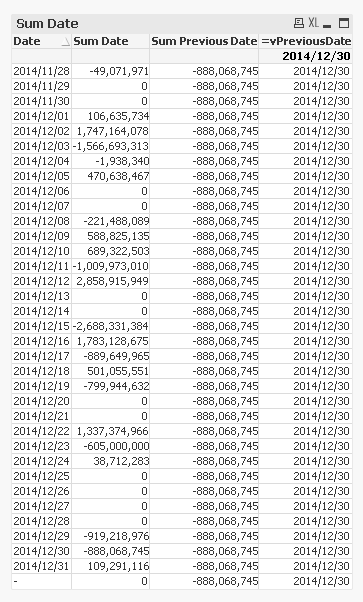
If this is what you are looking to do, then use this expression:
=Sum({<Pmt_Subtype={'Credit line connected payment'}, Date={'$(vPreviousDate)'}>} TOTAL Pmt_amount)
Best,
S
- Mark as New
- Bookmark
- Subscribe
- Mute
- Subscribe to RSS Feed
- Permalink
- Report Inappropriate Content
Hi again,
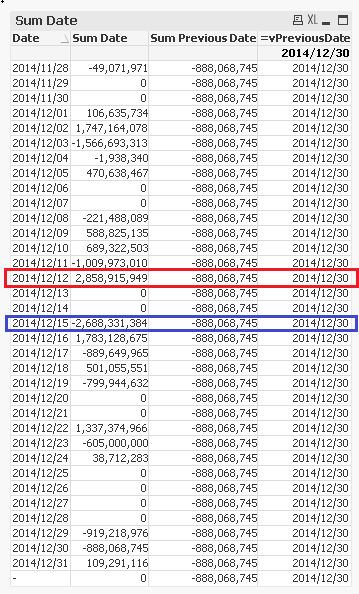
Im expecting vPreviousDate to show the previos date for each row,
For instance:
Red row
vPreviousDate should equal 2014/12/11
Sum PreviousDate should equal -1,009,973,010
Blue row
vPreviousDate should equal 2014/12/12 (since there's a weekend in between)
Sum PreviousDate should equal 2,858,915,949