Unlock a world of possibilities! Login now and discover the exclusive benefits awaiting you.

- Qlik Community
- :
- All Forums
- :
- QlikView
- :
- Sum(Total) pivot table issue
- Subscribe to RSS Feed
- Mark Topic as New
- Mark Topic as Read
- Float this Topic for Current User
- Bookmark
- Subscribe
- Mute
- Printer Friendly Page

- Mark as New
- Bookmark
- Subscribe
- Mute
- Subscribe to RSS Feed
- Permalink
- Report Inappropriate Content
Sum(Total) pivot table issue
Hi,
I am having a problem with a pivot table and a sum(total) function.
I need to calculate the participation of each salesmas's sales in each company in a pivot table. Something like this:
Dimension1 = Company
Dimension2 = Salesman
X = Sales
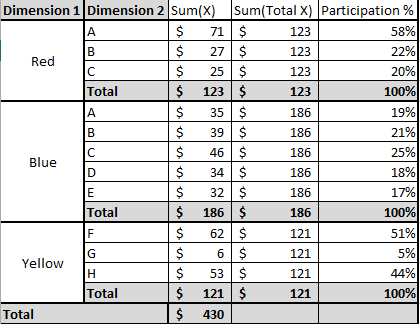
I have used Sum(Total) but it totalized the value by Dimension1 and I need to be totalize by Dimension2 to get the participation.
Thank you for your help and your time.
Accepted Solutions
- Mark as New
- Bookmark
- Subscribe
- Mute
- Subscribe to RSS Feed
- Permalink
- Report Inappropriate Content

 Nicole-Smith
- Mark as New
- Bookmark
- Subscribe
- Mute
- Subscribe to RSS Feed
- Permalink
- Report Inappropriate Content
If you're using a pivot table, use what is called "Partial Sums" on Dimension 2:
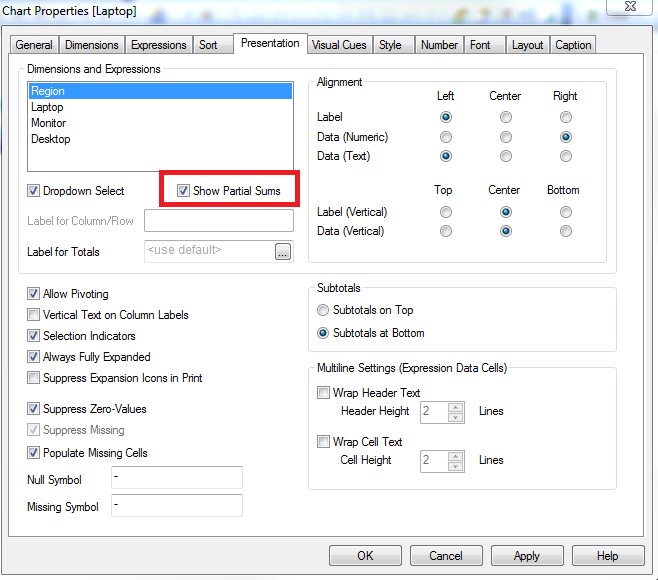
First, make sure you click on Dimension 2, then click the checkbox.
- Mark as New
- Bookmark
- Subscribe
- Mute
- Subscribe to RSS Feed
- Permalink
- Report Inappropriate Content
I think, I did not make myself clear.
I showed the "total row" on Dimension2 to compare it with the Sum(Total X) Column and to have a visual of my problem. What I need is to show that total value on the total row as a column.
Thanks for your time Nicole.
- Mark as New
- Bookmark
- Subscribe
- Mute
- Subscribe to RSS Feed
- Permalink
- Report Inappropriate Content
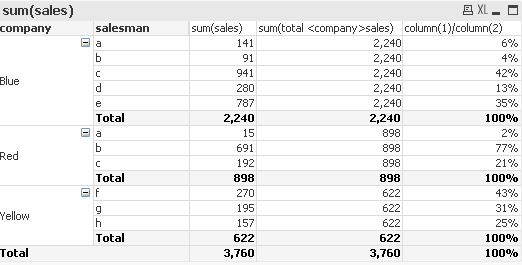
sum(total <company>sales)
- Mark as New
- Bookmark
- Subscribe
- Mute
- Subscribe to RSS Feed
- Permalink
- Report Inappropriate Content
Thank you very much Michael, that was exactly want I needed.
- Mark as New
- Bookmark
- Subscribe
- Mute
- Subscribe to RSS Feed
- Permalink
- Report Inappropriate Content
No problem. Pivot Tables can be very frustrating in QlikView. I typically try to avoid them in my final applications because they are not friendly in terms of "clickablility" when trying to tell a story to a business user.
Even in excel where I believe Pivot tables are pretty well established I find that an average business user struggles with them. Other Analyst grasp them but that is not the audience I am going after.