Unlock a world of possibilities! Login now and discover the exclusive benefits awaiting you.

- Qlik Community
- :
- All Forums
- :
- QlikView
- :
- Sum accumulated amount over the years using pivot ...
- Subscribe to RSS Feed
- Mark Topic as New
- Mark Topic as Read
- Float this Topic for Current User
- Bookmark
- Subscribe
- Mute
- Printer Friendly Page

- Mark as New
- Bookmark
- Subscribe
- Mute
- Subscribe to RSS Feed
- Permalink
- Report Inappropriate Content
Sum accumulated amount over the years using pivot table
Hi,
I have a pivot table with time dimension and trying to sum the accumulated amount for the selected year(s). The sum should take the selected max date and sum all the way back over the years taking into consideration the time dimension.
So let us say we have this data table:
| 2011 | 2012 | 2013 | 2014 | 2015 | |
|---|---|---|---|---|---|
| Cash | $100 | $100 | $100 | $100 | $100 |
| Restricted Cash | $50 | $50 | $50 | $50 | $50 |
So in case 2012, 2014 and 2015 are selected, the results in the pivot table should be:
| 2012 | 2014 | 2015 | |
|---|---|---|---|
| Cash | $200 | $400 | $500 |
| Restricted Cash | $100 | $200 | $250 |
I've tried these expressions but non have worked the way should:
sum({1<[Transaction Date] = {"<=$(=max([Transaction Date]))"}>}[CASH]) //(It ignores all the selected years and sums year-by-year)
sum(TOTAL{$<[Transaction Date] = {"<=$(=max([Transaction Date]))"}>}[CASH])
sum(TOTAL{1<[Transaction Date] = {"<=$(=max([Transaction Date]))"}>}[CASH]) (same amount for the max year )
sum(total{$<Year =, Month=,Quarter=,[Transaction Date] = {"<=$(=max([Transaction Date]))"}>}[CASH])
Any help will be appreciated. Thanks!

 ramoncova06
- Mark as New
- Bookmark
- Subscribe
- Mute
- Subscribe to RSS Feed
- Permalink
- Report Inappropriate Content
you can use rangesum and before for this
RangeSum(sum({<[Transaction Date]={"<=$(=max([Transaction Date]))"}>}Cash),
Before(sum({<[Transaction Date]={"<=$(=max([Transaction Date]))"}>}Cash),0,ColumnNo())
)

 sunny_talwar
- Mark as New
- Bookmark
- Subscribe
- Mute
- Subscribe to RSS Feed
- Permalink
- Report Inappropriate Content
Is this what you want?
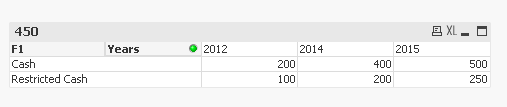
Dimension F1 and Years
Expression: =If(Sum(Data) > 0, RangeSum(Before(Sum({<Years = >}Data), 0, ColumnNo())))
PFA the application for reference.
Best,
Sunny