Unlock a world of possibilities! Login now and discover the exclusive benefits awaiting you.

- Qlik Community
- :
- All Forums
- :
- QlikView
- :
- Re: Sum, mode, count question
- Subscribe to RSS Feed
- Mark Topic as New
- Mark Topic as Read
- Float this Topic for Current User
- Bookmark
- Subscribe
- Mute
- Printer Friendly Page

- Mark as New
- Bookmark
- Subscribe
- Mute
- Subscribe to RSS Feed
- Permalink
- Report Inappropriate Content
Sum, mode, count question
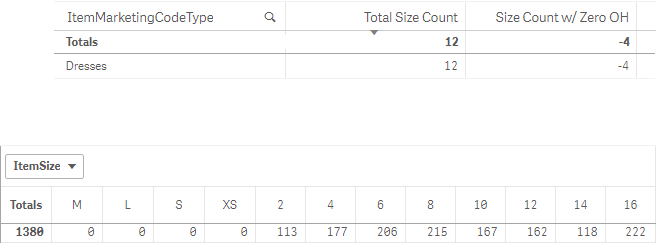
Trying to count the number of sizes; however, I do not want to include in the count the sizes that doesn't come in a particular size. The image below shows a dress that comes in numeric sizing; however, the count function is counting the zeros in sizes XS-L. Is there a syntax, similar to the mode function that'll allow me to count only the inventory within the sizes most common of a number or a letter? The count I need is 8, not 12. If size "6" showed zero, then my count would be 8 with 1 count with zero inventory.

 lorenzoconforti
- Mark as New
- Bookmark
- Subscribe
- Mute
- Subscribe to RSS Feed
- Permalink
- Report Inappropriate Content
Maybe something like this?
Count(if( IsNum(Size),Size))
Can you post your application?
- Mark as New
- Bookmark
- Subscribe
- Mute
- Subscribe to RSS Feed
- Permalink
- Report Inappropriate Content
Post my application? I use Qlik Sense...
Below is what I get using your "Count(if(IsNum(Size),Size))".

lorenzoconforti
- Mark as New
- Bookmark
- Subscribe
- Mute
- Subscribe to RSS Feed
- Permalink
- Report Inappropriate Content
I see; I got confused as this is actually the QlikView forum. I think you can still upload your qvf file.
Probably best to re-post on the QlikSense forum

 effinty2112
- Mark as New
- Bookmark
- Subscribe
- Mute
- Subscribe to RSS Feed
- Permalink
- Report Inappropriate Content
Hi Karley,
Try:
Count(if(IsNum(ItemSize),ItemSize))
Cheers
Andrew

 swuehl
- Mark as New
- Bookmark
- Subscribe
- Mute
- Subscribe to RSS Feed
- Permalink
- Report Inappropriate Content
Maybe something like
=Count( DISTINCT If( Isnum(ItemSize),ItemSize))
or using set analysis:
=Count({<ItemSize = {"=Isnum(ItemSize)"}>} DISTINCT ItemSize)
or
=Count({<ItemSize = {">0"}>} DISTINCT ItemSize)
If this doesn't work, would be good to see your expression that shows the 12 total count.

 uroboros
- Mark as New
- Bookmark
- Subscribe
- Mute
- Subscribe to RSS Feed
- Permalink
- Report Inappropriate Content
I agree with your contribution