Unlock a world of possibilities! Login now and discover the exclusive benefits awaiting you.

- Qlik Community
- :
- All Forums
- :
- QlikView
- :
- Re: Sum of Rows vs Expression Total.
- Subscribe to RSS Feed
- Mark Topic as New
- Mark Topic as Read
- Float this Topic for Current User
- Bookmark
- Subscribe
- Mute
- Printer Friendly Page

 apthansh
- Mark as New
- Bookmark
- Subscribe
- Mute
- Subscribe to RSS Feed
- Permalink
- Report Inappropriate Content
Sum of Rows vs Expression Total.
Hi ,
I have below expression in the bar chart.
My dimension is Called Type.
=(If(GetFieldSelections(_BTUnitOfMeasure)='SQF',
(Sum([RSF])),
(Sum([RSF]))) * SUM(Value)
I am not getting the desired number,So tried with the straight table.Here I get different number with Expression total and sum of rows.
How can I get the same with both options.
Thank you,
Accepted Solutions

 sunny_talwar
- Mark as New
- Bookmark
- Subscribe
- Mute
- Subscribe to RSS Feed
- Permalink
- Report Inappropriate Content
sunny_talwar
- Mark as New
- Bookmark
- Subscribe
- Mute
- Subscribe to RSS Feed
- Permalink
- Report Inappropriate Content
What are you getting and what was expected? Do you have a sample or images to show?
sunny_talwar
- Mark as New
- Bookmark
- Subscribe
- Mute
- Subscribe to RSS Feed
- Permalink
- Report Inappropriate Content
May be try this
=If(GetFieldSelections(_BTUnitOfMeasure) = 'SQF', Sum([RSF]), Sum([RSF]) * Sum(Value))
apthansh
- Mark as New
- Bookmark
- Subscribe
- Mute
- Subscribe to RSS Feed
- Permalink
- Report Inappropriate Content
Hi Sunny...Thank you.
I have attached 2 files...QVW and excel.
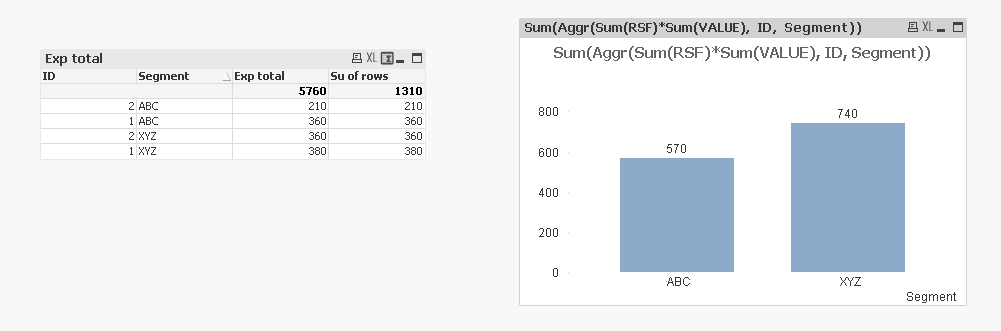
How can I get sum of rows number in bar char ?
apthansh
- Mark as New
- Bookmark
- Subscribe
- Mute
- Subscribe to RSS Feed
- Permalink
- Report Inappropriate Content
sunny_talwar
- Mark as New
- Bookmark
- Subscribe
- Mute
- Subscribe to RSS Feed
- Permalink
- Report Inappropriate Content
May be you want this
Sum(Aggr(Sum(RSF)*Sum(VALUE), ID, Segment))
 tripatirao
- Mark as New
- Bookmark
- Subscribe
- Mute
- Subscribe to RSS Feed
- Permalink
- Report Inappropriate Content
Hi,
Can you tell us which output your trying to get in the excel.
apthansh
- Mark as New
- Bookmark
- Subscribe
- Mute
- Subscribe to RSS Feed
- Permalink
- Report Inappropriate Content
Awesomeness....Thank you.
