Unlock a world of possibilities! Login now and discover the exclusive benefits awaiting you.

- Qlik Community
- :
- All Forums
- :
- QlikView
- :
- Table
- Subscribe to RSS Feed
- Mark Topic as New
- Mark Topic as Read
- Float this Topic for Current User
- Bookmark
- Subscribe
- Mute
- Printer Friendly Page

 smilingjohn
- Mark as New
- Bookmark
- Subscribe
- Mute
- Subscribe to RSS Feed
- Permalink
- Report Inappropriate Content
Table
Hi ALl,
I have two tables A and B ..
Always Table A has to be displayed and Table B should be hidden...
When i select any Department from Table A then Table B should appear below Table A ...
PLease find the attachment of the QVW file
Can someone please suggest me on this ?
Regards
John
Accepted Solutions

 antoniotiman
- Mark as New
- Bookmark
- Subscribe
- Mute
- Subscribe to RSS Feed
- Permalink
- Report Inappropriate Content

 florentina_doga
- Mark as New
- Bookmark
- Subscribe
- Mute
- Subscribe to RSS Feed
- Permalink
- Report Inappropriate Content
pls see attach.
select one or more department.
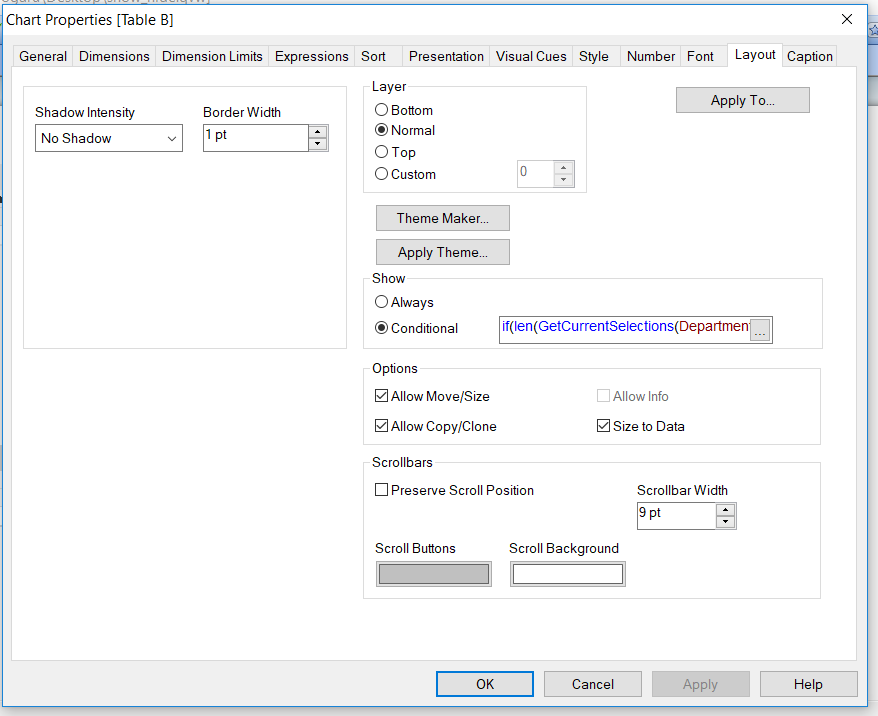
in table 2, in the layout we set the display condition
antoniotiman
- Mark as New
- Bookmark
- Subscribe
- Mute
- Subscribe to RSS Feed
- Permalink
- Report Inappropriate Content
Or in Conditional
GetSelectedCount(Department) > 0
smilingjohn
- Mark as New
- Bookmark
- Subscribe
- Mute
- Subscribe to RSS Feed
- Permalink
- Report Inappropriate Content
Hi Florentina
Thanks for the reply ......By default we have set triggers on activating the sheet therefore the Table A and B are appearing ...I applied your logic and i have to clear the selection then the Tabe B is Hiding ..and when i select Department from Table A then Table B is Apeearing this is working fine...
But Table B should be hidden even there are selection being made on the lisboxes ...and it should apeear only when i select Table A
 techvarun
- Mark as New
- Bookmark
- Subscribe
- Mute
- Subscribe to RSS Feed
- Permalink
- Report Inappropriate Content
Check the attached
