Unlock a world of possibilities! Login now and discover the exclusive benefits awaiting you.

- Qlik Community
- :
- All Forums
- :
- QlikView
- :
- Text Object Expression
- Subscribe to RSS Feed
- Mark Topic as New
- Mark Topic as Read
- Float this Topic for Current User
- Bookmark
- Subscribe
- Mute
- Printer Friendly Page

 shamitshah
- Mark as New
- Bookmark
- Subscribe
- Mute
- Subscribe to RSS Feed
- Permalink
- Report Inappropriate Content
Text Object Expression
Hi,
I tried the following expression in a text object to highlight the size:
Small <=100
Medium between 100 - 200
Large greater than 200
Expression: =if(max([Size)<=100,'Small',if(max(Size)='>100<=200','Medium','Large'))
The above does not seem to work correctly. Any idea on what should be the correct expression?
Thanks
Accepted Solutions

 Kushal_Chawda
- Mark as New
- Bookmark
- Subscribe
- Mute
- Subscribe to RSS Feed
- Permalink
- Report Inappropriate Content
=If(Max(Size) <= 100,'Small',If(Max(Size) > 200,'Large','Medium'))

 devarasu07
- Mark as New
- Bookmark
- Subscribe
- Mute
- Subscribe to RSS Feed
- Permalink
- Report Inappropriate Content
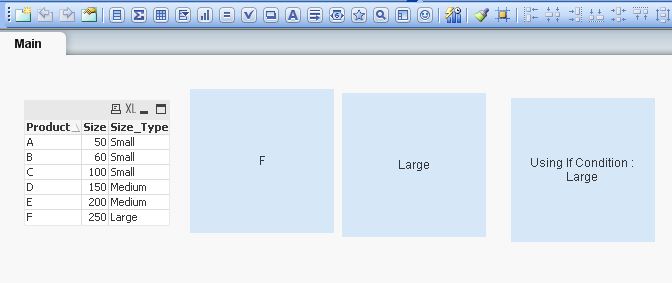
Hi,
Try like this,
=if((Size<=100),'Small',
if((Size>100) and (Size<=200),'Medium ',
'Large')
)
 antoniotiman
- Mark as New
- Bookmark
- Subscribe
- Mute
- Subscribe to RSS Feed
- Permalink
- Report Inappropriate Content
=If(Max(Size) <= 100,'Small',If(Max(Size) <= 200,'Medium','Large'))

 kamal_sanguri
- Mark as New
- Bookmark
- Subscribe
- Mute
- Subscribe to RSS Feed
- Permalink
- Report Inappropriate Content
You have provided conditions incorrectly,
Incorrect:
=if(max([Size)<=100,'Small',if(max(Size)='>100<=200','Medium','Large'))
the condition highlighted in Red is incorrect, it should be if(max(Size)>100 and max(Size)<=200)
Other conditions are OK.
Correct One:
=if(max(Size)<=100,'Small',if(max(Size)>100 and max(Size)<=200,'Medium','Large'))
kamal_sanguri
- Mark as New
- Bookmark
- Subscribe
- Mute
- Subscribe to RSS Feed
- Permalink
- Report Inappropriate Content
Since you have handled values less than 100 in first condition, the max(Size)>100 is actually not required in your second condition for Medium.
=if(max(Size)<=100,'Small',if(max(Size)>100 and max(Size)<=200,'Medium','Large'))
So, this is enough
=if(max(Size)<=100,'Small',if(max(Size)<=200,'Medium','Large'))
 Sergey_Shuklin
- Mark as New
- Bookmark
- Subscribe
- Mute
- Subscribe to RSS Feed
- Permalink
- Report Inappropriate Content
Hello, Shamit!
What is the size? Is it some field or a text object parameter like "Width"/"Height"?
Or you want to color text object depend on calculation? If so, then you must use color defining condition.
Kushal_Chawda
- Mark as New
- Bookmark
- Subscribe
- Mute
- Subscribe to RSS Feed
- Permalink
- Report Inappropriate Content
=If(Max(Size) <= 100,'Small',If(Max(Size) > 200,'Large','Medium'))
shamitshah
- Mark as New
- Bookmark
- Subscribe
- Mute
- Subscribe to RSS Feed
- Permalink
- Report Inappropriate Content
Thanks , that worked out.
Shamit
