Unlock a world of possibilities! Login now and discover the exclusive benefits awaiting you.

- Qlik Community
- :
- All Forums
- :
- QlikView
- :
- Re: Text Object: Write Vertically
- Subscribe to RSS Feed
- Mark Topic as New
- Mark Topic as Read
- Float this Topic for Current User
- Bookmark
- Subscribe
- Mute
- Printer Friendly Page

- Mark as New
- Bookmark
- Subscribe
- Mute
- Subscribe to RSS Feed
- Permalink
- Report Inappropriate Content
Text Object: Write Vertically
Hello!
I have the following text: "Total Range Sum" in a Text Object.
What I want is to show the text vertically.
Do you know how could I do that?
Thank you!!!
- Tags:
- new_to_qlikview
Accepted Solutions

 vgutkovsky
- Mark as New
- Bookmark
- Subscribe
- Mute
- Subscribe to RSS Feed
- Permalink
- Report Inappropriate Content
You mean like
T
o
t
a
l
or do you mean rotating the entire object CCW 90 degrees?
The first one can be achieved by simple entering a line break after each letter. The second one is not possible natively in QlikView, but you can take a screenshot, rotate it in MS Paint, and then apply the screenshot as the background of a text object.
Regards,
Vlad
vgutkovsky
- Mark as New
- Bookmark
- Subscribe
- Mute
- Subscribe to RSS Feed
- Permalink
- Report Inappropriate Content
You mean like
T
o
t
a
l
or do you mean rotating the entire object CCW 90 degrees?
The first one can be achieved by simple entering a line break after each letter. The second one is not possible natively in QlikView, but you can take a screenshot, rotate it in MS Paint, and then apply the screenshot as the background of a text object.
Regards,
Vlad
- Mark as New
- Bookmark
- Subscribe
- Mute
- Subscribe to RSS Feed
- Permalink
- Report Inappropriate Content
Hi,
For the left one:
- Create a pie chart without dimension.
- On expression tab, add an expression with definition value 1
- On Presentation tab. Text in Chart > Add.
- Here you can set the degrees.
- Now just redimensionate the graph and the text to just show the text itself
For the right one:
- Just letter return.... until the end.
I know that it isn't very elegant, but it's the only way I know.


 veidlburkhard
- Mark as New
- Bookmark
- Subscribe
- Mute
- Subscribe to RSS Feed
- Permalink
- Report Inappropriate Content
Hi Mart,
there is a simple solution for text with 10 or less characters. See the picture below
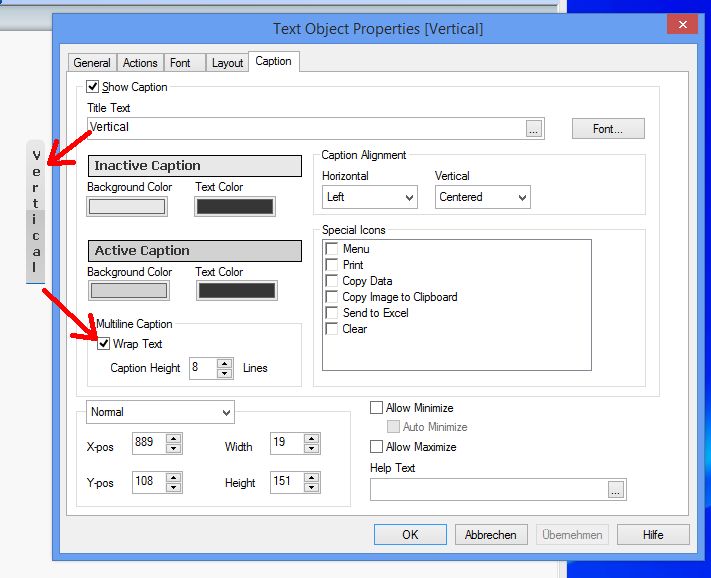
Hope this helps
Burkhard