Unlock a world of possibilities! Login now and discover the exclusive benefits awaiting you.

- Qlik Community
- :
- All Forums
- :
- QlikView
- :
- Time format.
- Subscribe to RSS Feed
- Mark Topic as New
- Mark Topic as Read
- Float this Topic for Current User
- Bookmark
- Subscribe
- Mute
- Printer Friendly Page

- Mark as New
- Bookmark
- Subscribe
- Mute
- Subscribe to RSS Feed
- Permalink
- Report Inappropriate Content
Time format.
Hi folks,
Can anyone advise me on how could I convert the time dimension from 24-hour to 12-hour format?
Sample script:
Time_DIM:
Load
time(frac(time_column),'HH12:MM:SS AM/PM');
@or
time(frac(time_column),'HH12:MM:SS');
From Time_DIM.xls;
Thanks.
Best Regards,
R
- Tags:
- qlikview_scripting
Accepted Solutions

 arjunkrishnan
- Mark as New
- Bookmark
- Subscribe
- Mute
- Subscribe to RSS Feed
- Permalink
- Report Inappropriate Content
Hai Asok Try This One
SET TimeFormat='h:mm:ss TT';
time(frac(time_column),'$(TimeFormat)');
'h:mm:ss'--->24 hrs Format
h:mm:ss TT-->12 hrs Format->Time Value In--->AM/PM
 brijesh1991
- Mark as New
- Bookmark
- Subscribe
- Mute
- Subscribe to RSS Feed
- Permalink
- Report Inappropriate Content
SET TimestampFormat='M/D/YYYY h:mm:ss[.fff] TT';
arjunkrishnan
- Mark as New
- Bookmark
- Subscribe
- Mute
- Subscribe to RSS Feed
- Permalink
- Report Inappropriate Content
Hai Asok Try This One
SET TimeFormat='h:mm:ss TT';
time(frac(time_column),'$(TimeFormat)');
'h:mm:ss'--->24 hrs Format
h:mm:ss TT-->12 hrs Format->Time Value In--->AM/PM
 jagan
jagan
- Mark as New
- Bookmark
- Subscribe
- Mute
- Subscribe to RSS Feed
- Permalink
- Report Inappropriate Content
Hi,
Try like this
=Time(time_column, 'hh:mm:ss TT')
Regards,
Jagan.

 er_mohit
- Mark as New
- Bookmark
- Subscribe
- Mute
- Subscribe to RSS Feed
- Permalink
- Report Inappropriate Content
simply use it on script side
timestamp(time_coloumn,'hh:mm:ss TT') as Time
 amit_saini
- Mark as New
- Bookmark
- Subscribe
- Mute
- Subscribe to RSS Feed
- Permalink
- Report Inappropriate Content
Hi Ram,
Try this:
=Time(Your_Time_filed, 'hh:mm:ss TT')
Thanks,
AS
- Mark as New
- Bookmark
- Subscribe
- Mute
- Subscribe to RSS Feed
- Permalink
- Report Inappropriate Content
Hi guys,
The formats you guys stated worked, but am not getting the correct output. Have a look at the screenshot below:
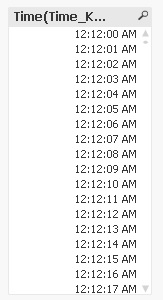
Am only getting all the hours with 12 minutes in between, its not a full 24hours cycle with 1second intervals as expected. Please advise.
Thanks.
Best Regards,
R
- Mark as New
- Bookmark
- Subscribe
- Mute
- Subscribe to RSS Feed
- Permalink
- Report Inappropriate Content
Hi guys,
Its alright, found a out solution to it. Thanks!
Best Regards,
R