Unlock a world of possibilities! Login now and discover the exclusive benefits awaiting you.

- Qlik Community
- :
- All Forums
- :
- QlikView
- :
- Re: Time off calculation
- Subscribe to RSS Feed
- Mark Topic as New
- Mark Topic as Read
- Float this Topic for Current User
- Bookmark
- Subscribe
- Mute
- Printer Friendly Page

- Mark as New
- Bookmark
- Subscribe
- Mute
- Subscribe to RSS Feed
- Permalink
- Report Inappropriate Content
Time off calculation
Hello,
I need help calculating time off aggregated by week on daily data. The data format is as follows:
Territory ------StartDate-------EndDate ------timeoff
A1---------------02/02/2016-----02/04/2016-----2
A2---------------02/08/2016------02/08/2016---1
Currently i figured out how to calculate time off for a selected range from a calendar object but i am having difficulties calculating time off on a weekly basis. I tried using a Master Calendar but i still couldn't figure it out.
I need the results to look like this:
Territory-------WeekEnding------Timeoff(days)
A1---------------02/07/2016--------2
A2---------------02/14/2016-------1
I tried linking the data to master calendar using Week(StartDate) but didn't work.
Can anyone help? I would appreciate any thoughts and thank you !

 swuehl
- Mark as New
- Bookmark
- Subscribe
- Mute
- Subscribe to RSS Feed
- Permalink
- Report Inappropriate Content
Maybe you want to create reference dates for your intervals:
Creating Reference Dates for Intervals
then link the reference dates to your master calendar.
- Mark as New
- Bookmark
- Subscribe
- Mute
- Subscribe to RSS Feed
- Permalink
- Report Inappropriate Content
Thank you swuehl. I will look it up.
- Mark as New
- Bookmark
- Subscribe
- Mute
- Subscribe to RSS Feed
- Permalink
- Report Inappropriate Content
I just tried it and it didn't work. I am still showing missing date ranges (Weeks).
I will try again

 sunny_talwar
- Mark as New
- Bookmark
- Subscribe
- Mute
- Subscribe to RSS Feed
- Permalink
- Report Inappropriate Content
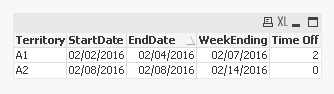
May be something like this?
Table:
LOAD *,
WeekEnd(EndDate, 0, 0) as WeekEnding,
EndDate-StartDate as [Time Off];
LOAD * Inline [
Territory, StartDate, EndDate
A1, 02/02/2016, 02/04/2016
A2, 02/08/2016, 02/08/2016
];
- Mark as New
- Bookmark
- Subscribe
- Mute
- Subscribe to RSS Feed
- Permalink
- Report Inappropriate Content
Sunny,
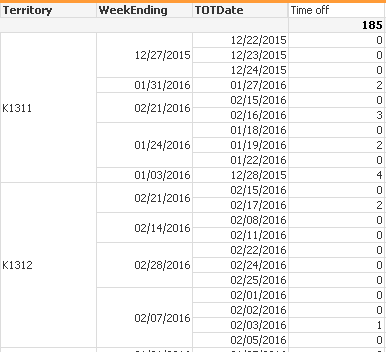
Thank you for your help with this. I tried your suggestion but i am still having a problem with missing dates.
I am working on adding a master calendar to try to fill in the gaps. Below is what i have as of now: