Unlock a world of possibilities! Login now and discover the exclusive benefits awaiting you.

- Qlik Community
- :
- All Forums
- :
- QlikView
- :
- Time
- Subscribe to RSS Feed
- Mark Topic as New
- Mark Topic as Read
- Float this Topic for Current User
- Bookmark
- Subscribe
- Mute
- Printer Friendly Page

 evansabres
- Mark as New
- Bookmark
- Subscribe
- Mute
- Subscribe to RSS Feed
- Permalink
- Report Inappropriate Content
Time
Hello -
In my application, I am trying to utilize a list box to display appointment times.
My data source displays the time in the following format: hh:mm:ss TT. (For example, 2:30:00 PM)
However, when I bring the data into my Qlik application, it displays in a 24 hour format (2:30 PM becomes 14:30)
How can I have this display as 2:30 PM in my application?
Thank you.
Accepted Solutions

 sunny_talwar
- Mark as New
- Bookmark
- Subscribe
- Mute
- Subscribe to RSS Feed
- Permalink
- Report Inappropriate Content
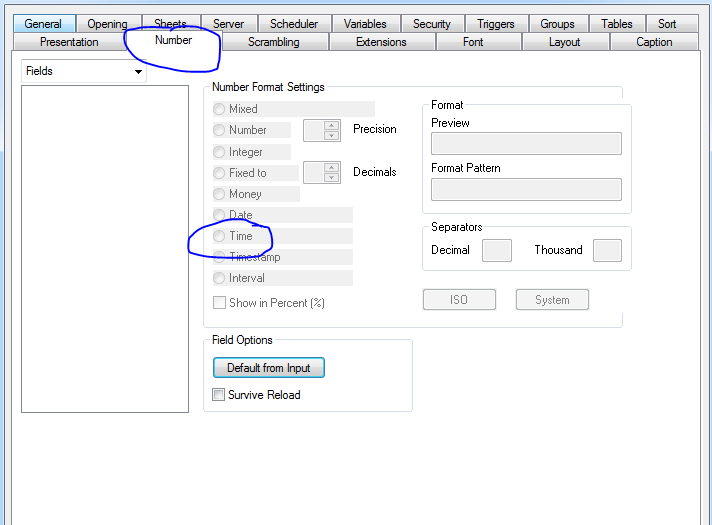
Try going into document properties (Alt +Ctrl + D) and set the TimeField format from there for the whole application and see if that helps.
sunny_talwar
- Mark as New
- Bookmark
- Subscribe
- Mute
- Subscribe to RSS Feed
- Permalink
- Report Inappropriate Content
Check if your time format is set like this within QlikView:
SET TimeFormat='h:mm:ss TT';
And then may be this:
Time(TimeField) as TimeField,
evansabres
- Mark as New
- Bookmark
- Subscribe
- Mute
- Subscribe to RSS Feed
- Permalink
- Report Inappropriate Content
My Set TimeFormat is set up like that, however, still get the same results when I reload the ap.
My Field is Time' and the format it appears is HH:MM:SS AM/PM
Just want to make sure I explained this fully.
Thank you.
sunny_talwar
- Mark as New
- Bookmark
- Subscribe
- Mute
- Subscribe to RSS Feed
- Permalink
- Report Inappropriate Content
Try going into document properties (Alt +Ctrl + D) and set the TimeField format from there for the whole application and see if that helps.
evansabres
- Mark as New
- Bookmark
- Subscribe
- Mute
- Subscribe to RSS Feed
- Permalink
- Report Inappropriate Content
worked perfectly, thank you
sunny_talwar
- Mark as New
- Bookmark
- Subscribe
- Mute
- Subscribe to RSS Feed
- Permalink
- Report Inappropriate Content
Awesome 
