Unlock a world of possibilities! Login now and discover the exclusive benefits awaiting you.

- Qlik Community
- :
- All Forums
- :
- QlikView
- :
- Re: Top 10
- Subscribe to RSS Feed
- Mark Topic as New
- Mark Topic as Read
- Float this Topic for Current User
- Bookmark
- Subscribe
- Mute
- Printer Friendly Page

 emteam162
- Mark as New
- Bookmark
- Subscribe
- Mute
- Subscribe to RSS Feed
- Permalink
- Report Inappropriate Content
Top 10
Hi All,
I want display top 10 and how have more then 15 items
| dim | item |
| a | 25 |
| b | 10 |
| c | 12 |
| d | 78 |
| e | 16 |
| f | 15 |
| g | 67 |
| h | 3 |
| m | 9 |
i want this
| dim | item |
| d | 78 |
| g | 67 |
| a | 25 |
| e | 16 |
| f | 15 |
Many thanks for your help
Said
- « Previous Replies
-
- 1
- 2
- Next Replies »

 amit_saini
- Mark as New
- Bookmark
- Subscribe
- Mute
- Subscribe to RSS Feed
- Permalink
- Report Inappropriate Content
Try :
=IF(aggr(rank(sum(items)),dim)<=10,dim)
as your dimension.
Thanks,
AS
amit_saini
- Mark as New
- Bookmark
- Subscribe
- Mute
- Subscribe to RSS Feed
- Permalink
- Report Inappropriate Content
See the attachment.
Thanks,
AS
emteam162
- Mark as New
- Bookmark
- Subscribe
- Mute
- Subscribe to RSS Feed
- Permalink
- Report Inappropriate Content
attached what I want
amit_saini
- Mark as New
- Bookmark
- Subscribe
- Mute
- Subscribe to RSS Feed
- Permalink
- Report Inappropriate Content
Yes than should be like this:
=IF(Aggr(Rank(SUM(items),15),dim)<=5,dim)
See the attachment.
Thanks,
AS

 sunny_talwar
- Mark as New
- Bookmark
- Subscribe
- Mute
- Subscribe to RSS Feed
- Permalink
- Report Inappropriate Content
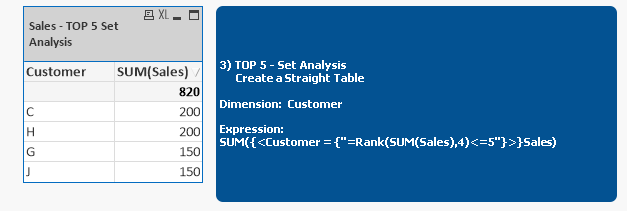
May be this?
If(Sum({<Customer = {"=Rank(SUM(Sales),4)<=5"}>}Sales) >= 150, Sum({<Customer = {"=Rank(SUM(Sales),4)<=5"}>}Sales))

 qlikview979
- Mark as New
- Bookmark
- Subscribe
- Mute
- Subscribe to RSS Feed
- Permalink
- Report Inappropriate Content
Hi,
Try this may be this help full
T1:
load * Inline [
dim, item
a, 25
b, 10
c, 12
d, 78
e, 16
f, 15
g, 67
h, 3
m, 9
];
NoConcatenate
T2:
First 5
load
dim,
item
Resident T1 Order by item desc;
DROP Table T1;
qlikview979
- Mark as New
- Bookmark
- Subscribe
- Mute
- Subscribe to RSS Feed
- Permalink
- Report Inappropriate Content
Hi Try this ,
you will get correct output,
If you want check my attached file
T1:
load * Inline [
dim, item
a, 25
b, 10
c, 12
d, 78
e, 16
f, 15
g, 67
h, 3
m, 9
];
Take Straight table
Dimention:- dim,item
Expression:- Sum(item)
Step1:-Goto Presentation tab Select item Hide colomn "item".
Step2:-Goto Select item Click on "Restrict which values are displayed using the first expression
Step3:-Select "Show only Values that are:"
Then select this "Greaterthenor Equal to, 15, Exact total
And remove show others

- « Previous Replies
-
- 1
- 2
- Next Replies »