Unlock a world of possibilities! Login now and discover the exclusive benefits awaiting you.

- Qlik Community
- :
- All Forums
- :
- QlikView
- :
- Re: Top N Analysis issue
- Subscribe to RSS Feed
- Mark Topic as New
- Mark Topic as Read
- Float this Topic for Current User
- Bookmark
- Subscribe
- Mute
- Printer Friendly Page

 kkkumar82
- Mark as New
- Bookmark
- Subscribe
- Mute
- Subscribe to RSS Feed
- Permalink
- Report Inappropriate Content
Top N Analysis issue
All,
Attaching a qvw file where I want to have two things
1. One in a text box
2. Another in a pivot table.
Ist requirement:
Want to see top 5 salesman along with their sales
I was able to get top 5 Salesman but not their sales
2nd requirement
Have a pivot table ProductID, SalesmanID
In the pivot table I am showing top 5 SalesmanID for each productID(got this)
also want to show the top Performers in a productID along with his sales in the pivot table
Kiran Kumar
- Tags:
- aggr
Accepted Solutions

 sunny_talwar
- Mark as New
- Bookmark
- Subscribe
- Mute
- Subscribe to RSS Feed
- Permalink
- Report Inappropriate Content
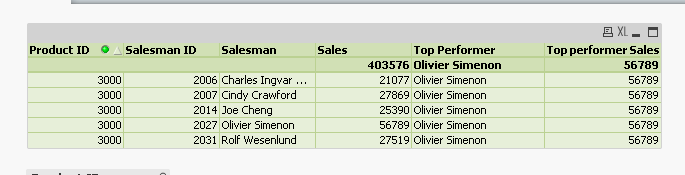
2) Two expression for your 2nd requirement
Top Performer - > FirstSortedValue(TOTAL <[Product ID]> Salesman, -Aggr(Sum(Sales),[Product ID],[Salesman ID]))
Top Performer's Sales -> Max(TOTAL <[Product ID]> Aggr(Sum(Sales), [Product ID], [Salesman ID]))
 Chanty4u
- Mark as New
- Bookmark
- Subscribe
- Mute
- Subscribe to RSS Feed
- Permalink
- Report Inappropriate Content

 jagan
jagan
- Mark as New
- Bookmark
- Subscribe
- Mute
- Subscribe to RSS Feed
- Permalink
- Report Inappropriate Content
Hi,
Try like this using variable
Regards,
jagan.
kkkumar82
- Mark as New
- Bookmark
- Subscribe
- Mute
- Subscribe to RSS Feed
- Permalink
- Report Inappropriate Content
Hi Jagan,
Sorry I didn't find the solutions , did I miss anything.
Attaching some pics for further clarity.
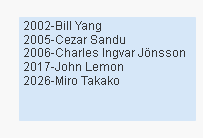
I was able to get the above text box but was not able to get the Sales of the persons after them for a selected product.
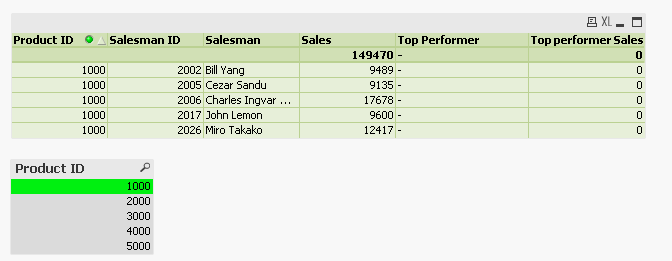
In the above for Top Performer I want Charles ... name becuase he is the top sales and in the next column the sales of Charles..
Hope I am clear this time.
Thanks
Kiran Kumar
sunny_talwar
- Mark as New
- Bookmark
- Subscribe
- Mute
- Subscribe to RSS Feed
- Permalink
- Report Inappropriate Content
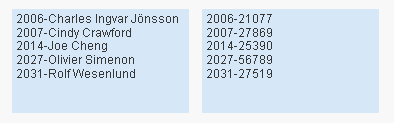
1) Expression for 1st requirement
=If(GetSelectedCount([Product ID]) = 0, 'Select a ProductID', Concat(Distinct If(Aggr(Rank(Sum(Sales)), [Product ID],[Salesman ID]) <=5, [Salesman ID] & '-' & Aggr(Sum(Sales), [Product ID], [Salesman ID])), Chr(13)))
sunny_talwar
- Mark as New
- Bookmark
- Subscribe
- Mute
- Subscribe to RSS Feed
- Permalink
- Report Inappropriate Content
2) Two expression for your 2nd requirement
Top Performer - > FirstSortedValue(TOTAL <[Product ID]> Salesman, -Aggr(Sum(Sales),[Product ID],[Salesman ID]))
Top Performer's Sales -> Max(TOTAL <[Product ID]> Aggr(Sum(Sales), [Product ID], [Salesman ID]))
kkkumar82
- Mark as New
- Bookmark
- Subscribe
- Mute
- Subscribe to RSS Feed
- Permalink
- Report Inappropriate Content
