Unlock a world of possibilities! Login now and discover the exclusive benefits awaiting you.

- Qlik Community
- :
- All Forums
- :
- QlikView
- :
- Re: Total Hours
- Subscribe to RSS Feed
- Mark Topic as New
- Mark Topic as Read
- Float this Topic for Current User
- Bookmark
- Subscribe
- Mute
- Printer Friendly Page

 mparker123
- Mark as New
- Bookmark
- Subscribe
- Mute
- Subscribe to RSS Feed
- Permalink
- Report Inappropriate Content
Total Hours
Hello All,
I have this formula but it doesn't seem to work. If(HOURS='0' and DEPT='44840',MONTH)
The only problem with this is that I need it to be IF Total HOURS=0. How do I write a formula that looks at Total Hours and returns the MONTH field?

 Kushal_Chawda
- Mark as New
- Bookmark
- Subscribe
- Mute
- Subscribe to RSS Feed
- Permalink
- Report Inappropriate Content
Where you are writing this formula? Is it calculated dimension?
try below
=sum(aggr(if(sum(HOURS)=0 and and DEPT='44840',Month),DEPT,Month))

 prieper
- Mark as New
- Bookmark
- Subscribe
- Mute
- Subscribe to RSS Feed
- Permalink
- Report Inappropriate Content
in script or in application?
What do you mean with "Total Hours"? Is this a field or should it be the sum of hours or HOURS?

 its_anandrjs
- Mark as New
- Bookmark
- Subscribe
- Mute
- Subscribe to RSS Feed
- Permalink
- Report Inappropriate Content
In the loading script you are doing this or what
Try
Load
If(HOURS = 0 and DEPT = '44840', MONTH) as FieldName
From Source;
Or
If(HOURS = 0 and DEPT = 44840, MONTH)
mparker123
- Mark as New
- Bookmark
- Subscribe
- Mute
- Subscribe to RSS Feed
- Permalink
- Report Inappropriate Content
In application.
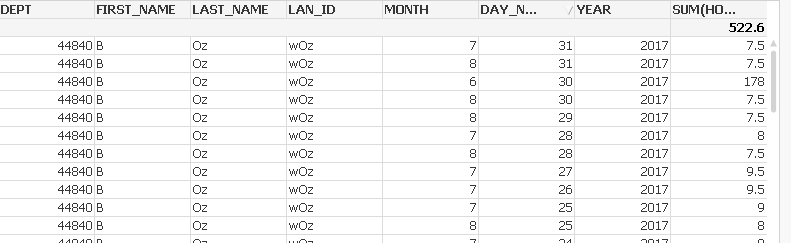
HOURS is the Field name but I want to total the HOURS. In the data set you can have a zero hours logged in one project and 8 hours logged in the other. The way I have the formula it will still show me the MONTH because there is a zero showing in that DAY, so i want to total the HOURS for the day so this doesn't show up.
mparker123
- Mark as New
- Bookmark
- Subscribe
- Mute
- Subscribe to RSS Feed
- Permalink
- Report Inappropriate Content
I am writing an expression in the application
its_anandrjs
- Mark as New
- Bookmark
- Subscribe
- Mute
- Subscribe to RSS Feed
- Permalink
- Report Inappropriate Content
Can you provide expected op with example to explain.
mparker123
- Mark as New
- Bookmark
- Subscribe
- Mute
- Subscribe to RSS Feed
- Permalink
- Report Inappropriate Content
Posted an example
prieper
- Mark as New
- Bookmark
- Subscribe
- Mute
- Subscribe to RSS Feed
- Permalink
- Report Inappropriate Content
You have used a "Table Box", in which you cannot calculate.
Change to "Straight Table" and have under Presentation "Suppress Zero" and you should get something like the below.
HTH Peter
