Unlock a world of possibilities! Login now and discover the exclusive benefits awaiting you.

- Qlik Community
- :
- All Forums
- :
- QlikView
- :
- Re: Total error in stacked bar chart
- Subscribe to RSS Feed
- Mark Topic as New
- Mark Topic as Read
- Float this Topic for Current User
- Bookmark
- Subscribe
- Mute
- Printer Friendly Page

 stefangegg
- Mark as New
- Bookmark
- Subscribe
- Mute
- Subscribe to RSS Feed
- Permalink
- Report Inappropriate Content
Total error in stacked bar chart
Hi,
I'm facing a somehow simple error when it come to a second dimension (=stacked) bar chart.
The calculation/sum for totals on top of the stacked bar ignore the negative figures - pls find the file attached.
The problem doesn't appear if I only have one dimension (Month).
Did you ever experience that? Is therer already a workaround for that?
Many thanks,
Stefan !

 sunny_talwar
- Mark as New
- Bookmark
- Subscribe
- Mute
- Subscribe to RSS Feed
- Permalink
- Report Inappropriate Content
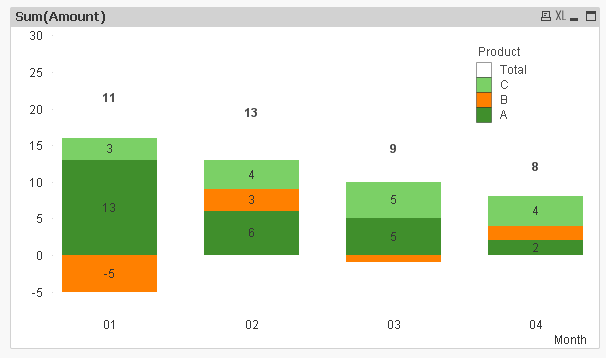
Not the best of the solutions, but may be this:
stefangegg
- Mark as New
- Bookmark
- Subscribe
- Mute
- Subscribe to RSS Feed
- Permalink
- Report Inappropriate Content
Many thanks, good hint!
But in case I restrict the dimension limit, the "others" will be shown above the TOTAL segment...  I'll have a try to sort, but until now I couldn't succeed...
Anyway, your help is much appreciated and I didn't know the "Pick" function.

.png "Former Employee") hic
hic
- Mark as New
- Bookmark
- Subscribe
- Mute
- Subscribe to RSS Feed
- Permalink
- Report Inappropriate Content
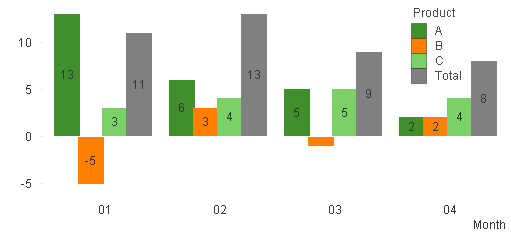
I think it is an incorrect approach to use a stacked bar chart when there are negative values. I frankly don't see how the chart should be drawn. Sunny's solution shows the right numbers, but the sizes of the bars are misleading.
I would instead suggest a grouped bar chart, with an additional "total" bar (check box under "Dimension Limits")
HIC
stefangegg
- Mark as New
- Bookmark
- Subscribe
- Mute
- Subscribe to RSS Feed
- Permalink
- Report Inappropriate Content
Many thanks, also a good solution, but not helpful as we don't only have three products, but a higher amount of products, therefore there might be some graphical issues as a consequence...
Anyway, the problem is already in revision and qlik already accepted theirselves this as a "bug", maybe we see a solution in a future release of qlikview. Until then, I'm happy with Sunny T's solution.
BR,
Stefan
