Unlock a world of possibilities! Login now and discover the exclusive benefits awaiting you.

- Qlik Community
- :
- All Forums
- :
- QlikView
- :
- Re: Totals within Pivot Table
- Subscribe to RSS Feed
- Mark Topic as New
- Mark Topic as Read
- Float this Topic for Current User
- Bookmark
- Subscribe
- Mute
- Printer Friendly Page

 sunny_talwar
- Mark as New
- Bookmark
- Subscribe
- Mute
- Subscribe to RSS Feed
- Permalink
- Report Inappropriate Content
Totals within Pivot Table
** Update: Attached the sample QlikView file **
Hey Guys,
I have three Dimensions (Category, Item and Supplier). Each category can have multiple items in it. and I am trying to get here
| Item | Sup1 | Sup2 | Sup3 | Sup4 | Total |
|---|---|---|---|---|---|
| Item1 | 1 | 1 | 1 | 1 | 4 |
| Item2 | 1 | 1 | 1 | 1 | 4 |
| Item3 | 1 | 1 | 1 | 1 | 4 |
| Item4 | 1 | 1 | 1 | 1 | 4 |
| Item5 | 1 | 1 | 1 | 1 | 4 |
| Total | 5 | 5 | 5 | 5 | 20 |
But Right now I am getting this using the following expression: =Count(DISTINCT TOTAL <Item, Category> Item)
| Item | Sup1 | Sup2 | Sup3 | Sup4 | Total |
|---|---|---|---|---|---|
| Item1 | 1 | 1 | 1 | 1 | 1 |
| Item2 | 1 | 1 | 1 | 1 | 1 |
| Item3 | 1 | 1 | 1 | 1 | 1 |
| Item4 | 1 | 1 | 1 | 1 | 1 |
| Item5 | 1 | 1 | 1 | 1 | 1 |
| Total | 5 | 5 | 5 | 5 | 5 |
How do I make it so that it shows the total at both the ends?
Any help would be greatly appreciated.
Best,
S
- « Previous Replies
-
- 1
- 2
- Next Replies »
sunny_talwar
- Mark as New
- Bookmark
- Subscribe
- Mute
- Subscribe to RSS Feed
- Permalink
- Report Inappropriate Content
I don't see any changes except that the Show Partial Sum for Supplier has been disabled.
Best,
S

- Mark as New
- Bookmark
- Subscribe
- Mute
- Subscribe to RSS Feed
- Permalink
- Report Inappropriate Content
added aggr expression . hopefully it will work now.
sunny_talwar
- Mark as New
- Bookmark
- Subscribe
- Mute
- Subscribe to RSS Feed
- Permalink
- Report Inappropriate Content
Hey Vinay,
Not what I want. I want this output:
| Item | Sup1 | Sup2 | Sup3 | Sup4 | Total |
|---|---|---|---|---|---|
| Item1 | 1 | 1 | 1 | 1 | 4 |
| Item2 | 1 | 1 | 1 | 1 | 4 |
| Item3 | 1 | 1 | 1 | 1 | 4 |
| Item4 | 1 | 1 | 1 | 1 | 4 |
| Item5 | 1 | 1 | 1 | 1 | 4 |
| Total | 5 | 5 | 5 | 5 | 20 |
and Currently your aggregated formula is getting the following result:
| Item | Sup1 | Sup2 | Sup3 | Sup4 | Total |
|---|---|---|---|---|---|
| Item1 | - | 1 | 1 | - | 2 |
| Item2 | 1 | 1 | 1 | 1 | 4 |
| Item3 | - | 1 | 1 | 1 | 3 |
| Item4 | 1 | 1 | 1 | 1 | 4 |
| Item5 | 1 | - | - | 1 | 2 |
| Total | 3 | 4 | 4 | 4 | 15 |
Best,
S
- Mark as New
- Bookmark
- Subscribe
- Mute
- Subscribe to RSS Feed
- Permalink
- Report Inappropriate Content
but there are holes in your data for supplier 1 you dont have Item 1 and item 3. please confirm
- Mark as New
- Bookmark
- Subscribe
- Mute
- Subscribe to RSS Feed
- Permalink
- Report Inappropriate Content
aggregate function is working but the problem is there is no data Buddy.
sunny_talwar
- Mark as New
- Bookmark
- Subscribe
- Mute
- Subscribe to RSS Feed
- Permalink
- Report Inappropriate Content
You are right Vinay, but within the Count I am using Total. I would expect the Total to work within the aggregate function, unless it doesn't. Because without the aggregate function, Total is working and showing 1 without any issues. Its just that as I use the aggregate, the 1's become 0 and sum changes.
Best,
S
sunny_talwar
- Mark as New
- Bookmark
- Subscribe
- Mute
- Subscribe to RSS Feed
- Permalink
- Report Inappropriate Content
The formula you used: sum(aggr(Count(DISTINCT TOTAL <Item, Category> Item),Category,Supplier,Item)) (This has TOTAL in it also
Output
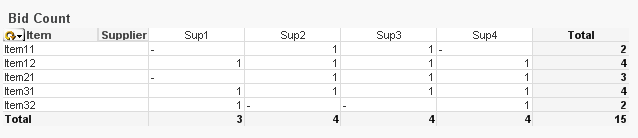
and my formula: Count(DISTINCT TOTAL <Item, Category> Item)
Output
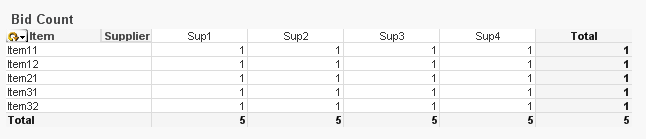
Best,
S
sunny_talwar
- Mark as New
- Bookmark
- Subscribe
- Mute
- Subscribe to RSS Feed
- Permalink
- Report Inappropriate Content
Trying my luck once again.
Please let me know if somebody has a solution for this.
Best,
S
- « Previous Replies
-
- 1
- 2
- Next Replies »