Unlock a world of possibilities! Login now and discover the exclusive benefits awaiting you.

- Qlik Community
- :
- All Forums
- :
- QlikView
- :
- Re: Trouble with Macros
- Subscribe to RSS Feed
- Mark Topic as New
- Mark Topic as Read
- Float this Topic for Current User
- Bookmark
- Subscribe
- Mute
- Printer Friendly Page

- Mark as New
- Bookmark
- Subscribe
- Mute
- Subscribe to RSS Feed
- Permalink
- Report Inappropriate Content
Trouble with Macros
I'm trying to create a macro to export a chart as a JPG file.
From within the Edit Script (Ctrl-E) I have added a new tab and entered the following
FUNCTION ExportObjectToJpg( ObjID, fName)
ActiveDocument.GetSheetObject(ObjID).ExportBitmapToFile fName
END FUNCTION
SUB CallExample
ExportObjectToJpg "CH01", "C:\CH01Image.jpg"
END SUB
The following error is displayed
Unknown statement
FUNCTION ExportObjectToJpg( ObjID, fName)
ActiveDocument.GetSheetObject(ObjID).ExportBitmapToFile fName
END FUNCTION
SUB CallExample
ExportObjectToJpg "CH01", "C:\CH01Image.jpg"
END SUB
I obtained the script from here:
QlikView Macros – Useful collection | Lucian Cotea
and also tried
FUNCTION RunExe(cmd)
CreateObject("WScript.Shell").Exec(cmd)
END FUNCTION
SUB CallExample
RunExe("c:\Program Files\Internet Explorer\iexplore.exe")
END SUB
which again fails.
I'm at a loss, any help greatly appreciated.
- « Previous Replies
-
- 1
- 2
- Next Replies »

 jerrysvensson
- Mark as New
- Bookmark
- Subscribe
- Mute
- Subscribe to RSS Feed
- Permalink
- Report Inappropriate Content
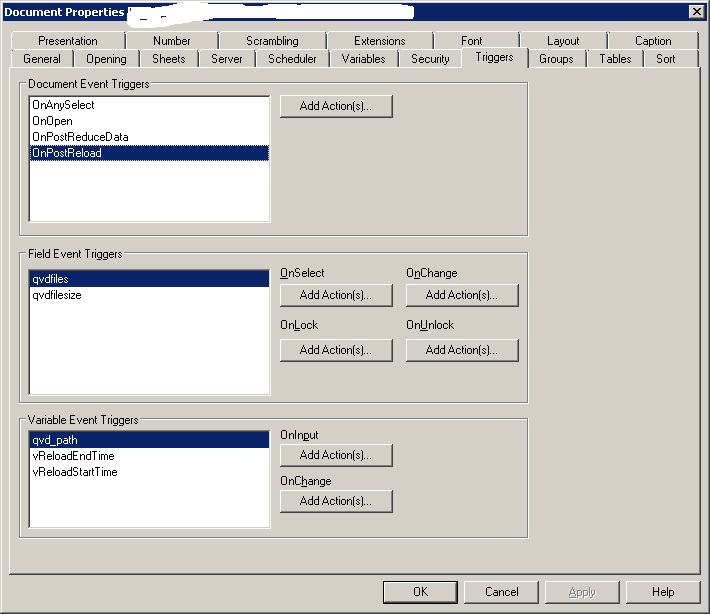 Yes you need to add a trigger to the event OnPostReload
- Mark as New
- Bookmark
- Subscribe
- Mute
- Subscribe to RSS Feed
- Permalink
- Report Inappropriate Content
Hi Fernando, Think you posted just after me. Macro now working, but need it to run automatically after an update.
I need to use the "on postreload" option I believe, so just need to work out how.
thanks
steve
jerrysvensson
- Mark as New
- Bookmark
- Subscribe
- Mute
- Subscribe to RSS Feed
- Permalink
- Report Inappropriate Content
Add an Action.
Action Type . External
Action : Run macro.
- Mark as New
- Bookmark
- Subscribe
- Mute
- Subscribe to RSS Feed
- Permalink
- Report Inappropriate Content
Got it working finally. Wasn't sure what macro name to use. Second name worked so all is good.
Thank you all for your help.
- « Previous Replies
-
- 1
- 2
- Next Replies »