Unlock a world of possibilities! Login now and discover the exclusive benefits awaiting you.

- Qlik Community
- :
- All Forums
- :
- QlikView
- :
- Re: URL not displayed when multiple rows
- Subscribe to RSS Feed
- Mark Topic as New
- Mark Topic as Read
- Float this Topic for Current User
- Bookmark
- Subscribe
- Mute
- Printer Friendly Page

- Mark as New
- Bookmark
- Subscribe
- Mute
- Subscribe to RSS Feed
- Permalink
- Report Inappropriate Content
URL not displayed when multiple rows
Hi
I am trying to display a URL in a stairght table here is my expression a&<'url'>&b but for few rows its actually displaying a blank(where are 2 records for same person/date) , as soon as I include dimensions a and b in the chart all the url values displays correct..
Can someone please let me know why is this caused ? and how do I include those 2 dimensions in expression rather than dimensions .. for now I have included them in dimensions and hidden.
Thanks!
- Tags:
- new_to_qlikview

 sunny_talwar
- Mark as New
- Bookmark
- Subscribe
- Mute
- Subscribe to RSS Feed
- Permalink
- Report Inappropriate Content
As you mentioned it yourself that when there are 2 records, Straight Table doesn't know which value to display. You need to tell it which one it needs to display: First Value or Last Value or Both Values in the same column?
- Mark as New
- Bookmark
- Subscribe
- Mute
- Subscribe to RSS Feed
- Permalink
- Report Inappropriate Content
How do I display both ?
sunny_talwar
- Mark as New
- Bookmark
- Subscribe
- Mute
- Subscribe to RSS Feed
- Permalink
- Report Inappropriate Content
You can use Concat()
Concat(a) & <'url'> & Concat(b)
- Mark as New
- Bookmark
- Subscribe
- Mute
- Subscribe to RSS Feed
- Permalink
- Report Inappropriate Content
actually I want to display in 2 rows not in a single row
sunny_talwar
- Mark as New
- Bookmark
- Subscribe
- Mute
- Subscribe to RSS Feed
- Permalink
- Report Inappropriate Content
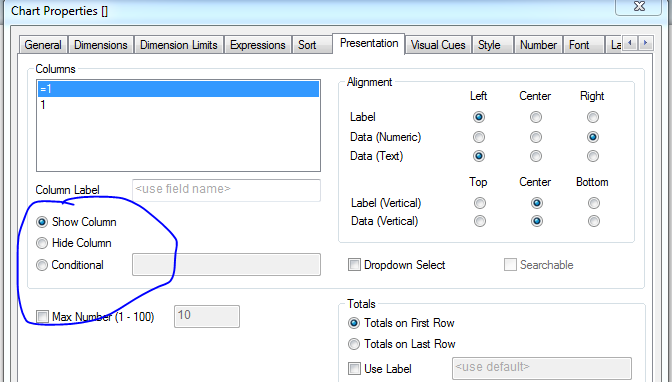
I guess in that case add a and b as your dimension and then hide both these using hide column check box on presentation tab of straight table's properties.
- Mark as New
- Bookmark
- Subscribe
- Mute
- Subscribe to RSS Feed
- Permalink
- Report Inappropriate Content
That's what I am doing now .. but I don't want to include in dimension , can I someway add in the expression itself ?
sunny_talwar
- Mark as New
- Bookmark
- Subscribe
- Mute
- Subscribe to RSS Feed
- Permalink
- Report Inappropriate Content
I doubt it would be possible without adding the dimension. But what is the issue with adding the dimension? You won't see a and b dimension as they are going to be hidden.