Unlock a world of possibilities! Login now and discover the exclusive benefits awaiting you.

- Qlik Community
- :
- All Forums
- :
- QlikView
- :
- Update when task fails in QMC
- Subscribe to RSS Feed
- Mark Topic as New
- Mark Topic as Read
- Float this Topic for Current User
- Bookmark
- Subscribe
- Mute
- Printer Friendly Page

 anjali0108
- Mark as New
- Bookmark
- Subscribe
- Mute
- Subscribe to RSS Feed
- Permalink
- Report Inappropriate Content
Update when task fails in QMC
Hi All,
I pull data for one of my modules every 5 minutes as the data is huge and throws error "Field length exceeded ..." when I try to pull for longer duration.
Many a times my task fails in QMC and sometimes,I might miss to check the same.
And it takes a lot of time to recover the data back again.
Could anyone please tell if there is any way I can get a mail or anything by which I can know that the task failed in QMC while I am working on something else?
It will help me to quickly troubleshoot and end d prob dt moment itself.
Any suggestions , any ideas on this will be helpful.
Thanks in advance.
- Tags:
- qlikview_scripting
 awhitfield
- Mark as New
- Bookmark
- Subscribe
- Mute
- Subscribe to RSS Feed
- Permalink
- Report Inappropriate Content
Hi Anjali,
it may be worthwhile checking out the Alerts Functionality, please follow this lnk:
https://help.qlik.com/en-US/qlikview/12.1/Subsystems/Client/Content/Alerts.htm
Best regards.
Andy

 asgardd2
- Mark as New
- Bookmark
- Subscribe
- Mute
- Subscribe to RSS Feed
- Permalink
- Report Inappropriate Content
Hello!
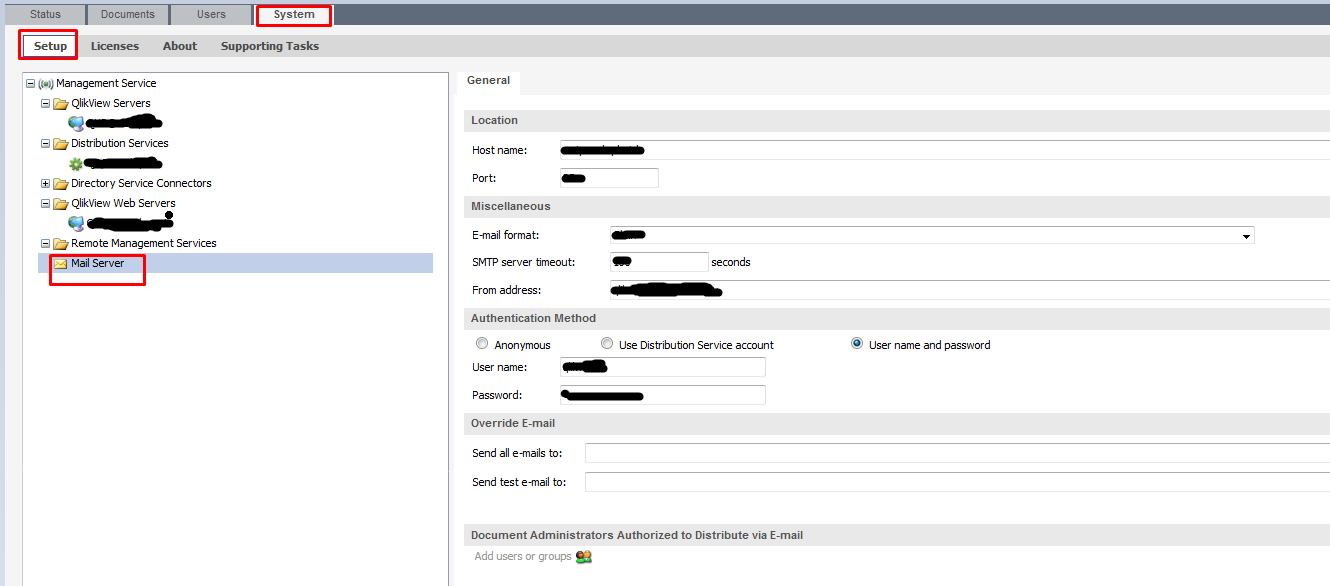
Did you configure the tab "Mail Server" in QMC?
 Peter_Cammaert
- Mark as New
- Bookmark
- Subscribe
- Mute
- Subscribe to RSS Feed
- Permalink
- Report Inappropriate Content
Once you've got that configured, make sure to enter Alert E-mail destination addresses in QMC->System->Setup->Distribution Services->Your Distribution Service->Alert E-mail->Alert E-mail to System Administrators. Separate multiple destinations with semicolon characters.
If you do not have a Publisher, you can do the same in QMC->System->Setup->QlikView Servers->Your QlikView Server->Alerts->Address by clicking the green plus button to the right.
