Unlock a world of possibilities! Login now and discover the exclusive benefits awaiting you.

- Qlik Community
- :
- All Forums
- :
- QlikView
- :
- Re: Using dynamic formula in Action:select in Fiel...
- Subscribe to RSS Feed
- Mark Topic as New
- Mark Topic as Read
- Float this Topic for Current User
- Bookmark
- Subscribe
- Mute
- Printer Friendly Page

- Mark as New
- Bookmark
- Subscribe
- Mute
- Subscribe to RSS Feed
- Permalink
- Report Inappropriate Content
Using dynamic formula in Action:select in Field
Hello Guys,
Have this question:
In excel you can filter the data based on a range. In Qlikview there is no function for that, so I am trying to build a workaround.
1st step:
So I got some formulas, and I load them in my inline table:
Load * inline [
SelectionFieldName, Formula
2016 No Visits,"sum({<YEAR={'2016'}>} NV)"
2016 Member Count,"sum({<YEAR={'2016'}>} MM)"
]
So they work in text boxes, if I pick a Selection Field Name. See below:

Now the second step: I want to pick and choose a certain field, PCP_No in my case, based on the formula and the variable. The following works, as if I click on it it gives me a list of PCPs that satisfy the criteria. See pic below:
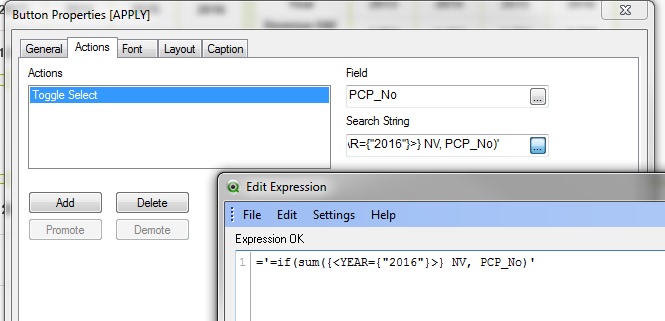
But here is the problem: Ideally I want this to work based on the Field I choose, kind like combining the previous 2 steps.
No success. I think single quotes and double quotes might be the issue, but I tried different combos and so far no luck.
See below:
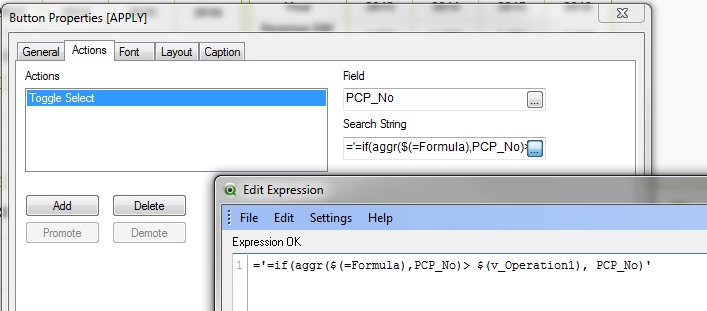
If you have any idea, that will be great. Thank you.
I upload the test qvw.
Accepted Solutions

 swuehl
- Mark as New
- Bookmark
- Subscribe
- Mute
- Subscribe to RSS Feed
- Permalink
- Report Inappropriate Content
I think you are right, you need to take care of the quoting.
Either remove the single quotes from the set modifier, as far as possible, or use something like
='=if(aggr('& Formula&',PCP_No)> $(v_Operation1), PCP_No)'
swuehl
- Mark as New
- Bookmark
- Subscribe
- Mute
- Subscribe to RSS Feed
- Permalink
- Report Inappropriate Content
I think you are right, you need to take care of the quoting.
Either remove the single quotes from the set modifier, as far as possible, or use something like
='=if(aggr('& Formula&',PCP_No)> $(v_Operation1), PCP_No)'
- Mark as New
- Bookmark
- Subscribe
- Mute
- Subscribe to RSS Feed
- Permalink
- Report Inappropriate Content
Magical. Thank you!
Now the users can filter the data. This will be great!